LLM provider configuration
This page configures how the AI service reaches LLM providers and which models are exposed to clients. It sits between the data layer setup (which must be complete first) and JWT authentication (which gates per-user access to the models configured here). The environment variables documented below are set on the AI service container — in a docker run command, a Kubernetes Deployment manifest, or an ECS task definition.
Two environment variables and one JWT claim control provider and model configuration:
-
PROVIDERS: tells the AI service how to authenticate with each LLM provider API. -
MODELS: tells the service which models to expose to clients and which features each model supports. -
auth.ai.permissions(JWT claim): gates per-user access to individual models.
This page documents every supported provider type, every required field, and every known production issue for both variables.
Start with the Getting started guide if the AI service container is not yet running. The following sections assume a running ai-service container.
Provider and model architecture
The AI service uses two related environment variables:
| Variable | Type | What it does |
|---|---|---|
|
JSON object |
Map of provider IDs to provider configurations. Each entry says how to authenticate with one LLM provider API. |
|
JSON array |
List of models exposed to clients. Each model points at a |
JSON Web Token (JWT) |
string array |
Per-user authorization list. Includes |
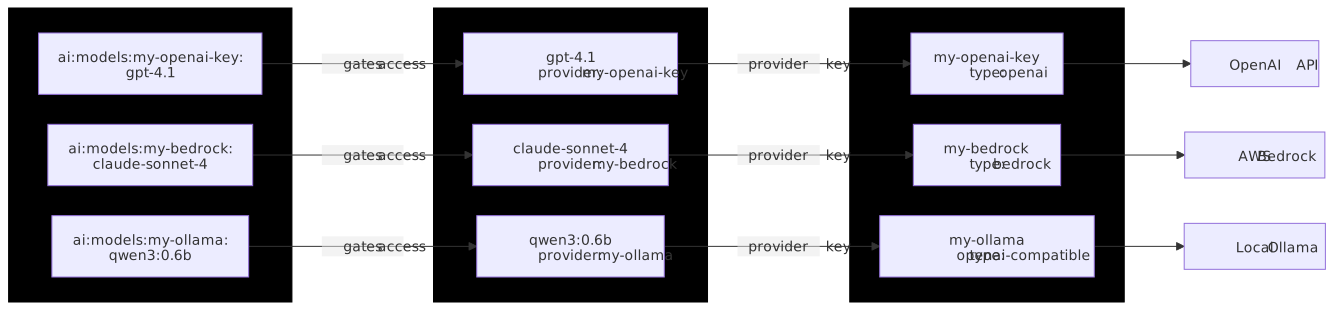
The PROVIDERS keys are arbitrary identifiers (for example "openai", "my-bedrock", "team-azure"). Each value object has a type field that picks the implementation:
type |
Provider |
|---|---|
|
OpenAI (api.openai.com) |
|
Anthropic (api.anthropic.com) |
|
Google AI Studio / Gemini direct |
|
Azure OpenAI Service |
|
AWS Bedrock |
|
Google Cloud Vertex AI |
|
Any OpenAI-compatible HTTP API (Ollama, vLLM, LM Studio, llama.cpp, LocalAI, OpenRouter, Together, Groq, Fireworks, and similar) |
The key (not the type) is what gets referenced from:
-
MODELS[].provider; to wire a model to a provider -
JWT
auth.ai.permissions; for per-provider or per-model access control (see JWT authentication)
{
  "my-openai-key":   { "type": "openai",   "apiKeys": ["sk-proj-..."] },
  "my-bedrock":      { "type": "bedrock",  "region": "us-east-1", "credentials": { "accessKeyId": "...", "secretAccessKey": "..." } },
  "my-ollama":       { "type": "openai-compatible", "baseUrl": "http://host.docker.internal:11434/v1" }
}
GET /v1/models/1 reports the provider name, not the provider key, in the provider field of each model.
Defining the model list
Default model behavior (agent-1)
The OpenAI, Anthropic, and Google providers come with a default list of models. The default list includes agent-1, the recommended agent model. Set MODELS to replace the default list, and to declare the models of Azure OpenAI, Amazon Bedrock, Google Vertex AI, and openai-compatible providers, which have no default list.
Set MODELS explicitly for production. Image versions can add models to the default list, so a deployment without MODELS can offer different models after an upgrade.
|
Startup validation
The service validates PROVIDERS and MODELS when the container starts:
-
The service does not start without at least one provider in
PROVIDERS. -
The service does not start until each conversation, review, and action feature has at least one model to serve it. List
conversations,reviews, andactionson at least one model each, or cover each of their sub-features. -
A
MODELSentry that names a provider key that is not defined inPROVIDERSstops startup. See Multiple providers coexistence. -
Some features need a model that supports structured output. Models of the same class as the latest major releases from Anthropic, Google, or OpenAI give the best results.
Details: agent-1 behavior and limitations
-
The
/v1/models/1endpoint reportsagent-1withallowed: falseunless the JWT includes theai:models:agentpermission. -
Setting
MODELSexplicitly routes each model to the correct provider. -
See JWT authentication for permission syntax.
For the response format of the model list endpoint, see Fetch all models for a compatibility version in the API reference. The endpoint only accepts the literal version 1. Other values return 400 Bad Request:
# Works
curl http://localhost:8000/v1/models/1

# All 400
curl http://localhost:8000/v1/models/v1
curl http://localhost:8000/v1/models/v2
curl http://localhost:8000/v1/models/latest
Minimum MODELS entry to make a model usable:
[
  {
    "id": "gpt-5-mini",
    "provider": "my-openai-key",
    "description": "OpenAI GPT-5 mini",
    "features": ["conversations", "reviews", "actions"]
  }
]
The features array must include at least one of conversations, reviews, or actions for the model to be selectable for that feature. A model with no overlapping features is invisible to that part of the UI.
A full field reference for MODELS is at the end of this page.
OpenAI
API key from platform.openai.com. The OpenAI provider comes with a default model list, so it works without an explicit MODELS definition, but defining MODELS is recommended for production (see Defining the model list).
When MODERATION is not set, the AI service also uses the API key of the OpenAI provider in PROVIDERS for content moderation, and sends prompts and uploaded images to the OpenAI moderation API even when other providers serve the models. See Content moderation.
|
Configuration details
JSON shape:
{
  "openai": {
    "type": "openai",
    "apiKeys": ["sk-proj-YOUR_KEY_HERE"]
  }
}
Fields:
| Field | Required | Notes |
|---|---|---|
|
Yes |
Literal |
|
Yes |
Array of one or more API keys. Multiple keys allow zero-downtime rotation. |
|
No |
Override only if proxying through a private OpenAI gateway. |
Full docker run example:
docker run --init -d -p 8000:8000 \
  --name ai-service \
  -e LICENSE_KEY="$LICENSE_KEY" \
  -e ENVIRONMENTS_MANAGEMENT_SECRET_KEY="$MANAGEMENT_SECRET" \
  -e DATABASE_DRIVER='mysql' \
  -e DATABASE_HOST='mysql' \
  -e DATABASE_USER='root' \
  -e DATABASE_PASSWORD="$DB_PASSWORD" \
  -e DATABASE_DATABASE='ai_service' \
  -e REDIS_HOST='redis' \
  -e STORAGE_DRIVER='database' \
  -e PROVIDERS='{"openai":{"type":"openai","apiKeys":["sk-proj-YOUR_KEY_HERE"]}}' \
  registry.containers.tiny.cloud/ai-service-tiny:latest
Verify:
curl -s -H "Authorization: Bearer sk-proj-YOUR_KEY_HERE" \
  https://api.openai.com/v1/models | head -20
When that curl call succeeds from the host, the same key in PROVIDERS works inside the container.
Project-scoped keys (sk-proj-…) only work for models the project has been granted access to. A 404 on gpt-5.5 usually means the key’s project is restricted. Org-level keys require the org header, which the service does not send; use a project key instead.
|
Anthropic
API key from console.anthropic.com. Same shape as OpenAI.
Configuration details
JSON shape:
{
  "anthropic": {
    "type": "anthropic",
    "apiKeys": ["sk-ant-YOUR_KEY_HERE"]
  }
}
Fields:
| Field | Required | Notes |
|---|---|---|
|
Yes |
Literal |
|
Yes |
Array. Rotation behaves the same as OpenAI. |
Reasoning models:
Claude models support reasoning. To surface the reasoning toggle in the TinyMCE UI, add capabilities.reasoning: true to the model entry in MODELS:
{
  "id": "claude-sonnet-5",
  "provider": "anthropic",
  "description": "Anthropic Claude Sonnet 5 with reasoning",
  "capabilities": { "reasoning": true },
  "features": ["conversations", "reviews", "actions"]
}
Minimal example:
-e PROVIDERS='{"anthropic":{"type":"anthropic","apiKeys":["sk-ant-YOUR_KEY_HERE"]}}'Verify:
curl -s https://api.anthropic.com/v1/models \
  -H "x-api-key: sk-ant-YOUR_KEY_HERE" \
  -H "anthropic-version: 2023-06-01"
Google (Gemini direct)
Direct Gemini access through Google AI Studio. Distinct from Vertex AI; different keys, different endpoints, different billing path.
Configuration details
JSON shape:
{
  "google": {
    "type": "google",
    "apiKeys": ["AIza-YOUR_KEY_HERE"]
  }
}
Fields:
| Field | Required | Notes |
|---|---|---|
|
Yes |
Literal |
|
Yes |
Array of |
Minimal example:
-e PROVIDERS='{"google":{"type":"google","apiKeys":["AIza-YOUR_KEY_HERE"]}}'Verify:
curl -s "https://generativelanguage.googleapis.com/v1beta/models?key=AIza-YOUR_KEY_HERE"
AI Studio AIza keys do not work against Vertex endpoints. For Vertex, see the Google Vertex AI section.
|
| Free-tier keys are heavily rate limited and return 429 responses under modest load. Move to a paid tier before load testing or production traffic. |
Azure OpenAI
Azure-hosted OpenAI models. Requires an Azure subscription, an Azure OpenAI resource, and at least one deployment. The MODELS[].id must match the Azure deployment name exactly.
Configuration details
Prerequisites in the Azure portal:
-
Create an Azure OpenAI resource. Note the resource name; this is the subdomain prefix in
https://<RESOURCE_NAME>.openai.azure.com. -
Apply for model access if required by the region.
-
In Azure AI Studio, create a deployment for each model to expose. Start each deployment name with the ID of the OpenAI model behind it, followed by any suffix (for example
gpt-5-mini-prod,gpt-4.1-mini-low-cost). -
Copy one of the two API keys from Keys and Endpoint in the resource overview.
JSON shape:
{
  "azure": {
    "type": "azure",
    "resourceName": "YOUR_RESOURCE_NAME",
    "apiKeys": ["YOUR_AZURE_KEY_HERE"],
    "apiVersion": "2024-10-21"
  }
}
Fields:
| Field | Required | Notes |
|---|---|---|
|
Yes |
Literal |
|
Yes, unless |
The |
|
Yes, unless |
Array. Azure issues two keys per resource for zero-downtime key rotation. Set either |
|
Yes |
The Azure OpenAI API version, sent as the |
The MODELS[].id value must match the Azure deployment name exactly, and the deployment name must start with the ID of the OpenAI model it serves, for example gpt-4.1-editorial for a gpt-4.1 deployment. The service reads that prefix to recognize the model family and choose the request options. A MODELS[].id that does not match the deployment name produces a DeploymentNotFound error.
|
Authentication and URL options in image version 1.1.0 and later:
In image version 1.1.0 and later, an Azure OpenAI provider can authenticate with a token instead of API keys. The following example defines a provider that authenticates with Microsoft Entra ID:
{
  "azure-entra": {
    "type": "azure",
    "baseUrl": "https://YOUR_RESOURCE_NAME.openai.azure.com",
    "apiVersion": "2024-10-21",
    "authentication": {
      "type": "entra-id",
      "scope": "https://cognitiveservices.azure.com/.default"
    }
  }
}| Field | Required | Notes |
|---|---|---|
|
No |
Endpoint of the Azure resource, for example |
|
No |
Defaults to |
|
If not using |
|
|
For |
Token sent with every request to the Azure endpoint. |
|
For |
Scope requested from Microsoft Entra ID, for example |
With bearer-token, the service sends the configured token. With entra-id, the service obtains and refreshes tokens through the Azure default credential chain, so the identity comes from the host: environment variables, a managed identity, or a workload identity.
Two-deployment example:
-e PROVIDERS='{
  "azure": {
    "type": "azure",
    "resourceName": "tinymce-ai",
    "apiKeys": ["YOUR_AZURE_KEY_HERE"],
    "apiVersion": "2024-10-21"
  }
}'

-e MODELS='[
  {
    "id": "gpt-5-mini-prod",
    "provider": "azure",
    "name": "GPT-5 mini (production)",
    "description": "Azure deployment of GPT-5 mini for production traffic",
    "recommended": true,
    "features": ["conversations", "reviews", "actions"]
  },
  {
    "id": "gpt-4.1-mini-low-cost",
    "provider": "azure",
    "name": "GPT-4.1 mini (low cost)",
    "description": "Azure deployment of GPT-4.1 mini for cheap actions",
    "features": ["reviews", "actions"]
  }
]'
Verify:
curl -s -H "api-key: YOUR_AZURE_KEY_HERE" \
  "https://YOUR_RESOURCE_NAME.openai.azure.com/openai/deployments?api-version=2024-10-21"
Expect a JSON list that includes the deployment IDs from MODELS.
Wrong region quota: each Azure region has independent quotas. Bursty workloads may throttle at modest QPS; split traffic across resources in different regions if needed. Content filter false positives: Azure’s safety filter is stricter than OpenAI direct. Reviews on certain technical content can return content_filter errors. Configure custom content filter policies in Azure AI Studio.
|
AWS Bedrock
Amazon’s hosted-model marketplace (Anthropic, Meta, Mistral, Cohere, Amazon Titan).
In image versions earlier than 1.2.0, inline the credentials in the PROVIDERS JSON: the AWS SDK default credential chain is not used. Image version 1.2.0 and later can also use an assumed role or the credentials of the host. See [bedrock-newer-credentials].
Configuration details
The AWS SDK reads the AWS_BEARER_TOKEN_BEDROCK environment variable as a Bedrock API key, and it takes precedence over assumedRole and credentials. Leave it unset unless it is the intended identity.
|
JSON shape:
{
  "bedrock": {
    "type": "bedrock",
    "region": "us-east-1",
    "credentials": {
      "accessKeyId": "AKIA_YOUR_KEY_HERE",
      "secretAccessKey": "YOUR_SECRET_HERE",
      "sessionToken": "OPTIONAL_FOR_STS"
    }
  }
}
The sessionToken field is optional but required for STS-issued short-lived credentials. Plan a rotation procedure when using temporary credentials.
Instead of credentials, a Bedrock provider can set apiKeys to a Bedrock API key issued in the AWS console.
Bedrock console-issued API keys have a separate billing entitlement check that can return INVALID_PAYMENT_INSTRUMENT on accounts where the IAM-credential path works fine. Prefer IAM credentials (the credentials block, or in image version 1.2.0 and later, an assumed role or the credentials of the host) for production.
|
Assumed role and host credentials in image version 1.2.0 and later:
The following example defines a provider that assumes a role and a provider that uses the credentials of the host:
{
  "bedrock-role": {
    "type": "bedrock",
    "region": "us-east-1",
    "assumedRole": {
      "roleArn": "arn:aws:iam::123456789012:role/tinymce-ai-bedrock",
      "externalId": "YOUR_EXTERNAL_ID",
      "sessionDurationSeconds": 3600
    }
  },
  "bedrock-host": {
    "type": "bedrock",
    "region": "us-east-1"
  }
}| Field | Required | Notes |
|---|---|---|
|
Yes, when |
ARN of the IAM role that the service assumes through AWS Security Token Service (STS) before calling Bedrock. |
|
No |
External ID required by the trust policy of the role. |
|
No |
Lifetime of the temporary credentials, from 900 to 43200 seconds, capped by the maximum session duration of the role. Defaults to the AWS default. |
|
No |
Session name recorded in AWS CloudTrail. Must match |
The service authenticates with the first of the following that is configured:
-
assumedRole: the service callssts:AssumeRoleand signs Bedrock requests with the temporary credentials, renewing them before they expire. TheAssumeRolecall usescredentialswhen both are set, and the credentials of the host whenassumedRoleis set on its own. Use this for cross-account access, with the Bedrock permissions attached to the role. -
credentials: the service signs requests with the configured access key. Temporary keys also needsessionToken, and the service does not renew them. -
apiKeys: the service sends the Bedrock API key as a bearer token, with no request signing. -
The credentials of the host: when none of the options above is set, or
apiKeysresolves to an empty string, the AWS SDK resolves the identity of the machine in its standard order (environment variables, shared AWS configuration files, a web identity token file, the container credentials endpoint, and the instance metadata service). A container on EC2, ECS, or EKS can then reach Bedrock with no secret inPROVIDERS.
Prerequisites checklist:
-
Enable model access. Bedrock console → Model access → Manage model access. Each model must be approved per-region.
-
Subscribe through AWS Marketplace for non-Amazon models. Anthropic Claude on Bedrock requires a one-time Marketplace subscription.
-
Create an IAM user or role with the permissions below.
-
Pick a region that has the model. Not every model is in every region. Check Bedrock console > Model catalog before assuming.
Required IAM permissions:
{
  "Version": "2012-10-17",
  "Statement": [
    {
      "Sid": "BedrockInvoke",
      "Effect": "Allow",
      "Action": [
        "bedrock:InvokeModel",
        "bedrock:InvokeModelWithResponseStream",
        "bedrock:Converse",
        "bedrock:ConverseStream"
      ],
      "Resource": "*"
    }
  ]
}
The service uses both InvokeModel and Converse paths depending on the model family, so include both.
Claude cross-region inference profiles:
Recent Claude models on Bedrock use cross-region inference profiles rather than per-region model IDs. The MODELS[].id must be the inference profile ID, prefixed with the regional group. For example, the US profile ID for Claude Sonnet 5 is us.anthropic.claude-sonnet-5.
The region groups and profile IDs differ for each model. Check the model card in the Amazon Bedrock documentation for the profiles of the model in use.
Using the bare model ID (anthropic.claude-sonnet-5) returns ValidationException.
Minimal example:
-e PROVIDERS='{
  "bedrock": {
    "type": "bedrock",
    "region": "us-east-1",
    "credentials": {
      "accessKeyId": "AKIA_YOUR_KEY_HERE",
      "secretAccessKey": "YOUR_SECRET_HERE"
    }
  }
}'

-e MODELS='[
  {
    "id": "us.anthropic.claude-sonnet-5",
    "provider": "bedrock",
    "name": "Claude Sonnet 5 (Bedrock)",
    "description": "Anthropic Claude Sonnet 5 through AWS Bedrock cross-region inference",
    "recommended": true,
    "capabilities": { "reasoning": true },
    "features": ["conversations", "reviews", "actions"]
  }
]'
Verify before running the AI service:
aws bedrock list-foundation-models --region us-east-1 \
  --query 'modelSummaries[?contains(modelId,`claude`)].[modelId,modelLifecycle.status]' \
  --output table
aws bedrock-runtime converse \
--region us-east-1 \
--model-id us.anthropic.claude-sonnet-5 \
--messages '[{"role":"user","content":[{"text":"Say hello in five words."}]}]'If either fails, the AI service fails with the same root cause; fix IAM and model access before continuing.
AccessDeniedException almost always means missing model access in the Bedrock console. ThrottlingException on the first call indicates low default quotas; request an increase through Service Quotas. ValidationException means a mismatch between regional model IDs and cross-region inference profiles. INVALID_PAYMENT_INSTRUMENT indicates a missing AWS Marketplace subscription.
|
Google Vertex AI
Google’s enterprise model surface. Project-scoped, IAM-driven, GCP-billed.
In image versions earlier than 1.2.0, inline a service account key or an account-bound API key in the PROVIDERS JSON: Application Default Credentials are not used. Image version 1.2.0 and later can also use impersonation or the credentials of the host. See [vertex-newer-credentials].
Configuration details
An API key authenticates Gemini models only. Requests to Claude models on Vertex AI always need a Google OAuth token. Give a provider that serves Claude models credentials. In image version 1.2.0 and later, impersonation or a host with Application Default Credentials also work.
|
JSON shape (service account):
{
  "vertex": {
    "type": "vertex",
    "project": "YOUR_GCP_PROJECT_ID",
    "location": "us-central1",
    "credentials": {
      "clientEmail": "ai-service@YOUR_GCP_PROJECT_ID.iam.gserviceaccount.com",
      "privateKey": "-----BEGIN PRIVATE KEY-----\nMIIE...\n-----END PRIVATE KEY-----\n"
    }
  }
}
JSON shape (account-bound API key):
{
  "vertex": {
    "type": "vertex",
    "project": "YOUR_GCP_PROJECT_ID",
    "location": "us-central1",
    "apiKeys": ["YOUR_VERTEX_API_KEY"]
  }
}
Fields:
| Field | Required | Notes |
|---|---|---|
|
Yes |
Literal |
|
Yes |
GCP project ID, not the project number. Can also come from the |
|
Yes |
Region, for example |
|
If using SA |
The |
|
If using SA |
The |
|
If using account-bound key |
Array of one or more Vertex-bound API keys. |
Impersonation and host credentials in image version 1.2.0 and later:
The following example defines a provider that impersonates a service account and a provider that uses the credentials of the host:
{
  "vertex-impersonation": {
    "type": "vertex",
    "project": "YOUR_GCP_PROJECT_ID",
    "location": "us-central1",
    "impersonation": {
      "targetPrincipal": "ai-service@YOUR_GCP_PROJECT_ID.iam.gserviceaccount.com",
      "lifetimeSeconds": 3600
    }
  },
  "vertex-host": {
    "type": "vertex",
    "project": "YOUR_GCP_PROJECT_ID",
    "location": "us-central1"
  }
}| Field | Required | Notes |
|---|---|---|
|
Yes, when |
Email of the service account to impersonate. |
|
No |
Lifetime of the access tokens issued for that service account. Defaults to |
The service authenticates with the first of the following that is configured:
-
impersonation: the service requests a short-lived access token fortargetPrincipalfrom the IAM Credentials API, scoped tohttps://www.googleapis.com/auth/cloud-platform, and renews it as it expires. The token request usescredentialswhen both are set, and the credentials of the host whenimpersonationis set on its own. Grant the source identityroles/iam.serviceAccountTokenCreatoron the target service account. -
credentials: the service signs a JWT with the service account key and exchanges it for an access token. -
apiKeys: the service calls Vertex AI in express mode with the API key (Gemini models only). -
The credentials of the host: when none of the options above is set, the Google auth library resolves Application Default Credentials in its standard order (the file that
GOOGLE_APPLICATION_CREDENTIALSpoints to, the file written bygcloud auth application-default login, and the service account attached to the host). A container on Google Cloud can then reach Vertex AI with no secret inPROVIDERS.
private_key newline escaping:
When copying the private_key from a GCP service account JSON key into a .env file and then expanding with set -a && source .env, the shell collapses the \n sequences and the key becomes invalid (Vertex returns invalid_grant). A reliable approach is to build the entire PROVIDERS value using a JSON serializer:
python3 - <<'EOF' > providers.json
import json
sa = json.load(open("/path/to/service-account.json"))
providers = {
    "vertex": {
        "type": "vertex",
        "project": sa["project_id"],
        "location": "us-central1",
        "credentials": {
            "clientEmail": sa["client_email"],
            "privateKey": sa["private_key"]
        }
    }
}
print(json.dumps(providers))
EOF

export PROVIDERS="$(cat providers.json)"
Account-bound API keys still require a service account:
The Vertex "account-bound API key" is bound to a Google Cloud project AND a service account inside that project. A service account must exist and have roles/aiplatform.user granted; the API key only avoids distributing the private key.
GCP org policies that block setup:
| Org policy | Blocks |
|---|---|
|
Creating the service account. Symptom: |
|
Downloading a JSON key. Symptom: Create key greyed out, or |
|
Account-bound API key creation. Symptom: |
When a GCP org enforces any of these, the security or cloud team must grant a project-level exception or pre-provision the credentials.
Minimal example:
-e PROVIDERS='{
  "vertex": {
    "type": "vertex",
    "project": "tinymce-ai",
    "location": "us-central1",
    "credentials": {
      "clientEmail": "ai-service@tinymce-ai.iam.gserviceaccount.com",
      "privateKey": "-----BEGIN PRIVATE KEY-----\nMIIEv...\n-----END PRIVATE KEY-----\n"
    }
  }
}'

-e MODELS='[
  {
    "id": "gemini-3.8-flash",
    "provider": "vertex",
    "name": "Gemini 3.8 Flash (Vertex)",
    "description": "Google Gemini 3.8 Flash through Vertex AI",
    "features": ["conversations", "reviews", "actions"]
  }
]'
The service account needs roles/aiplatform.user (or a custom role with aiplatform.endpoints.predict and aiplatform.endpoints.streamGenerateContent).
Verify:
gcloud auth activate-service-account \
  --key-file=/path/to/service-account.json

gcloud ai models list \
  --region=us-central1 \
  --project=YOUR_GCP_PROJECT_ID
Region mismatch: set location to a region that hosts the model. SERVICE_DISABLED means the Vertex AI API is not enabled; run gcloud services enable aiplatform.googleapis.com. Quota: new projects default to 5 QPS; request an increase before production traffic.
|
OpenAI-compatible (Ollama, vLLM, LM Studio, and similar)
Use this provider type for any runtime or aggregator that is not listed as a native provider above but exposes an OpenAI-compatible /v1/chat/completions endpoint — including Ollama, vLLM, LM Studio, OpenRouter, Together, Groq, and Fireworks.
The baseUrl must include the OpenAI-compatible path prefix of the runtime, typically /v1. The AI service appends /chat/completions to the baseUrl.
Configuration
{
  "local-llm": {
    "type": "openai-compatible",
    "baseUrl": "http://host.docker.internal:11434/v1",
    "apiKeys": ["optional-bearer-token"],
    "headers": { "X-Custom-Header": "value" }
  }
}| Field | Required | Notes |
|---|---|---|
|
Yes |
Literal |
|
Yes |
Must include the OpenAI-compatible path prefix of the runtime, typically |
|
No |
Sent as |
|
No |
Additional headers such as auth tokens or tenant IDs. |
File uploads through this adapter are limited to image/* MIME types. PDFs and Office documents are not forwarded. To work with non-image files, route through an OpenAI, Anthropic, or Bedrock provider instead.
|
Ollama networking
Ollama listens on 127.0.0.1:11434 by default, which is unreachable from inside a Docker container. Bind to all interfaces:
OLLAMA_HOST=0.0.0.0:11434 ollama serveOn Linux with systemd, create an override file instead:
# /etc/systemd/system/ollama.service.d/override.conf
[Service]
Environment="OLLAMA_HOST=0.0.0.0:11434"
Then reload and restart: sudo systemctl daemon-reload && sudo systemctl restart ollama.
On Linux, add the host gateway so host.docker.internal resolves:
services:
  ai-service:
    image: registry.containers.tiny.cloud/ai-service-tiny:latest
    extra_hosts:
      - "host.docker.internal:host-gateway"
If Ollama returns "does not support tools", the model was built from a raw GGUF without a chat template. Use ollama pull for a Library model that includes a proper Modelfile, or author a custom one.
Custom Modelfile example
FROM /path/to/your-model.gguf

TEMPLATE """{{ if .System }}<|im_start|>system
{{ .System }}<|im_end|>
{{ end }}{{ range .Messages }}<|im_start|>{{ .Role }}
{{ .Content }}<|im_end|>
{{ end }}<|im_start|>assistant
"""

PARAMETER stop "<|im_end|>"
PARAMETER stop "<|im_start|>"
The exact template depends on the base model. Check the model card for the recommended chat template. Verify tool support with ollama show <model> before connecting to the AI service.
The reasoning toggle (capabilities.reasoning: true) is cosmetic for Ollama-backed models; the openai-compatible adapter does not translate it to the native Ollama API.
Timeout
Large self-hosted models on consumer hardware can exceed the default 180-second timeout. Override with:
-e LLM_TIMEOUT_MS='600000'Example — Ollama
-e PROVIDERS='{
  "ollama": {
    "type": "openai-compatible",
    "baseUrl": "http://host.docker.internal:11434/v1"
  }
}'

-e MODELS='[
  {
    "id": "qwen3:0.6b",
    "provider": "ollama",
    "name": "Qwen3 0.6B (local)",
    "description": "Local Ollama model for fast actions",
    "features": ["conversations", "reviews", "actions"]
  }
]'
Example — vLLM and LM Studio
The configuration pattern is identical to Ollama — only the baseUrl, provider key, and model ID differ.
| Runtime | PROVIDERS entry |
MODELS entry |
|---|---|---|
vLLM |
|
|
LM Studio |
|
|
Verify
The AI service does not expose an OpenAI-compatible endpoint of its own. It appends /chat/completions to the baseUrl of the provider. To verify the setup, first confirm that the runtime answers at that path prefix. For the Ollama example, run on the host:
curl -s http://localhost:11434/v1/modelsThe response lists the models that the runtime serves. Each id in MODELS must match one of them.
Then open the editor, select the local model in Chat, and send a message. If the reply fails, the AI service log contains the URL that the service called on the runtime. A 404 response from that URL usually means that the baseUrl is missing the /v1 path prefix.
Multiple providers coexistence
PROVIDERS is a single JSON object that may contain any number of entries. Each entry is independent; the service maintains a separate client pool per provider. There is no limit beyond JSON-in-env-var size constraints (many shells allow 64 KB+ or more in a single variable).
A MODELS array routes individual models to specific providers using the provider field, which must match a PROVIDERS key.
Example: three providers, mixed routing
Click to expand: three-provider PROVIDERS and MODELS example
-e PROVIDERS='{
  "openai":     { "type": "openai",    "apiKeys": ["sk-proj-YOUR_KEY_HERE"] },
  "bedrock-us": {
    "type": "bedrock",
    "region": "us-east-1",
    "credentials": {
      "accessKeyId": "AKIA_YOUR_KEY_HERE",
      "secretAccessKey": "YOUR_SECRET_HERE"
    }
  },
  "ollama":     { "type": "openai-compatible", "baseUrl": "http://host.docker.internal:11434/v1" }
}'

-e MODELS='[
  {
    "id": "gpt-5.5",
    "provider": "openai",
    "name": "GPT-5.5",
    "description": "OpenAI GPT-5.5 for conversations",
    "recommended": true,
    "features": ["conversations"]
  },
  {
    "id": "us.anthropic.claude-sonnet-5",
    "provider": "bedrock-us",
    "name": "Claude Sonnet 5 (Bedrock)",
    "description": "Claude on Bedrock for reviews",
    "capabilities": { "reasoning": true },
    "features": ["reviews"]
  },
  {
    "id": "qwen3:0.6b",
    "provider": "ollama",
    "name": "Qwen3 0.6B (local)",
    "description": "Local model for cheap quick actions",
    "features": ["actions"]
  }
]'
This wires conversations to OpenAI, reviews to Bedrock-hosted Claude, and quick actions to a local Ollama model. The AI service picks the model for system reviews, system actions, and conversation title generation from the models that declare each feature in features. Chat messages, custom actions, and custom reviews use the model that the request names. See Model resolution order.
A MODELS entry with a provider value that does not exist in PROVIDERS stops the service at startup with [FATAL] Following models have invalid provider: followed by the affected model IDs. Check the spelling of each provider field against the keys in PROVIDERS. See Troubleshooting for additional debugging steps.
Model resolution order
Feature strings form a dot-separated hierarchy: in reviews.correctness, the parent feature is reviews. The service routes a request as follows:
-
A request goes to a model that declares the most specific matching feature. A request for
reviews.correctnessgoes to a model that declaresreviews.correctness, even when a model that declaresreviewscomes earlier inMODELS. -
A feature with no exact match falls back to its parent. When models declare only
reviewsandreviews.correctness, areviews.clarityrequest goes to the model that declaresreviews. -
When several models declare the same feature, the order of
MODELSranks them. When the service picks the model for a feature, the first model serves the request, and the next one serves it when the first model is unavailable (see Model availability).
MODELS field reference
Top-level fields
| Field | Required | Type | Default | Notes |
|---|---|---|---|---|
|
Yes |
string |
- |
Model identifier sent to the provider. For Azure, this must match the deployment name, which starts with the ID of the OpenAI model. For Bedrock, this must match the model ID or inference profile. Must be unique across all models. No model can use an |
|
No |
string |
|
|
|
For agent models |
|
- |
Ordered list of standard model IDs that an agent model routes to. See Custom agent models. |
|
Yes (standard models) |
string |
- |
Must match a key in |
|
Yes |
string |
- |
Shown under the model name in the model picker. |
|
No |
string |
value of |
Display name in the model picker. |
|
No |
boolean |
|
If |
|
No |
boolean |
|
Whether to allow the web search toggle for this model. Requires |
|
No |
boolean |
|
Whether to expose a reasoning toggle. Supported providers include Anthropic, Bedrock-Claude, and OpenAI o-series. Cosmetic for Ollama (see openai-compatible section). |
|
No |
object |
see below |
Per-model context constraints. |
|
No |
|
- |
Which features the model serves. A standard model without |
contextLimits defaults
| Field | Default | Unit |
|---|---|---|
|
|
characters |
|
|
count |
|
|
bytes |
|
|
bytes |
|
|
pages |
Values set in contextLimits are in bytes, characters, or counts, as listed above. To read the limits that the running image applies, call GET /v1/models/1 and check the limits object of each model. contextLimits caps only what the model accepts. When a model cannot accept file input, remove the file upload permission from the users who can select that model.
Override contextLimits only when necessary, for example when a model has a smaller real context window than the default 256K character budget, or when a deployment policy restricts file size.
Available features strings
The full set of feature strings recognized by the service:
conversations
conversations.titleGeneration
reviews
reviews.correctness
reviews.clarity
reviews.readability
reviews.make-longer
reviews.make-shorter
reviews.make-tone-casual
reviews.make-tone-direct
reviews.make-tone-friendly
reviews.make-tone-confident
reviews.make-tone-professional
reviews.translate
actions
actions.make-longer
actions.make-shorter
actions.continue
actions.make-tone-casual
actions.make-tone-direct
actions.make-tone-friendly
actions.make-tone-confident
actions.make-tone-professional
actions.translate
actions.fix-grammar
actions.improve-writing
The three umbrella values conversations, reviews, and actions enable every sub-feature of that feature. Use a specific sub-feature only when restricting a model to a subset; for example, a low-cost model that handles only actions.fix-grammar.
A model with no features entry, or with only sub-features the editor does not request, will be hidden from the picker.
Custom agent models
MODELS can define custom agent models. A custom agent model is a virtual model that calls no provider itself. It lists standard models in fallbackOrder, and each request goes to the first model on that list that is available. When none of them is available, the request fails.
-e MODELS='[
  {
    "id": "claude-sonnet-5",
    "provider": "anthropic",
    "description": "Anthropic Claude Sonnet 5",
    "capabilities": { "reasoning": true }
  },
  {
    "id": "gpt-5-mini",
    "provider": "openai",
    "description": "OpenAI GPT-5 mini",
    "capabilities": { "reasoning": true }
  },
  {
    "type": "agent",
    "id": "writing-assistant",
    "name": "Writing assistant",
    "description": "Uses the first available model from two providers",
    "recommended": true,
    "capabilities": { "reasoning": true },
    "features": ["conversations", "reviews", "actions"],
    "fallbackOrder": ["claude-sonnet-5", "gpt-5-mini"]
  }
]'
An agent model accepts the same fields as a standard model (id, name, description, recommended, capabilities, contextLimits, and features), with these differences:
-
typemust beagent. -
fallbackOrderis required. It is a non-empty, ordered array ofidvalues of standard models in the sameMODELSarray. -
The service ignores
provider. Each request uses the provider of the standard model that serves it.
When an agent model sets capabilities.webSearch or capabilities.reasoning to true, every model in its fallbackOrder must set the same capability. Otherwise the service fails to start with a validation error.
Clients see an agent model as an ordinary model in the model list. The list never includes its fallbackOrder or the providers of the models behind it.
Agent models can replace or reorder the models behind a stable model ID, for example to roll out a newer model or retire an old one, without changing editor configuration or JWT permissions. They also keep the choice of models and providers private to the deployment, and continue to answer during a provider outage when they list models from more than one provider.
Model availability
The service tracks the health of every model and takes an unhealthy model out of rotation for 60 seconds. All replicas share this state through Redis, so a model that is out of rotation is out of rotation on every replica.
-
A model leaves rotation after three failed requests, or three responses that took more than 10 seconds to produce the first token, within 5 minutes. The service counts failures and slow responses separately, and one healthy response resets both counts.
-
After 60 seconds, the service sends one probe request to the model. If it succeeds, the model returns to rotation. If it fails, the model stays out for another 60 seconds.
-
The service picks the model before it sends a request, and does not switch models during a request.
A request to a standard model that is out of rotation fails, because there is nothing to fall back to. An agent model uses the first model in its fallbackOrder that is in rotation, and fails only when none is. To keep requests working during a provider outage, offer an agent model that lists models from at least two providers.
Rotating API keys without downtime
The apiKeys field on every provider type that has one is an array. The service uses the first key, and if the provider rejects that key as invalid, the next one. To rotate a key without downtime, add the new key after the current one, restart, then remove the old key:
-
Append the new key to the array:
"apiKeys": ["sk-proj-OLD_KEY", "sk-proj-NEW_KEY"] -
Restart the AI service container so it picks up the new
PROVIDERSvalue. -
Verify the new key directly against the provider, with the Verify command in the provider section above. The service keeps using the first key until the provider rejects it.
-
Revoke the old key in the provider console.
-
Remove the old key from
apiKeys:"apiKeys": ["sk-proj-NEW_KEY"] -
Restart the AI service container again.
The same procedure works for anthropic, google, azure, and openai-compatible provider types. For Bedrock and Vertex, swap the credentials object atomically; there is no array of credential objects, so plan a short maintenance window or run two AI service replicas behind a load balancer for a no-downtime swap. In image version 1.2.0 and later, a Bedrock or Vertex AI provider that uses an assumed role, impersonation, or the credentials of the host has no static keys in PROVIDERS to rotate, unless the assumed role or impersonation also uses credentials.
Quick troubleshooting index
| Symptom | Most likely cause | Section |
|---|---|---|
Requests return HTTP 403 |
The token lacks |
|
|
Wrong compatibility version |
|
Bedrock returns |
No credentials that the service can use. In image versions earlier than 1.2.0, relying on the AWS default credential chain |
Bedrock |
Bedrock returns |
Model access not enabled in console |
Bedrock prerequisites |
Bedrock returns |
Bare model ID used instead of a cross-region inference profile |
Bedrock |
Bedrock returns |
Missing AWS Marketplace subscription for the model family |
Bedrock prerequisites |
Vertex returns |
|
Vertex |
Vertex returns |
aiplatform.googleapis.com not enabled |
Vertex |
Azure returns |
|
Azure |
Azure SDK errors about missing API version |
|
Azure |
Ollama: "Not Found" in SSE |
|
OpenAI-compatible |
Ollama: "does not support tools" |
Bare-GGUF Modelfile without chat template |
OpenAI-compatible |
Ollama: reasoning toggle has no effect |
Not supported through the openai-compatible adapter |
OpenAI-compatible |
Self-hosted model times out at 180s |
Default |
OpenAI-compatible |
AI request hangs forever in browser |
Reverse proxy buffering SSE |
See Production deployment for the reverse proxy and TLS section |
More general troubleshooting (database, JWT, storage, networking) lives in Troubleshooting.
See also
-
MCP and web integrations: Model Context Protocol tool calling and web scraping/search endpoints
-
Getting started: initial container bring-up and demo
-
JWT authentication: per-model and per-provider JWT permissions
-
Database, Redis, and storage: MySQL/Postgres configuration for the AI service
-
Troubleshooting: general troubleshooting beyond provider configuration