MCP and web integrations
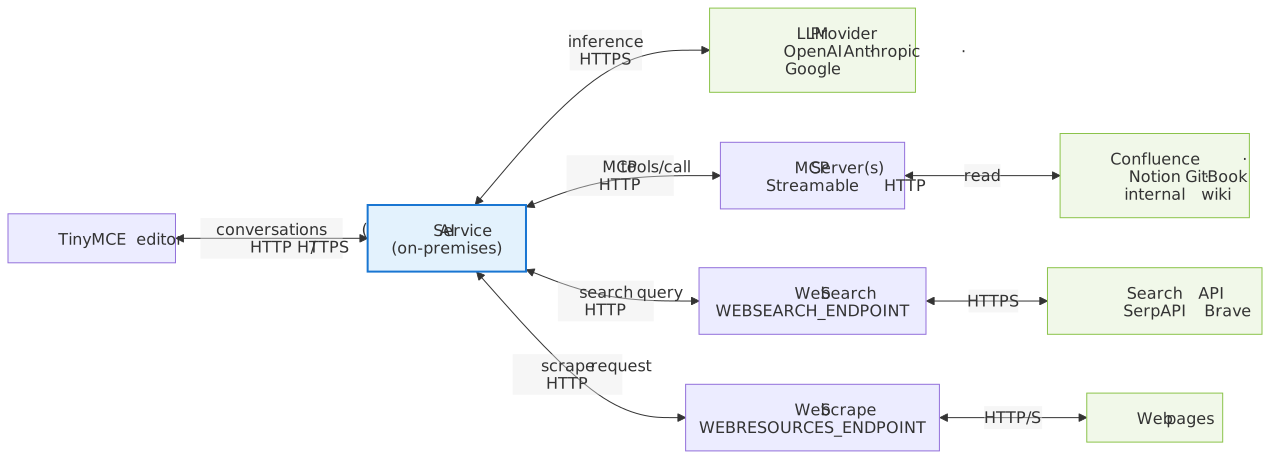
The AI service extends model capabilities through two integration points: the Model Context Protocol (MCP) for tool calling, and pluggable web endpoints for page fetching and search. AI conversations use both features, and Document Processing requests use MCP tools and web search. Reviews and quick actions use neither. Web search and scraping allow the AI to reference live internet content during conversations, and for most deployments, enabling at least web search improves response quality.
These features are configured through environment variables on the AI service container, or through a configuration file. In image version 1.2.0 and later, MCP servers can also be registered for one environment at runtime through the MCP server admin API. No additional infrastructure is required beyond a search endpoint and a scrape endpoint.
Demo
The following demo shows the editor experience that MCP configuration enables. The AI service backing the demo has an MCP server connected to a sample database of acquisition deals and company records. Choosing one of the suggested actions in the Chat sidebar prompts the model to call the MCP server’s tools, then either fill in the document placeholders or answer in Chat.
On premises, the editor configuration shown in the JS tab also needs tinymceai_service_url set to the AI service URL, and tinymceai_default_model set to a model ID defined in MODELS. MCP servers are declared on the AI service through MCP_SERVERS, not in the editor configuration.
-
TinyMCE
-
HTML
-
CSS
-
JS
<textarea id="tinymceai-mcp">
  <h1>Deal summary</h1>
  <h2><span class="placeholder mceNonEditable">Company name</span></h2>
  <h3>Executive summary</h3>
  <p><span class="placeholder mceNonEditable">A short overview of the company.</span></p>
  <p><span class="placeholder mceNonEditable">A concise M&A deal summary of the target company.</span></p>
  <hr>
  <h3>Company profile</h3>
  <p>
    <strong>Industry:</strong>
    <span class="placeholder mceNonEditable">Industry</span>
  </p>
  <p>
    <strong>Location:</strong>
    <span class="placeholder mceNonEditable">Location</span>
  </p>
  <p>
    <strong>Founded:</strong>
    <span class="placeholder mceNonEditable">Founded date</span>
  </p>
  <p>
    <strong>Employees:</strong>
    <span class="placeholder mceNonEditable">Employee count</span>
  </p>
  <p>
    <strong>Ownership structure:</strong>
    <span class="placeholder mceNonEditable">Ownership structure</span>
  </p>
  <p>
    <strong>Status:</strong>
    <span class="placeholder mceNonEditable">Company status</span>
  </p>
  <h3>Financial snapshot</h3>
  <p>
    <strong>Annual revenue:</strong>
    <span class="placeholder mceNonEditable">Annual revenue</span>
  </p>
  <p>
    <strong>Key financials:</strong>
    <span class="placeholder mceNonEditable">Key financials</span>
  </p>
  <h3>Strategic rationale</h3>
  <p><span class="placeholder mceNonEditable">Explain why this company may be an attractive target based on its sector, scale, market position, and business profile.</span></p>
  <h3>Key contacts and supporting materials</h3>
  <p><span class="placeholder mceNonEditable">Summarize which people may be most relevant for the next step in diligence.</span></p>
</textarea>
/* Styles the mentions profile card, which renders in the editor user interface. */
span.mymention {
color: gray !important;
}
div.card,
.tox div.card {
width: 240px;
background: white;
border: 1px solid #ccc;
border-radius: 3px;
box-shadow: 0 4px 8px 0 rgba(34, 47, 62, .1);
padding: 8px;
font-size: 14px;
font-family: -apple-system,BlinkMacSystemFont,"Segoe UI",Roboto,Oxygen-Sans,Ubuntu,Cantarell,"Helvetica Neue",sans-serif;
}
div.card::after,
.tox div.card::after {
content: "";
clear: both;
display: table;
}
div.card h1,
.tox div.card h1 {
font-size: 14px;
font-weight: bold;
margin: 0 0 8px;
padding: 0;
line-height: normal;
font-family: -apple-system,BlinkMacSystemFont,"Segoe UI",Roboto,Oxygen-Sans,Ubuntu,Cantarell,"Helvetica Neue",sans-serif;
}
div.card p,
.tox div.card p {
font-family: -apple-system,BlinkMacSystemFont,"Segoe UI",Roboto,Oxygen-Sans,Ubuntu,Cantarell,"Helvetica Neue",sans-serif;
}
div.card img.avatar,
.tox div.card img.avatar {
width: 48px;
height: 48px;
margin-right: 8px;
float: left;
}// The MCP server is configured on the AI service, not in the editor. The editor only
// needs the tinymceai plugin and a token provider.
// The demo-only data plumbing (merge tag list, mentions directory, revision history,
// and template storage) is omitted below to keep the AI configuration in focus.
tinymce.init({
selector: 'textarea#tinymceai-mcp',
height: 'clamp(650px, 80vh, 1200px)',
plugins: [
'autolink', 'link', 'emoticons', 'lists', 'table', 'advlist', 'searchreplace', 'wordcount', 'autocorrect', 'tinymcespellchecker', 'charmap', 'fullscreen', 'advcode', 'accordion', 'anchor', 'footnotes', 'powerpaste', 'importword', 'exportpdf', 'exportword', 'markdown', 'a11ychecker', 'typography', 'casechange', 'checklist', 'advtable', 'formatpainter', 'permanentpen', 'tableofcontents', 'help', 'math', 'linkchecker', 'media', 'mediaembed',
'quickbars', 'tinymceai', 'tinycomments', 'uploadcare'
],
toolbar: 'undo redo | tinymceai-chat tinymceai-review | ai-quickactions-translate | styles fontsizeinput | bold italic underline forecolor backcolor casechange | link uploadcare table addcomment | align bullist numlist checklist removeformat | code fullscreen help',
quickbars_selection_toolbar: 'tinymceai-quickactions ai-quickactions-improve-writing addcomment',
body_class: 'tox-comments-visible', // Ensure comments show up on init
sidebar_show: 'tinymceai-chat',
toolbar_mode: 'sliding',
visual: false,
table_default_attributes: {}, // Prevents inserting border=1 attribute on a new table
content_css: 'content.css',
user_id: 'james-wilson',
advcode_inline: true,
highlight_on_focus: false,
tinycomments_mode: 'embedded',
tinymceai_default_model: 'claude-4-6-sonnet',
tinymceai_allow_model_selection: false,
tinymceai_chat_welcome_message: 'This demo is connected to an Airtable database containing acquisition deals and related companies information.',
tinymceai_chat_welcome_actions: [
{ text: 'Try using the following actions with this database:' },
{ text: '**Get help editing your document**' },
{
title: 'Fill with "Nuvo Technologies" account details',
command: 'TinyMCEAIChatPrompt',
value: {
prompt: 'Pull the "Nuvo Technologies" record from "TinyMCE demo data" Airtable database and fill in all placeholders in this document',
displayedPrompt: 'Pull the "Nuvo Technologies" record from Airtable and fill in all placeholders in this document'
},
icon: 'document-properties'
},
{ text: '**Explore data via chat**' },
{
title: 'Compile an open deals summary report',
command: 'TinyMCEAIChatPrompt',
value: {
prompt: 'Find all deals in "proposal sent" status and provide a summary in chat with their deal value, notes, confidence level and potential red flags'
},
icon: 'comment'
}
],
tinymceai_languages: [
{ title: 'English', language: 'english' },
{ title: 'Chinese (Simplified)', language: 'chinese' },
{ title: 'Spanish', language: 'spanish' },
{ title: 'German', language: 'german' },
{ title: 'Japanese', language: 'japanese' },
{ title: 'Portuguese', language: 'portuguese' },
{ title: 'Korean', language: 'korean' },
{ title: 'Italian', language: 'italian' }
],
// Required for authentication. Replace with the token endpoint for the AI service.
tinymceai_token_provider: () => {
return fetch('/api/tinymceai-token', { credentials: 'include' })
.then(resp => resp.text())
.then(token => ({ token }));
}
});Prerequisites
This page assumes the following are already configured:
-
A running AI service container with database and Redis (see Database and Redis).
-
At least one LLM provider configured in
PROVIDERSandMODELS(see LLM providers). -
A JWT token endpoint deployed and signing tokens with the correct API Secret (see JWT authentication).
Model Context Protocol (MCP)
MCP allows the AI service to call external tools (internal wikis, API specifications, runbooks, contract databases, and compliance checkers) during conversations. The service connects to MCP servers over Streamable HTTP transport.
Only Streamable HTTP transport is supported. Stdio-based MCP servers cannot connect directly to the AI service. Wrap them with the SDK’s HTTP transport adapter (for example, StreamableHTTPServerTransport in the TypeScript SDK or StreamableHTTPServer in the Python SDK) before use.
MCP tools are available in AI conversations and, in image version 1.1.0 and later, in Document Processing requests. Reviews and quick actions do not invoke MCP tools. Document Processing runs with no signed-in user, so it skips OAuth-enabled MCP servers. For OAuth-enabled MCP servers, each user must complete the authorization flow before the server’s tools become available.
The AI service does not offer the resources of an MCP server to the model. To use them, connect the server to a context. See MCP resources.
Configuration
Set the MCP_SERVERS environment variable to a JSON object. Each key is a server identifier; each value describes the connection. For OAuth-enabled servers, also set MCP_OAUTH_CALLBACK_URL (see OAuth 2.0 authentication).
-e MCP_SERVERS='{
  "knowledge-hub": {
    "url": "http://host.docker.internal:3001/mcp",
    "options": { "callToolTimeout": 30 }
  }
}'| Field | Description |
|---|---|
|
HTTP endpoint of the MCP server (Streamable HTTP transport). For OAuth-enabled servers, this must be the endpoint that supports OAuth protected resource discovery (RFC 9728). See MCP server URL for OAuth. |
|
JSON object of HTTP headers sent with every request (for example, |
|
OAuth 2.0 configuration block. Enables per-user authorization for MCP servers that require it. See OAuth 2.0 authentication. |
|
Array of tool names to exclude from LLM access. |
|
Per-tool-call timeout in seconds (default 60). |
|
Array of environment IDs that can use the server. See Environment allowlist. |
|
Connection pool limits for the server. See Connection pooling. |
MCP_SERVERS supports multiple server entries. Add additional keys to the same JSON object:
-e MCP_SERVERS='{
  "knowledge-hub": {
    "url": "http://host.docker.internal:3001/mcp"
  },
  "compliance-checker": {
    "url": "http://host.docker.internal:3002/mcp"
  }
}'
Each server’s tools are namespaced independently (for example, knowledge-hub-search_docs and compliance-checker-run_check).
Environment allowlist
By default, every environment can use a server defined in MCP_SERVERS. The allowedEnvironments field limits a server to the listed environment IDs. The service matches IDs exactly, and there is no wildcard value. In an environment that is not on the list, the service behaves as if the server were not configured.
-e MCP_SERVERS='{
  "knowledge-hub": {
    "url": "http://host.docker.internal:3001/mcp",
    "allowedEnvironments": ["<environment-id>"]
  }
}'
Connection pooling
The service keeps MCP connections open and reuses them for later tool calls. A server that uses static headers shares one connection. An OAuth-enabled server holds one connection for each user and environment, because each user connects with their own token. The pool object limits these connections for each server:
| Field | Default | Description |
|---|---|---|
|
|
Maximum number of open connections for the server. At the limit, the service closes the connection that has been idle the longest. When every connection is busy, the request fails instead of waiting. |
|
|
How long an unused connection is kept, in milliseconds. |
|
|
Maximum age of a connection, in milliseconds. The service closes an older connection once it is no longer in use, and the next request opens a new one. |
|
|
How often the service pings idle connections, in milliseconds. The service closes a connection that does not respond, or that has reached |
-e MCP_SERVERS='{
  "knowledge-hub": {
    "url": "http://host.docker.internal:3001/mcp",
    "pool": {
      "maxClients": 25,
      "maxIdleTime": 600000,
      "maxLifetime": 1800000,
      "healthCheckInterval": 10000
    }
  }
}'
The pool values are in milliseconds, while options.callToolTimeout is in seconds.
|
MCP server admin API
In image version 1.2.0 and later, MCP servers can also be registered for one environment at runtime, without redeploying the container. Tokens for the admin endpoints need the ai:admin permission, and the service takes the environment from the token. See Permissions reference, and for the endpoints, see MCP Server Admin in the API reference.
Servers defined in MCP_SERVERS and servers registered through the admin API share one namespace, and MCP_SERVERS takes priority:
-
The admin API rejects a server name that
MCP_SERVERSalready uses. -
When
MCP_SERVERSlater adds a name that was first registered through the admin API, theMCP_SERVERSentry replaces the registered server.
A server registered through the admin API with an oauth block must set oauth.callbackUrl. Changing the url or the oauth settings of a registered server, or deleting the server, revokes the OAuth tokens stored for it, and each user must authorize the server again.
Conversations and Document Processing requests use servers connected either way.
MCP resources
An MCP server can publish resources, such as documents and files, as well as tools. The AI service calls the tools of a connected server, but it does not offer the resources to the model. In image version 1.1.0 and later, resources are used through the context library:
-
Connect the MCP server through
MCP_SERVERSor the MCP server admin API. -
Set
mcpServerIdto the server name when creating or updating a context. The resources of the server become file items of that context, alongside its prompts and uploaded files. Connecting a context to an unavailable server is rejected. SetmcpServerIdtonullin an update to disconnect the server. -
Reference the context in requests, or create it with
autoApply. Each request needs theai:contexts:<contextId>permission, orai:contexts:*, for the context. See Permissions reference.
The Context Admin operations require the ai:admin permission. See Create a context in the API reference.
Docker networking
On Linux Docker, add extra_hosts: ["host.docker.internal:host-gateway"] to the AI service compose entry to reach MCP servers running on the host machine.
host-gateway resolves to the Docker bridge IP, not 127.0.0.1. Host services bound to 127.0.0.1 only (common in Python MCP SDK examples and CLI-style servers) are unreachable from inside the container (ECONNREFUSED). Bind MCP servers to 0.0.0.0 or run them as sibling containers on the same Docker network.
|
Static-token authentication
The headers field sends a fixed set of HTTP headers with every request to the MCP server. Every tool call uses the same credentials regardless of which end user triggered the conversation.
-e MCP_SERVERS='{
  "knowledge-hub": {
    "url": "http://host.docker.internal:3001/mcp",
    "headers": {
      "Authorization": "Bearer QUkgc2VydmljZQ==",
      "X-Custom-Header": "custom-value"
    }
  }
}'
The headers field is the same for every user, so it cannot carry a per-user identity. For per-user identity, use OAuth 2.0 authentication. Custom integrations built on the REST API can also pass per-request data to one MCP server, or to one of its tools, with an mcp-tool-context message content part. See Send a message in the API reference.
OAuth 2.0 authentication
For MCP servers that require OAuth 2.0 authorization instead of a static access token in the headers field, the AI service can act as an OAuth client. The service implements the OAuth 2.0 Authorization Code flow with PKCE and supports Dynamic Client Registration (RFC 7591) for servers that allow it.
End users authorize the connection through their browser. Each user authorizes independently, and the resulting access token is reused on subsequent requests. The AI service refreshes the access token automatically when it expires.
MCP server URL for OAuth
When OAuth is enabled, the AI service discovers the authorization server by sending an unauthenticated request to the MCP server url and reading the resource_metadata link from the WWW-Authenticate header in the 401 response (per RFC 9728).
Some MCP servers expose separate endpoints for unauthenticated and OAuth-protected access. The url must point to the endpoint that returns this metadata. Using the wrong endpoint causes the initialize call to hang indefinitely (see Troubleshooting).
To verify the correct endpoint, send an unauthenticated request and inspect the WWW-Authenticate header. It should contain a resource_metadata URL: curl -sI -X POST https://mcp.example.com/v1/mcp/auth -H "Content-Type: application/json" | grep -i www-authenticate
|
Configuration
Enabling OAuth for an MCP server requires two steps:
-
Set
MCP_OAUTH_CALLBACK_URLto the URL of the OAuth callback page hosted by the integrating web application. The AI service uses this URL as the OAuthredirect_uriparameter for all OAuth-enabled MCP servers (unless overridden per server withoauth.callbackUrl). -
Add an
oauthblock inside the target server entry inMCP_SERVERS.
-e MCP_OAUTH_CALLBACK_URL='https://your-app.example.com/oauth/callback' \
-e MCP_SERVERS='{
  "knowledge-hub": {
    "url": "http://host.docker.internal:3001/mcp",
    "headers": { "Authorization": "Bearer static-token" }
  },
  "external-tools": {
    "url": "https://mcp.example.com/v1/mcp",
    "oauth": {
      "clientId": "<oauth-client-id>",
      "clientSecret": "<oauth-client-secret>",
      "scopes": ["read", "write"]
    }
  }
}'
Internal MCP servers can use static-token authentication (via headers) alongside external servers that require OAuth. Each server is configured independently within the same MCP_SERVERS object. MCP_OAUTH_CALLBACK_URL only applies to servers with an oauth block.
| Field | Description |
|---|---|
|
OAuth 2.0 client identifier issued by the MCP server. Omit to perform Dynamic Client Registration. |
|
OAuth 2.0 client secret. Used together with |
|
Array of OAuth scopes to request from the authorization server. Omit to use default server scopes. |
|
Per-server override of |
Dynamic Client Registration
If the MCP server supports RFC 7591 Dynamic Client Registration, clientId and clientSecret can be omitted from the oauth block. The AI service registers itself with the MCP server automatically on the first authorization attempt and reuses the resulting registration for subsequent flows.
Authorization flow
The OAuth flow is driven by the integrating web application. The AI service exposes REST endpoints (see REST endpoints); the application is responsible for orchestrating the redirects and forwarding the authorization code.
-
Initialize. The application calls
POST /v1/mcp/oauth/{serverName}/initializefor the signed-in user. The response contains either:-
{ "connected": true }— the user already has a valid access token; no further action is required. -
{ "connected": false, "authorizationUrl": "…" }— redirect the user’s browser toauthorizationUrl.
-
-
User consents. The MCP server’s authorization page opens in the user’s browser. After approval, the server redirects back to
MCP_OAUTH_CALLBACK_URL(oroauth.callbackUrl) withcodeandstatequery parameters appended. -
Complete. The callback page extracts
codeandstatefrom the query string and forwards them toPOST /v1/mcp/oauth/{serverName}/completewith body{ "code": "…", "state": "…" }. On success, the user’s connection becomes active and subsequent AI conversations can use the MCP server’s tools.
The AI service does not host the callback page. Register MCP_OAUTH_CALLBACK_URL (or each per-server oauth.callbackUrl) as an authorized redirect URI with the MCP server — either through the server’s developer console or, with Dynamic Client Registration, automatically.
|
The authorization session is valid for ten minutes after initialize. If the user takes longer to finish the authorization page, the complete call returns an mcp-oauth-invalid-state error and the flow must be restarted from initialize.
|
Callback page implementation
The AI service does not host the callback page. The integrating web application must serve a page at the MCP_OAUTH_CALLBACK_URL that extracts the code and state query parameters from the redirect URL and forwards them to the AI service’s complete endpoint.
<script>
  const params = new URLSearchParams(window.location.search);
  fetch('/api/mcp/oauth/my-server/complete', {
    method: 'POST',
    headers: { 'Content-Type': 'application/json' },
    body: JSON.stringify({ code: params.get('code'), state: params.get('state') })
  })
    .then(r => r.json())
    .then(data => document.body.textContent = data.connected ? 'Connected.' : 'Failed: ' + JSON.stringify(data));
</script>
Replace my-server with the key from MCP_SERVERS. In production, add error handling, a loading indicator, and validation for missing code or state parameters.
In the example above, the callback page calls /api/mcp/oauth/{serverName}/complete on the integrating application’s own server rather than directly on the AI service. This is the proxy pattern described below.
Browser integration and proxy endpoints
The OAuth REST endpoints on the AI service require JWT authentication and may not be directly callable from the browser due to CORS restrictions. In browser-based integrations, proxy the OAuth calls through the application’s own backend.
The backend generates a JWT (the same token used for conversations), attaches it to the request, and forwards the call to the AI service. This keeps the JWT generation server-side and avoids CORS configuration on the AI service.
A typical integration requires four proxy routes:
-
GET /api/mcp/oauth/status→GET {AI_SERVICE_URL}/v1/mcp/oauth/status -
POST /api/mcp/oauth/{serverName}/initialize→POST {AI_SERVICE_URL}/v1/mcp/oauth/{serverName}/initialize -
POST /api/mcp/oauth/{serverName}/complete→POST {AI_SERVICE_URL}/v1/mcp/oauth/{serverName}/complete -
DELETE /api/mcp/oauth/{serverName}→DELETE {AI_SERVICE_URL}/v1/mcp/oauth/{serverName}
REST endpoints
All endpoints are authenticated with the same JWT used for other AI service endpoints, and the token needs the ai:conversations:read and ai:conversations:write permissions. The acting user is identified by the token; each user has an independent connection state per MCP server. For requests, responses, and errors, see MCP OAuth in the API reference.
| Method | Path | Description |
|---|---|---|
|
|
Returns the connection status for every OAuth-enabled MCP server, with |
|
|
Starts the OAuth flow. Returns |
|
|
Finishes the OAuth flow. Body: |
|
|
Removes the stored token and any in-progress authorization state for the calling user. |
These endpoints are available once OAuth is configured for at least one MCP server.
Connection scope and revocation
OAuth connections are established per user and do not carry over between users or environments.
To revoke a user’s connection, send DELETE /v1/mcp/oauth/{serverName}.
For OAuth-enabled MCP servers, the connection is established only after each user completes the authorization flow. Until then, the server’s tools are not exposed to that user.
Tool namespacing
MCP tools are exposed to the LLM with a namespaced identifier: <server_id>-<tool_name> (for example, knowledge-hub-search_knowledge_base). The tools.disabled array accepts the bare tool name only (for example, "search_knowledge_base", not the namespaced form).
MCP server example
The following example uses the official MCP TypeScript SDK (@modelcontextprotocol/sdk) with StreamableHTTPServerTransport, which handles session management, SSE framing, and the full Streamable HTTP transport specification.
Knowledge-base MCP server
Create package.json:
{
  "name": "knowledge-mcp-server",
  "type": "module",
  "private": true,
  "dependencies": {
    "@modelcontextprotocol/sdk": "^1.29.0",
    "express": "^4.18.0",
    "zod": "^3.23.0"
  }
}
Install dependencies:
npm installCreate knowledge-mcp-server.js:
// knowledge-mcp-server.js
import { McpServer } from '@modelcontextprotocol/sdk/server/mcp.js';
import { StreamableHTTPServerTransport } from '@modelcontextprotocol/sdk/server/streamableHttp.js';
import express from 'express';
import { z } from 'zod';

const KNOWLEDGE_BASE = {
  'api-guidelines': 'All REST APIs must use JSON, include pagination through Link headers, and return 4xx for client errors with a machine-readable error code.',
  'deployment-process': 'Deployments require: 1) PR approval, 2) passing CI, 3) staging verification, 4) production canary (5% traffic for 30min), 5) full rollout.',
  'security-policy': 'All user data must be encrypted at rest (AES-256) and in transit (TLS 1.3). PII requires additional field-level encryption.',
};

function createServer() {
  const server = new McpServer({
    name: 'knowledge-hub',
    version: '1.0.0'
  });

  server.tool(
    'search_knowledge_base',
    'Search the company knowledge base for policies, guidelines, and procedures',
    { query: z.string().describe('Search query') },
    async ({ query }) => {
      const q = query.toLowerCase();
      const results = Object.entries(KNOWLEDGE_BASE)
        .filter(([key]) => key.includes(q) || q.includes(key.split('-')[0]))
        .map(([key, value]) => `## ${key}\n${value}`)
        .join('\n\n');
      return {
        content: [{ type: 'text', text: results || 'No results found.' }]
      };
    }
  );

  server.tool(
    'get_api_spec',
    'Get the OpenAPI spec for an internal service',
    { service: z.string().describe('Service name (for example user-service, billing-api)') },
    async ({ service }) => {
      return {
        content: [{ type: 'text', text: `Spec not found for: ${service}` }]
      };
    }
  );

  return server;
}

const app = express();
app.use(express.json());

app.all('/mcp', async (req, res) => {
  const server = createServer();
  const transport = new StreamableHTTPServerTransport({ sessionIdGenerator: undefined });
  await server.connect(transport);
  await transport.handleRequest(req, res, req.body);
  await server.close();
});

app.listen(3001, () => console.log('Knowledge MCP server on http://0.0.0.0:3001/mcp'));
The example server binds to 0.0.0.0 so it is reachable from inside Docker containers. When the MCP server runs on the host machine, the AI service connects to it at http://host.docker.internal:3001/mcp (see Docker networking).
Web search
The AI service can forward search queries to an external endpoint, enabling AI conversations to reference live web content.
Enabling web search
Web search requires three components configured together:
| Component | Configuration |
|---|---|
Environment variables |
Set |
MODELS entry |
The model’s |
JWT permission |
The JWT must include |
-e WEBSEARCH_ENABLED='true' \
-e WEBSEARCH_ENDPOINT='http://host.docker.internal:4001/search' \
-e WEBSEARCH_REQUEST_TIMEOUT='10000' \
-e WEBSEARCH_HEADERS='Authorization: Bearer search-api-key, X-Source: tinymce'
WEBSEARCH_HEADERS uses colon-CSV format (Header-Name: value, Another: value), not JSON. Passing a JSON object produces ERR_INVALID_HTTP_TOKEN and silently prevents all outbound search requests.
|
In a configuration file, the websearch_headers option can also be a JSON object. The environment variable always takes the colon-CSV string.
Per-message activation (custom integrations)
The TinyMCE editor sends the web search activation flag when the user toggles web search on. Custom integrations that call the AI service API directly must include the following in each message request body where web search should be active:
{
  "capabilities": { "webSearch": {} }
}
The value must be an empty object ({}). This is the documented API contract (see Capability configuration). The service rejects other shapes:
-
"webSearch": true: rejected (schema expects an object, not a boolean). -
"webSearch": {"enabled": true}: rejected (unrecognized key). -
Omitted entirely: web search is not surfaced to the model, even when all server-side configuration is correct.
Without this field, the environment variables, JWT permission, and MODELS configuration are insufficient. The model never receives the web search tool.
Endpoint contract
| Direction | Payload |
|---|---|
Request |
JSON object with a |
Response |
JSON object with a |
{ "query": "search string" }{
"results": [
{
"url": "https://example.com/article",
"text": "Content snippet",
"title": "Article Title",
"author": "Author",
"publishedAt": "2026-04-30T10:00:00Z",
"favicon": "https://example.com/favicon.ico"
}
]
}Implementation example (SerpAPI)
// search-service.js
const express = require('express');
const app = express();
app.use(express.json());

app.post('/search', async (req, res) => {
  const response = await fetch(
    `https://serpapi.com/search.json?q=${encodeURIComponent(req.body.query)}&api_key=${process.env.SERP_API_KEY}`
  );
  const data = await response.json();
  const results = (data.organic_results || []).slice(0, 5).map(r => ({
    url: r.link,
    title: r.title,
    text: r.snippet
  }));
  res.json({ results });
});

app.listen(4001);
Web scraping
The AI service can forward web page fetches to an external endpoint, enabling AI conversations to reference specific pages.
Enabling web scraping
Set WEBRESOURCES_ENABLED='true' and WEBRESOURCES_ENDPOINT on the AI service container. Optionally set WEBRESOURCES_REQUEST_TIMEOUT (default 10000ms).
-e WEBRESOURCES_ENABLED='true' \
-e WEBRESOURCES_ENDPOINT='http://host.docker.internal:4000/scrape' \
-e WEBRESOURCES_REQUEST_TIMEOUT='10000'
Trigger mechanism
The AI service calls the scrape endpoint (WEBRESOURCES_ENDPOINT) when it receives a request on:
POST /v1/conversations/{id}/web-resources
Content-Type: application/json

{ "url": "https://example.com/page-to-fetch" }
The TinyMCE editor sends this request when a user adds a link as a source in the Chat sidebar (the Add context source button, then Link), or selects an integrator-provided source that resolves to a URL (see tinymceai_chat_fetch_sources). A URL typed into the chat message itself does not trigger a fetch. Custom integrations must call this endpoint explicitly to trigger a page fetch.
The response is stored against the conversation. The type field in the scrape response must be text/html or text/markdown, and data must not be empty. Other MIME types (for example, application/pdf) and an empty data field are rejected with a 422 web-resource-download-error.
Endpoint contract
| Direction | Payload |
|---|---|
Request |
JSON object with a |
Response |
JSON object with |
{ "url": "https://example.com/article" }{ "type": "text/html", "data": "<html><body><p>Example page body</p></body></html>" }Implementation example (Playwright)
// scraper-service.js
const { chromium } = require('playwright');
const express = require('express');
const app = express();
app.use(express.json());

app.post('/scrape', async (req, res) => {
  const browser = await chromium.launch();
  const page = await browser.newPage();
  await page.goto(req.body.url, { waitUntil: 'networkidle' });
  const content = await page.content();
  await browser.close();
  res.json({ type: 'text/html', data: content });
});

app.listen(4000);
SSE events
Custom streaming UI integrations can use the following Server-Sent Events (SSE) to render tool call progress and search results. The AI service emits these events during conversations:
| Event name | Description |
|---|---|
|
Emitted when an MCP tool call completes. Contains the tool result. There is no pre-call event. |
|
Emitted when an MCP tool sends a notification while the call runs. Contains the tool name, the severity level, and the notification data. |
|
Sent when a web search runs. The payload is an empty object, and the event is also sent when the search back end fails (see Troubleshooting). |
|
Emitted with source citations from the model response. |
For every event and its payload, see the API reference.
Kubernetes deployment
In Kubernetes, the extra_hosts: host-gateway Docker pattern does not apply. Deploy MCP servers and web integration endpoints as sibling Deployments with ClusterIP Services in the same namespace as the AI service. Reference them using cluster DNS:
-e MCP_SERVERS='{
  "knowledge-hub": {
    "url": "http://mcp-knowledge.tinymce-ai.svc.cluster.local:3001/mcp",
    "options": { "callToolTimeout": 30 }
  }
}'
-e WEBRESOURCES_ENDPOINT='http://web-scrape.tinymce-ai.svc.cluster.local:4000/scrape'
-e WEBSEARCH_ENDPOINT='http://web-search.tinymce-ai.svc.cluster.local:4001/search'
Store MCP_SERVERS and WEBSEARCH_HEADERS in a Kubernetes Secret and mount them as environment variables in the AI service Deployment. This avoids exposing credentials in the Deployment manifest and allows rotation without redeploying.
For production clusters, the MCP server Deployments should have dedicated resource requests, liveness probes, and replica counts independent of the AI service. See Production deployment for general Kubernetes patterns.
Troubleshooting
| Symptom | Resolution |
|---|---|
Web search or web scraping features do not work |
|
Web search toggle is grayed out in the editor |
The JWT is missing the |
Web search is toggled on but the model never uses it |
The per-message request body is missing |
|
|
|
The MCP server is bound to |
|
Non-functional. The AI service re-handshakes with the MCP server after each eviction. Tool calls continue to work. This log volume is expected in steady state and does not indicate a problem. |
Web search returns "no results" but the search back end is running |
Check AI service container logs for |
|
This single error code covers multiple failure modes: the scrape endpoint returned 5xx, returned non-JSON, returned an empty |
|
The scrape endpoint did not respond in time. Check that the scraper is reachable from the AI service and the |
|
The authorization session expired. Sessions are valid for ten minutes after calling |
MCP tools not appearing for a user after OAuth is configured |
The user has not completed the authorization flow. OAuth connections are per user — each user must authorize independently through |
The MCP server |
See also
-
LLM providers: provider configuration and the
MODELScatalog -
Reference: full environment variable reference including
MCP_SERVERS,WEBRESOURCES_*, andWEBSEARCH_* -
Troubleshooting: general troubleshooting