


If you self-host the content infrastructure for your app, you can now trial TinyMCE 8 premium plugins in the same environment you'll use for deployment. The TinyMCE 8.6 release adds a self-hosted trial to the 14-day free trial available when you subscribe from the self-service portal. New signups can evaluate premium features with a trial license key issued straight from the customer portal with no cloud deployment required.
A cloud-only trial is a great way to see what TinyMCE's premium plugins can do. But if you run on-premises, in a private cloud, or air-gapped, it doesn't match how you actually ship. A deployment-accurate trial means your security review, integration testing, and performance checks can all happen up front, against the setup you're going to run in production.
The trial path is live today. Choose the self-hosted TinyMCE signup, generate a key, and you're ready to start.
What you get in the TinyMCE self-hosted free trial
When you drop the trial license key into your TinyMCE 8 configuration, the editor validates the key and runs fully on your own infrastructure. Most premium plugins come with it:
The rest of the offline-capable plugins all work with nothing more than that key and the tinymce-premium package.
A smaller group of premium features include server-side components which can be optionally self-hosted for a full deployment, but are available via Tiny Cloud services during the free trial so that your team doesn’t have to spin up a Docker container or configure service connections. These features are:
- Spell Checker Pro
- Link Checker
- Enhanced Media Embed
- Export to PDF
- Export to Word
- Import from Word
- Image Editing
These features all call out to a hosted service. You turn them on by setting one option, online_license_services_opt_in, to true. Leave it off and the rich text editor still runs, but without the features listed above. TinyMCE’s cloud-dependent plugins simply aren't auto-configured and will tell you their service URL isn't set. These features can only be trialed with the TinyMCE cloud backend.
If it's critical for your team to run the TinyMCE free trial on-prem, contact the TinyMCE team for a custom trial.
How to set up a self-hosted TinyMCE free trial
Prerequisites
The setup assumes a few things are already in place:
- A working account with an active TinyMCE 14 day free trial.
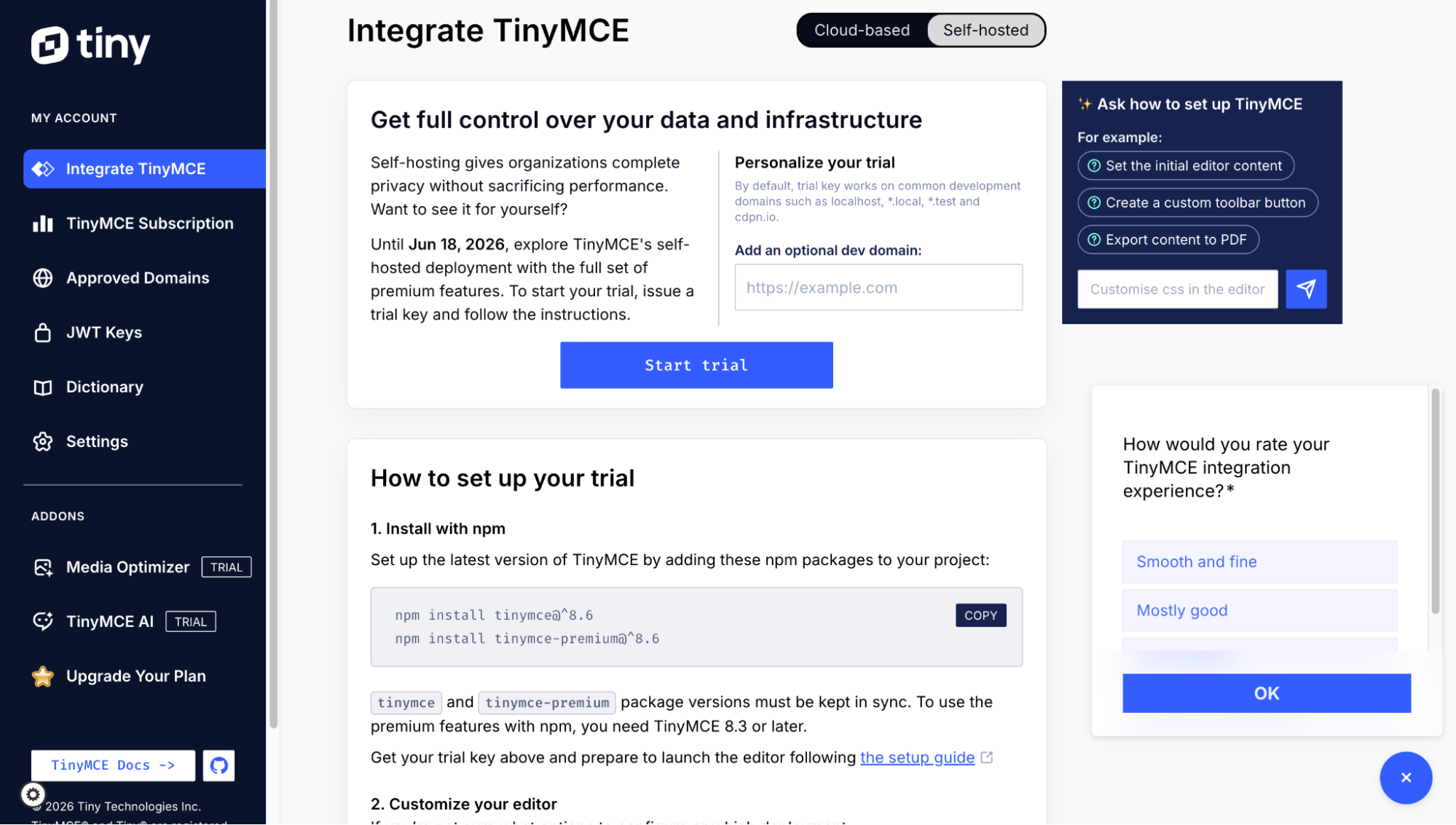
- A trial license key generated from the Self-hosted tab of the customer portal.
- Node.js and npm installed, and a project with a package.json.
One requirement is easy to miss, so it's worth stating plainly: the page has to be served over HTTPS or from localhost. Trial license keys validate in a secure context, and they won't complete validation without one. If your local dev server runs plain HTTP on something other than localhost, set that up first and the rest goes smoothly.
Note: Only new customers qualify for a self-hosted TinyMCE free trial. Existing customers on a current subscription aren’t eligible right now. If you’re a current customer, contact the TinyMCE team to find out more about self-hosting your version of TinyMCE.
Install TinyMCE and the premium features
Install the editor and the premium plugins together:
npm install tinymce@^8 tinymce-premium@^8hen add the trial key to your editor configuration. If you want the cloud-backed features for the trial, set online_license_services_opt_in in the same config.
Example TinyMCE configuration with a self-hosted license key
Here's an example configuration that does both:
tinymce.init({
  selector: "textarea",
  license_key: "your-trial-license-key", // from the Self-hosted tab of the portal
  plugins: [
    "advlist",
    "autolink",
    "lists",
    "link",
    "image",
    "charmap",
    "preview",
    "anchor",
    "searchreplace",
    "visualblocks",
    "code",
    "fullscreen",
    "insertdatetime",
    "media",
    "table",
    "help",
    "wordcount",
    "tinymcespellchecker",
    "exportpdf",
    "exportword",
    "importword",
    "linkchecker",
    "mediaembed",
    "editimage",
    "autocorrect",
  ],
  toolbar:
    "undo redo | blocks | bold italic | alignleft aligncenter alignright | bullist numlist outdent indent | help",
  online_license_services_opt_in: true,
});
What’s this code doing? The license_key value unlocks the editor and every offline premium plugin in your plugins list. Setting online_license_services_opt_in to true connects the editor to Tiny Cloud so the cloud-dependent plugins configure themselves for the trial period. Take the option out or set it to false, remove the premium plugins from the array, and you're back to a fully local editor with no cloud features.
Add the TinyMCE license key manager
The trial bundle also needs the license key manager available. If you're bundling, import it:
import "tinymce-premium/plugins/licensekeymanager";
If you're hosting the files yourself, make sure the licensekeymanager folder sits in your plugins directory alongside the others. With that folder in place, the key has what it needs to validate.
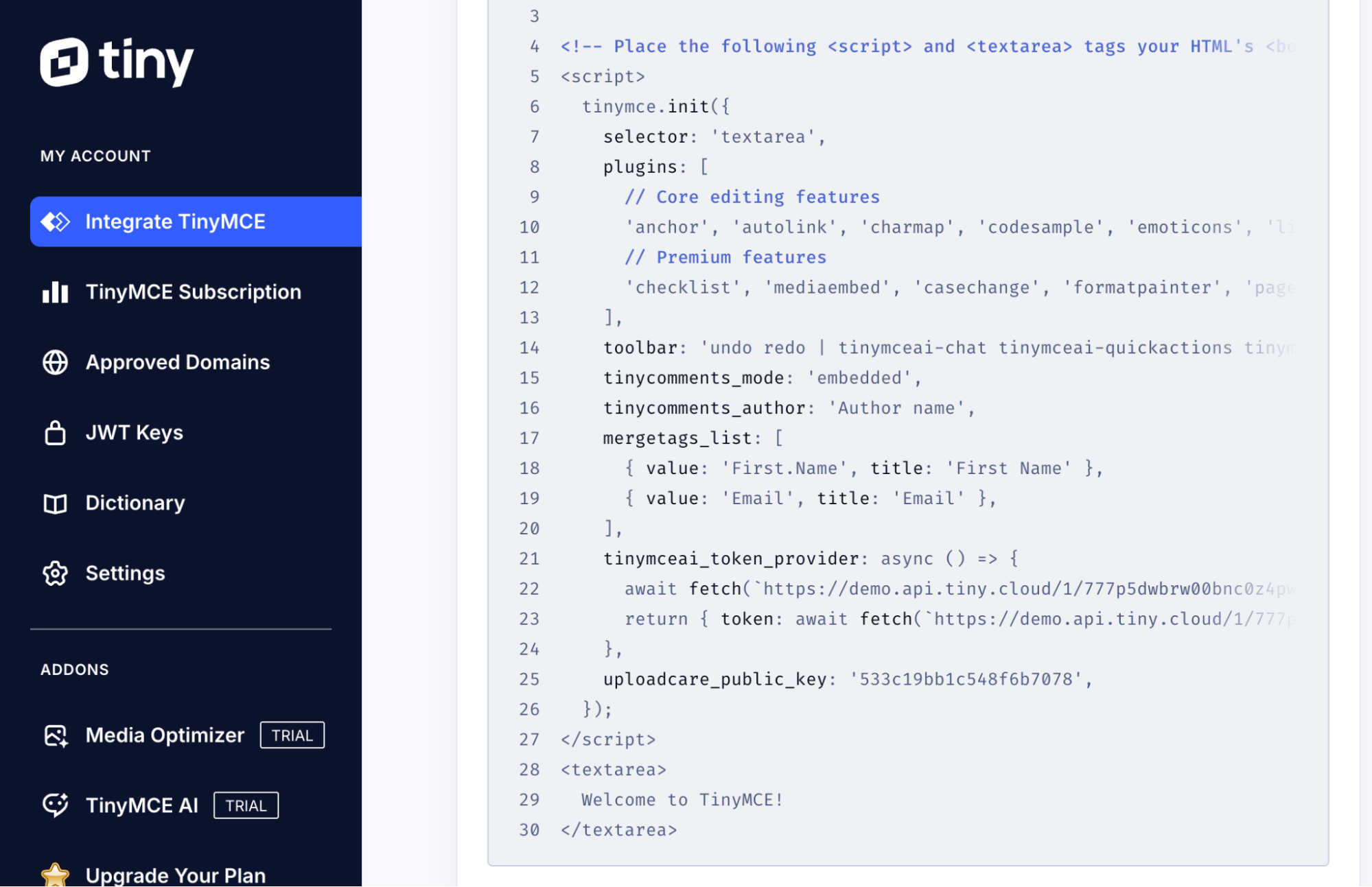
If you're not trialing the AI plugin, you can skip this part. TinyMCE AI does need one extra piece of configuration: A tinymceai_token_provider function, because it authenticates through a demo identity service during the trial. If you don’t want to write a function from scratch, you can simply copy the working example tinymceai_token_provider function at the bottom of the self-hosted section of the TinyMCE dashboard.
Tiny Cloud is always optional
When online_license_services_opt_in is enabled, the editor talks to Tiny Cloud at *.api.tiny.cloud. If your network sits behind a forward proxy or firewall, allow that domain pattern for outbound HTTPS, and check your Content Security Policy if you enforce one.
For a strong evaluation, that's the whole conversation: Don't set the opt-in, and the editor never reaches out. You can validate the core editor and every offline plugin in complete isolation, document exactly which TinyMCE features you’re using that need a connection, and hand a clear answer to whoever signs off on the deployment. That helps to put your review on solid ground from the start.
When the TinyMCE self-hosted trial ends
The trial starts after you sign up, but you’ll need to click the Start Trial button in your TinyMCE dashboard to issue the license key. It’s recommended to click Start Trial on day one so you have the full 14 days to try out every premium plugin you might need. Your portal shows the exact duration from the time of signup, so it's worth scoping your evaluation to fit that window. Self-service extensions aren't available, so if you'd like more time, a quick note to the TinyMCE team is the way to arrange it.
Converting is straightforward: Buy a commercial license from our sales team and replace the trial license key with the new license key. If you’re using any of the cloud-backed features, the recommendation is to convert them to a Docker-based setup after getting the new commercial license.
Try it where you'll ship it
The new TinyMCE 14-day self-hosted free trial is intended to answer the questions you actually have, and give you a more complete picture on if TinyMCE meets your app requirements. Sign up for TinyMCE, choose the self-hosted path, generate your trial key, and run every premium plugin inside your own stack. Your team gets to fully evaluate the deployment you're going to run, which is exactly where you want the decision made.
FAQs
Can I trial TinyMCE premium plugins without deploying cloud?
Yes. As of the TinyMCE 8.6 release, you can run the 14-day free trial on your own infrastructure, except for some TinyMCE premium plugins that require a connection to the TinyMCE Cloud during the free trial. You generate a trial license key from the Self-hosted tab of the customer portal, drop it into your TinyMCE 8 config, and the editor validates and runs locally.
Which TinyMCE premium plugins work fully offline during the trial?
Most of them. PowerPaste, Accessibility Checker, Advanced Typography, Comments, Enhanced Code Editor, Math, and Merge Tags all run with nothing more than your trial license key and the tinymce-premium package. A smaller group — TinyMCE AI, Spell Checker Pro, Link Checker, Enhanced Media Embed, Export to PDF, Export to Word, Import from Word, and Image Editing — include server-side components that call out to a hosted service. During the trial those are available through Tiny Cloud so you don't have to run a Docker container, but they stay dormant until you opt in.
Does the TinyMCE self-hosted trial work in an air-gapped or isolated environment?
Some of the offline plugins do. Leave online_license_services_opt_in unset and the editor never reaches out for premium plugins. You’ll need to validate the core editor with the license key outbound call, and most plugins have an outbound connection. These cloud-backed features need a connection to *.api.tiny.cloud, so those you'd test separately.
Why won't my TinyMCE trial license key validate locally?
The most common cause is the security context. Trial license keys only validate when the page is served over HTTPS or from localhost, so they won't complete validation on plain HTTP served from anything else. If your local dev server runs HTTP on a non-localhost host, fix that first and the rest follows.
Can existing TinyMCE customers use the self-hosted trial?
Not right now. The self-hosted trial is for new signups only; customers on a current subscription aren't eligible yet. If you're already a customer and want to self-host your version, contact the TinyMCE team to talk through your options.
What's the difference between the TinyMCE trial license key and the TinyMCE Cloud API key?
The trial license key is for self-hosted TinyMCE installations, and the Cloud API key is for cloud installations. They aren't two flavors of the same credential. During the trial, both unlock every premium feature, so the choice between them comes down to how you're installing, not what you're allowed to use.
How long does the TinyMCE self-hosted trial last, and what happens when it ends?
The current term is 14 days, starting at sign-up, and your TinyMCE portal shows the exact duration. Self-service extensions aren't available, so scope your evaluation to fit the window; if you need more time, a quick note to the TinyMCE team arranges it. To convert, buy a commercial license to keep the self-hosted editor running, and either self-host the premium server-side services or move those specific features onto a Tiny Cloud plan. The editor stays on your infrastructure either way.


