


If your product embeds a rich text editor, your VPAT inherits that editor's accessibility conformance. The toolbar, dialogs and content area your users work in are part of the product a procurement reviewer evaluates, so the editor vendor's Accessibility Conformance Report (ACR) becomes evidence in yours. To read it, check six things: which product version, features and VPAT edition the report covers, which standards and levels were evaluated, which conformance terms it uses, how each criterion is rated and what the remarks say about each gap, why many criteria are Not Applicable for an embedded editor, and what sits outside the tables. This guide walks through each step using TinyMCE 8's ACR, which is based on the ITI VPAT 2.5 WCAG edition, as the worked example, and ends with the questions to ask any editor vendor before you sign.
What is a VPAT, and how is it different from an ACR?
A VPAT is a template published by the Information Technology Industry Council (ITI) to help software vendors test their product against accessibility requirements and standards. Once completed, it becomes an ACR - a report that can be shared with buyers to assist them with understanding the impacts on their own accessibility compliance, usually tied to a particular version of the product.
However, many use the terms “ACR” and “VPAT” interchangeably. If it’s available to customers, you can generally assume it’s an ACR.
Ideally, a product’s VPAT would list every criteria as “supported”. However, in practice, this is often not possible. Accessibility is complex, and some UI/UX patterns are not well supported by the standards. The goal of a VPAT is to accurately represent how accessible a product is, and where the gaps are, so that customers can make informed decisions.
When choosing a rich text editor to embed, you should request the product’s VPAT. Both so you can be aware of its accessibility conformance, and so if you need to produce your own VPAT, you can fold in the results from the editor’s ACR.
This is where understanding an ACR becomes key.
The four VPAT 2.5 editions: WCAG, 508, EU, and INT
The latest version of the VPAT is 2.5, published in April 2025. It includes four editions of the VPAT to enable software vendors to focus on the standards relevant to their particular product and industry.
The four editions of the ITI VPAT 2.5
|
Edition |
Standards it reports against |
WCAG version included |
Sections beyond WCAG |
Use it when |
|---|---|---|---|---|
|
WCAG |
2.0, 2.1 and 2.2, Levels A, AA and AAA |
None |
Buyers ask for WCAG conformance without naming a legal standard |
|
|
508 |
Revised Section 508 (US federal) |
WCAG 2.0 Levels A and AA, which Section 508 incorporates |
Functional performance criteria, hardware, software, support documentation and services |
You sell to US federal agencies |
|
EU |
EN 301 549 (the usual way to show conformity with the European Accessibility Act) |
WCAG 2.1 Levels A and AA |
Functional performance, two-way voice communication, biometrics, hardware, non-web documents, software, documentation and support |
You sell into the EU |
|
INT |
WCAG, Revised Section 508 and EN 301 549 together |
2.0, 2.1 and 2.2 |
All 508 and EU sections |
You sell to several markets and want one report |
What a WCAG-edition ACR does and doesn't tell a Section 508 or EN 301 549 reviewer
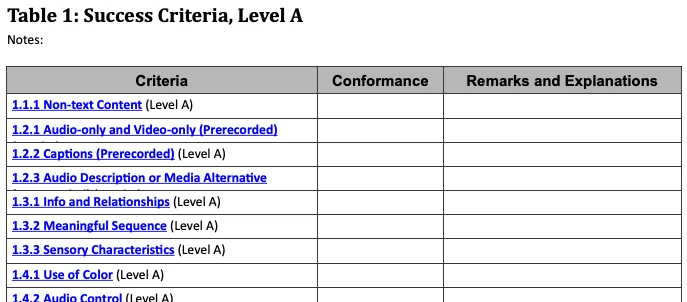
Because each edition includes a different set of standards, each VPAT also includes different tables for recording compliance. For example, VPAT 2.5 WCAG has three tables total, one for each compliance level (A, AA, and AAA), which simply list the success criteria for each.
However, the 508 and EU editions have additional sections and requirements, such as functional performance criteria, hardware, authoring tools, documentation and support.
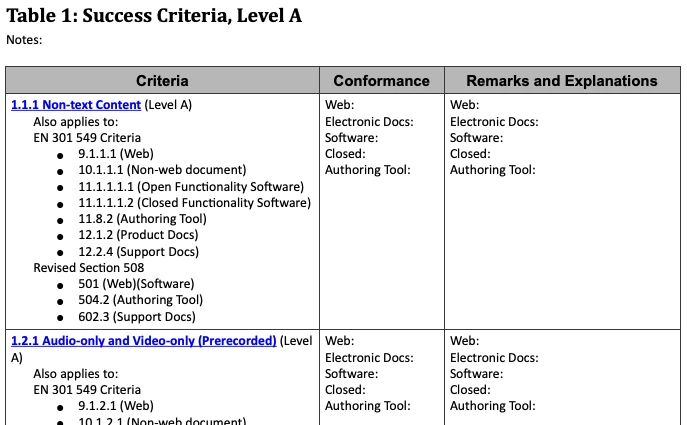
Because VPAT 2.5 INT combines all standards, it contains the three WCAG tables plus the additional EU and 508 sections. In addition, the WCAG tables contain additional details, merged in from the 508 and EU VPATS.
When reviewing a VPAT, make sure to check it has all the tables it should contain for that edition.
The VPAT published for TinyMCE is the WCAG edition. It does not cover Section 508 or EN 301 549 requirements.
To show the difference in detail between the WCAG and INT editions, here are the first tables from each VPAT:
Why does your product's VPAT depend on its rich text editor?
An embedded editor is part of the user interface you report on, so its gaps become your gaps unless you work around them. The first touchpoint is the VPAT. The second is the gaps identified within it.
Your VPAT inherits your editor's conformance
When preparing a VPAT for your own product, you are required to go through your UI with a fine-tooth comb. Every button, every menu, every image and workflow. This can take a significant amount of time.
This can be even worse if your app includes a rich text editor, which are often quite complicated UI pieces. Toolbars, popups, inputs, drag controls - every little UI element must be tested and recorded. Doing this with a product you did not implement, where you also need to discover all the little quirks, can be quite the task.
However, if the rich text editor you chose publishes their own VPAT, you can cite theirs in your ACR, saving you a significant amount of time.
Per the ITI’s VPAT Training course on Youtube, when your product includes a third-party product, how you handle the third-party product depends on its visibility to users.
- If your users can not tell it’s a third party product, you must test the accessibility of it and the ACR must cover it.
- If your users can tell it's a third party product, you may note that dependency in the ACR, and skip testing that section of the product. Ideally, it should also include a URL to the third party’s VPAT.
For example, in the Product Description section, based on ITI’s What Makes a Good ACR? tutorial, you could include:
“ACME CMS is a content management system for ACME customers. It integrates the TinyMCE rich text editor, which was evaluated separately.” TinyMCE’s VPAT can be found in the TinyMCE docs.
You may also want to cite the third-party ACR in the Remarks and Explanations column for any conformance issues caused by the third party product.
This way, by testing and documenting the UI around the editor yourself while citing the editor’s ACR for the relevant sections, you can create a VPAT which covers your whole product with minimal effort.
How do you read an editor's ACR, line by line?
The VPAT format lays out the relevant information in a distinct order for ease of reading: scope of the report, criterion and their ratings, remarks, then other notes, outside of the tables.
ITI has published video tutorials on reading ACRs, but here’s an overview:
Step 1: Check the scope
A VPAT ACR must start with the following information, to enable readers to check the report covers what they expect:
ACR header fields, with the values from the TinyMCE 8.9 ACR
|
Field |
What it must include |
TinyMCE example (8.9 ACR) |
|---|---|---|
|
Report title |
In the format of “[Company Name] Accessibility Conformance Report”. |
TinyMCE Accessibility Conformance Report |
|
Template version |
The version and edition of VPAT the ACR conforms to. |
WCAG Edition (Based on VPAT® Version 2.5) |
|
Name of product and version |
The name of the product covered by the report, and the product version if possible |
TinyMCE 8.9 (Basic featureset) |
|
Report date |
When the report was published, including at least month and year. |
2026-09-29 |
|
Product description |
A brief description of the product covered by the report. This may also list third-party dependencies. |
A rich text editor for editing content on the internet |
|
Contact information |
How to contact the company for any questions. |
|
|
Notes |
Any extra details or explanations about the product, if relevant. This section can be left blank. |
The best screen reader combination to use with TinyMCE is Firefox and NVDA, available for free on Windows operating systems. While other browser and screen reader combinations are not as well supported, the editor can be used with a large variety of combinations. |
|
Evaluation methods used |
The methods used to evaluate the product for the VPAT, including manual and automated methods. This may also list whether the evaluation was done internally, by a third party, or both. |
Expert evaluation through Axess Lab and testing with a variety of assistive technologies. WCAG 2.2 success criteria were evaluated internally by the Tiny Technologies accessibility team which also reviewed all previously reported findings against TinyMCE 8.9. |
Step 2: Check the applicable standards/guidelines
A VPAT must explicitly state which standards and guidelines were evaluated, from the list of standards and guidelines that apply to the edition. This is particularly important for WCAG, as the levels (A, AA, AAA) can be evaluated separately for each version (2.0, 2.1, and 2.2), and some products may not support all levels for all versions.
This information may be included in the previous section, or it may be its own section in the report, often formatted as a table. For example, TinyMCE’s WCAG edition VPAT lists all WCAG standards and their levels in a table, with evaluated standards marked with “Yes”.
Standards and levels covered by the TinyMCE 8.9 ACR
|
Standard/Guideline |
Included In Report |
|---|---|
|
Level A (Yes) Level AA (Yes) Level AAA (No) |
|
|
Level A (Yes) Level AA (Yes) Level AAA (No) |
|
|
Level A (Yes) Level AA (Yes) Level AAA (No) |
Step 3: Check the conformance terminology
The ACR must include a list of the terminology used in the conformance tables, and their definitions, to make it clear how well each criteria is support.
The ITI recommends the following terms, though companies may choose to use their own:
- Supports: The functionality of the product has at least one method that meets the criterion without known defects or meets with equivalent facilitation.
- Partially Supports: Some functionality of the product does not meet the criterion. Older VPAT documents will say “Supports with Exceptions” instead.
- Does Not Support: The majority of product functionality does not meet the criterion.
- Not Applicable: The criterion is not relevant to the product. “Supports” may be used instead, as if the criterion does not apply, it is satisfied.
- Not Evaluated: The product has not been evaluated against the criterion. This can only be used in WCAG Level AAA criteria.
If a definition is missing, it is not used in the report. If a vendor wishes to use a different set of terms, this must be flagged in the Notes section above and defined in the terminology section.
Step 4: Read the conformance levels
The details of the VPAT evaluation are recorded in the conformance tables, including what criteria were tested, how well they are supported, and any notes regarding their support. This is where you find out how accessible a product is.
The tables themselves and the items listed in each row are decided by ITI, and are part of the template. Whole sections can be left out if they don't apply, such as Chapter 4 (Hardware) or the Level AAA table. Individual rows can't be removed, except the rows for a WCAG version the report doesn't cover - this is something to watch out for.
The tables have specific columns:
- Criteria: The specific accessibility criteria being evaluated.
- Conformance Level: How well the product supports that criteria, using the terminology defined in the previous section.
- Remarks and Explanations: Any notes regarding the level of support, including relevant configuration and workarounds.
For example, the TinyMCE VPAT begins with a WCAG 2.x Level A section:
First rows of Table 1 (Success Criteria, Level A) in the TinyMCE 8.9 ACR
|
Criteria |
Conformance Level |
Remarks and Explanations |
|---|---|---|
|
1.1.1 Non-text Content (Level A) |
Supports |
|
|
1.2.1 Audio-only and Video-only (Prerecorded) (Level A) |
N/A |
|
|
1.2.2 Captions (Prerecorded) (Level A) |
N/A |
|
|
1.2.3 Audio Description or Media Alternative (Prerecorded) (Level A) |
N/A |
|
|
1.3.1 Info and Relationships (Level A) |
Partially Supports |
Generally, info and relationships are well conveyed, however in tables, some of the relationships are conveyed less optimally. |
|
1.3.2 Meaningful Sequence (Level A) |
Supports |
|
|
1.3.3 Sensory Characteristics (Level A) |
Supports |
|
|
1.4.1 Use of Color (Level A) |
Supports |
|
Notice that the row with “Partially Supports” includes a remark. Any criteria marked “Partially Supports” or “Does Not Support” should have remarks detailing what features do not meet the criteria and how. Remarks can also be used to explain why criteria are not applicable or when there is an accessible alternative available.
In a more detailed ACR, using the INT edition of VPAT which includes all standards, the first two rows look a lot more complicated:
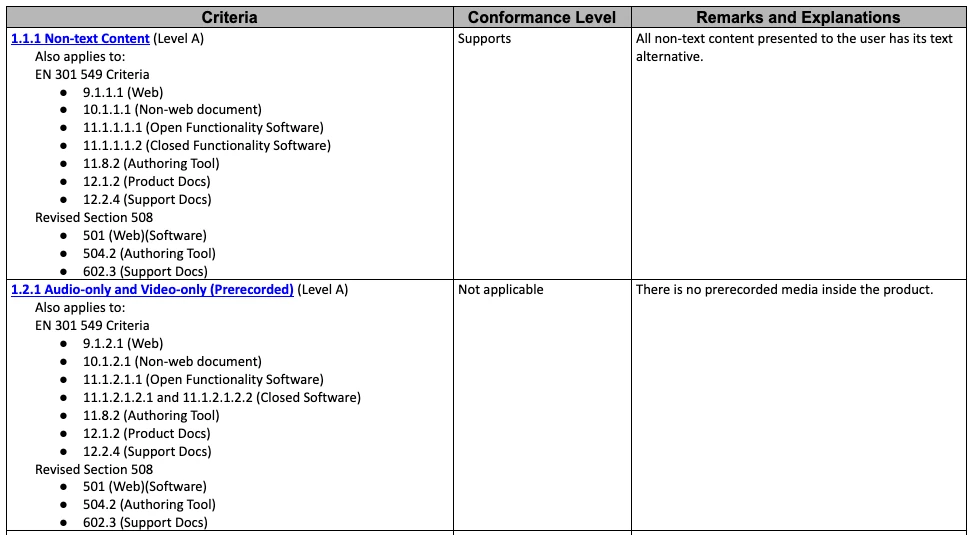
Beware ACRs which do not include explanations for criteria that are partially supported, or not supported.
Step 5: Understand why many criteria are Not Applicable for a component
For an embedded editor like TinyMCE, there are many criteria which are not applicable because they fall outside of the scope of what the editor does. However, these criteria may become applicable within the wider scope of your application.
The easiest example is when content made in the editor is published. TinyMCE can control the accessibility of the content while it is in the editor, but not once it is exported or published to the web. At that point, ensuring headings, media, etc. are accessible becomes your responsibility. Though TinyMCE’s Accessibility Checker plugin can help with that, and there are several other accessibility-related configuration options available.
Workflows are another area where your application’s accessibility may be more important than the editor’s Not Applicable. For example, if TinyMCE is used within a multi-step process, ensuring the editor is announced and can be navigated into is the responsibility of the application.
So while having an ACR for your editor can help ease your own evaluation overhead, it is not a replacement for testing everything around the editor within your application.
Step 6: Check what sits outside the tables
Premium plugins, notes and the recommended screen reader and browser pairing. In the TinyMCE ACR, premium plugins appear in notes for information only, not in the conformance tables.
Finally, check the report for any additional information regarding conformance or scope. This could be in the initial Notes section, as notes on any of the conformance sections, or at the end.
For example, TinyMCE’s VPAT includes an extra section at the end regarding premium plugins, since the main report is scoped to the basic featureset. This information is not reported using conformance tables, but as a quick summary for interested customers.
What do accessibility auditors test in the editor UI itself?
When evaluating an editor, auditors will check that the UI is accessible to those who use tools like keyboard navigation, screen readers, and visibility aids (see what makes an accessible rich text editor).
For example:
- Can every region of the editor be navigated to via keyboard navigation?
- Can all features be operated via keyboard navigation?
- Do screen readers correctly announce where focus is and what the editor is doing?
- Does the editor render correctly when zoomed in?
- Is there documentation about how to use the accessibility features?
For a product as complex as TinyMCE, supporting the standards VPAT evaluates requires a similarly complex set of accessibility features, such as:
- Keyboard navigation: TinyMCE includes over 60 keyboard shortcuts, to enable the editor to be used without a mouse. Many enable usage of particular features, but several are dedicated to navigating the UI. The main navigation shortcuts are listed in the table below. The TinyMCE docs also include a keyboard navigation guide.
- Screen readers: TinyMCE is compatible with JAWS, NVDA, and VoiceOver, all of which have their own requirements and quirks. For example, for VoiceOver on macOS and iOS, TinyMCE sets aria-label and role="textbox" on the content body because VoiceOver does not announce the iframe title, unlike other screen readers.
- Configuration options: TinyMCE also includes several configuration options to enable integrators to control accessibility features such as highlight_on_focus (controls whether the editor receives a highlight border on focus; on by default), iframe_aria_text (enables integrators to set an accessible name for the editor iframe), and a11y_advanced_options (enables extra accessibility-related dialog fields across multiple plugins).
TinyMCE shortcuts for moving around the editor UI
|
Windows or Linux |
macOS |
What it does |
|---|---|---|
|
Alt+F9 |
⌥+F9 |
Moves focus to the menu bar |
|
Alt+F10 |
⌥+F10 |
Moves focus to the toolbar |
|
Alt+F11 |
⌥+F11 |
Moves focus to the element path |
|
Alt+F12 |
⌥+F12 |
Moves focus to a notification |
|
Ctrl+F9 |
Ctrl+F9 |
Moves focus to the contextual toolbar |
|
Alt+0 |
⌥+0 |
Opens the Help dialog, which includes accessibility information |
|
Tab / Shift+Tab |
Tab / Shift+Tab |
Moves to the next or previous UI element; inside a dialog, focus stays within the dialog |
|
Arrow keys |
Arrow keys |
Move between controls on a toolbar or the menu bar, and between items in an open menu |
|
Esc |
Esc |
Closes a menu, dialog or notification, and moves focus back to the editor content |
These features are what enables TinyMCE to answer “Supports” or “Partially Supports” for so many criteria within the VPAT.
Why are buyers asking for VPATs now?
Governments around the world have been pushing accessibility in recent years, with various regulations gradually coming into effect. This has made accessibility documentation a standard procurement request, and that will likely only increase over coming years.
These regulations include:
- In the US, ADA Title II and Section 508 require software run by federal agencies and state and local governments to meet certain accessibility requirements. ADA Title II demands WCAG 2.1 Levels A and AA, and comes into effect in stages in the next couple of years. Section 508 requires WCAG 2.0 Levels A and AA plus additional requirements, and already applies, requiring vendors to supply ACRs during market research and evaluation.
- In Europe, the European Accessibility Act (EAA) requires certain key products and services to meet the needs of disabled persons, such as software related to transport, banking, and e-commerce. Unlike the US regulations, the EAA doesn’t only apply to the public sector. Meeting EN 301 549 is the usual way to show conformity with the EAA. This is the standard assessed by the EU and INT VPATs, which includes WCAG 2.1 Levels A and AA, plus several additional requirements. The EAA already partially applies, with a staggered rollout until 2030.
These regulations ensure that disabled persons can access key services as society shifts towards web applications over mail, phone calls, and in-person meetings.
Questions to ask your editor vendor
To ensure a vendor’s ACR includes the information you need for your own VPAT, ask the following:
- Which VPAT edition, and which standards and levels, does your ACR cover?
- Which product version and feature set was evaluated, and when?
- Who evaluated it, and with which assistive technologies and browsers?
- How often is the ACR updated, and where is the current version published?
- Which criteria are Partially Supports, and what are the workarounds or fix plans?
- Which configuration options affect accessibility?
- How do we report an accessibility bug, and what happens next?
- Is there a report for the older major version we still run?
Need an ACR for a specific TinyMCE version, or the security documents procurement asks for alongside it? Our team can send you what your review needs.
Request TinyMCE’s compliance documents
Frequently asked questions
Is an ACR the same as a VPAT?
No, but people tend to use the terms interchangeably. A Voluntary Product Accessibility Template (VPAT) is a template to assist software vendors with evaluating and documenting the accessibility of their product. Once complete, it becomes an Accessibility Conformance Report (ACR), which can be shared with customers.
Does a VPAT mean a product is WCAG compliant?
WCAG is a standard. VPAT is a way of documenting how compliant a product is with a standard, including the various WCAG versions and levels. Having a VPAT does not mean a product is fully compliant, but it does enable you to check how compliant the product is.
Who fills out a VPAT, the vendor or a third party?
Either. A third party, like an auditor, can be contracted to complete a VPAT on behalf of a vendor, or a vendor may fill out the VPAT themselves. Or there could be a mix, for example if an auditor does the initial evaluation, and the vendor does subsequent updates for future product releases.
Is a VPAT mandatory?
It depends on your customer base. If selling to US government entities, an ACR is compulsory for Section 508. For Title II and EAA compliance, other documentation is acceptable. However, an ACR may be an easy way to meet compliance requirements for all relevant regulations with one document.
Does an editor's ACR cover the content my users create?
No, an editor’s ACR only covers the UI and functionality of the editor itself, and the experience of using the editor. The accessibility of the content created in the editor is the responsibility of the parent application, though the editor should have features to assist with creating accessible content, such as TinyMCE’s Accessibility Checker plugin.
Which TinyMCE versions does the ACR cover?
The latest ACR for recent major versions of TinyMCE are available in the TinyMCE accessibility docs. The ACR for TinyMCE 8.9 covers WCAG 2.0, 2.1 and 2.2, for Levels A and AA. The ACR for TinyMCE 6.7 covers WCAG 2.0 and 2.1, for Levels A and AA. ACRs for other versions may be available upon request.
What else will procurement ask for alongside a VPAT?
Other compliance documentation such as SOC 2 Type II reports, recent penetration test results, SBOM documentation, and details regarding security controls and posture can all be helpful when evaluating a product.


