


The rich text editor (RTE) isn't where most teams expect things to go wrong in a help desk application. It's just the comment box, the internal note field, or the template composer. But when it doesn't work, the RTE becomes the daily friction point no one budgeted for.
The real issue isn't missing features; it’s variability of your user workflows. Every support team builds its own rhythms, and you need to create a help desk app that works for every team that uses your app.
What makes help desk app development teams choose TinyMCE as their RTE, and why? Flexibility, a self-contained ecosystem that doesn’t need maintenance, and a plug-and-play editor that just works are a few of the reasons.
Why help desk workflows can fracture
There’s no one “typical” user path for a help desk application. What the product team models as a basic workflow, the support team experiences as the least-worst way to get tickets closed without something falling through.
You have to account for the variability in different workflows when building your app, and this includes:
- Internal vs external communication: This is usually the first place assumptions crack. Some support teams use internal comments for compliance notes, while others rely on internal threads to move tickets forward across tiers. What counts as “internal” depends on what tooling sits around the help desk.
- Compliance and audit requirements: These requirements are usually treated like a feature, when they’re more like a contract. When you support regulated workflows in your help desk app, every edit or reply becomes part of a record someone might review.
- Agent experience levels: A help desk app needs the same system to work for highly trained, technical users as well as new support staff who are learning. Often, both groups are using the same interface, defaults, and with the same workflows assumed underneath.
- Escalation paths: These aren’t just “if X then escalate.” They reflect trust relationships and institutional knowledge for support teams. Escalation paths look different for every team.
This is just the beginning of the list that a development team needs to consider when creating a help desk app. When teams don’t take flexibility to handle a myriad of workflows into account, it can lead to a brittle application.
The hidden cost of encoding workflow flexibility
Perhaps you’re already accounting for workflow variability. But what does that look like when it comes to actually programming that flexibility in your help desk app from scratch? Logic accumulates, and exceptions grow.
Logic that was supposed to make the app more flexible becomes a problem instead of a solution. When the support team asks for just one more change to the rich text editor, it’s weeks of work for your team. The more you let a broad range of functionality spread across configurations, the harder it becomes to change anything without causing breakage somewhere else. What started as a customization layer becomes structural debt over time.
The rich text editor should be a silent touchpoint
Help desk app workflows should be predictable. The workflow isn’t the center of attention, so it shouldn’t be the star of the show. Your support team should. Communication between team members, and between clients and support, should flow naturally without concern about context or overexplanation.
At that point, the rich text editor isn’t just a box for holding words. It’s the place where those communication nuances are contained and managed. That makes it a critical enabler for everyone involved along the workflow.
How TinyMCE absorbs complexity without product bloat
How can one tiny (😉) rich text editor help when you’re building a help desk app for all of the different audiences?
TinyMCE helps your team meet workflow variability challenges with a functioning ecosystem designed to plug in and just work for your users. Your RTE should be self-contained and flexible enough to meet your users’ needs, whether it’s the comment box, the internal notes field, or a reply system.
It fits right into the help desk app without causing problems or errors for users, whether it’s clients or support staff. It’s quiet, but it works–without noise or distraction. The WYSIWYG editor is the critical center of the Venn diagram where the three circles of communication, context, and workflows meet.
Templates that enable consistency without rigidity
Instead of spending time coding new features to handle app variability, devs can add a native TinyMCE feature like Templates, Merge Tags, or user Mentions for different workflows. These three features are a few examples of how templated content can speed up support staff’s work.

The benefits of templating are:
- Don’t lock users into a single voice: Reusable responses can be built right into the template pop-up to maintain consistency, and offer different templates to different teams.
- Quick data point reference: Dynamic placeholders like merge tags allow for context and quick reference to data points.
TinyMCE gives your app users more content-level flexibility, and your developers don’t have to do a bunch of custom coding.
Compliance, auditing, and control at the content layer
In regulated environments, you can't afford to have an agent accidentally introduce formatting that breaks your audit trail or paste in content that violates data handling policies.
TinyMCE handles compliance requirements and audits through constrained editing. You can:
- Control what HTML tags are allowed with Full Page HTML.
- Run audits with Revision History.
- Manage allowed content with Media Optimizer.
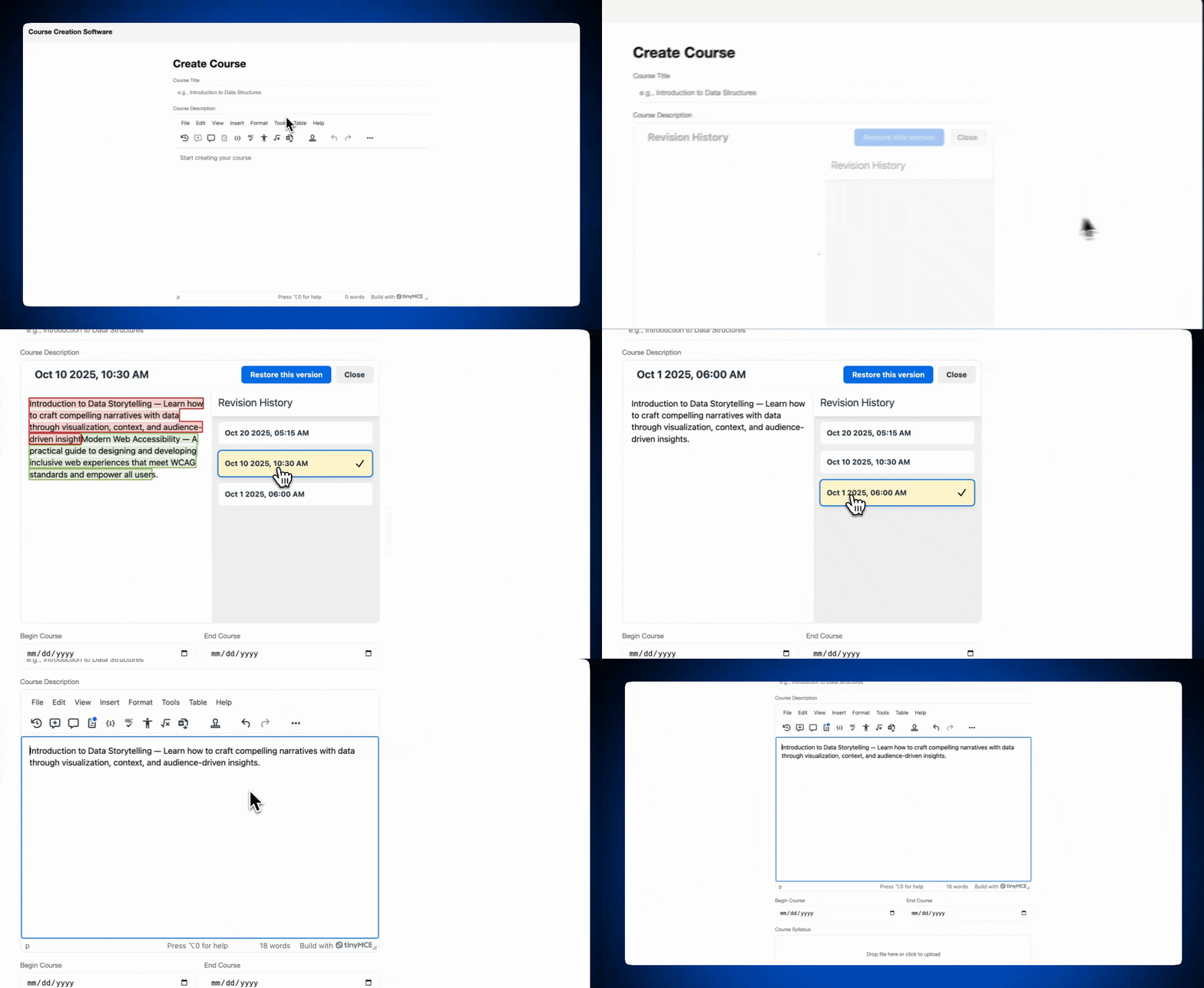
TinyMCE's content filtering gives you predictable output, and it's configurable per editor instance. You don't have to engineer workflows to handle different compliance needs. Customer-facing replies can have stricter filtering and limited formatting options, while internal notes can be more permissive. Same editor, different rulesets, and you aren't spending weeks building custom logic to make that work across your app.
Scaling human variability across support teams
Your help desk app has to work for junior agents and senior support staff alike. You can build for the lowest common denominator and frustrate your best agents, or you can optimize for speed and leave new hires struggling to keep up. TinyMCE doesn't force that tradeoff.
Templates and merge tags let junior agents rely on pre-built responses and structured formatting while they're still getting up to speed. At the same time, experienced agents aren't locked into those templates. They can use them as shortcuts or ignore them entirely, moving efficiently through their queue without the RTE getting in the way. The same toolset supports both workflows because it's flexible enough to meet people where they are. The system adapts to the person using it, not the other way around.
TinyMCE helps ease the burden of customization for multiple unique workflows by offering over 50 native plugins. Adding a TinyMCE feature is frictionless for developers, and if they need help, there’s a team of TinyMCE experts ready with a host of knowledge. Customization in the RTE for different workflows doesn’t have to be stressful, and it doesn’t break everything when your app users request yet another feature.
Conclusion: Decide where flexibility lives
You can’t standardize every bit of human support work. Every team develops its own rhythms, its own escalation patterns, its own ideas about what "internal" means and what belongs in the audit trail. You can decide where flexibility belongs in your help desk app. And when your rich text editor supports that flexibility, your app can scale faster to support the different workflows. The usual variability still exists, but it's manageable. Your support teams get what they need, and your developers aren't forced to engineer the RTE in every workflow.
TinyMCE gives help desk product teams a safe place to put complexity so it doesn't infect everything else. It's self-contained, it's flexible, and it handles the messy realities of human communication without forcing you to build that infrastructure yourself. If you have questions about how this robust RTE fits into your specific app’s needs, fill out the TinyMCE contact form to get answers.


