


Every rich text editor shows tidy formatting on screen; the HTML it saves is another matter. We pasted the same Word document into eight popular editors: the saved output ranged from 927 to 6,656 bytes, and four of them stored a numbered list as paragraphs with typed numbers. Our pick is TinyMCE with its PowerPaste add-on, which had the strongest result on the three checks that decide whether HTML is ready for production. It was the only editor in our test that kept existing HTML intact, turned Word and Google Docs paste into clean, structured HTML, and removed all the unsafe markup we tried. Our runner-up, CKEditor 5, was the only other editor to turn both Word and Google Docs paste into clean, structured HTML.
Key takeaways
- An editor's storage model decides its HTML. HTML-native editors store and return HTML; editors with a JSON model generate HTML on export and drop what their content model doesn't describe.
- Test the round trip. Load HTML you already store, read it back and compare: what comes back is what you'll save.
- Paste cleanup decides most of the markup that ships. Word and Google Docs bring their own styles, classes and fake lists, and editors handle them very differently.
- Sanitize on the server anyway. The editors we tested handled the same unsafe link in six different ways.
Note: Last tested: October 29, 2026, using the latest release of each editor. Three paid paste add-ons, including TinyMCE's PowerPaste, were tested on their vendors' public demo pages.
Best rich text editors for HTML output compared
We checked each editor against three things that decide whether its HTML can ship: does it keep the HTML you already have, does it turn Word and Google Docs paste into clean, structured HTML, and does it remove unsafe markup?
|
Editor |
Document model |
Keeps existing HTML |
Clean Word and Google Docs paste |
Removes unsafe markup |
|---|---|---|---|---|
|
TinyMCE + PowerPaste |
HTML |
Yes |
Yes |
Yes |
|
CKEditor |
Own data model |
No: 7 of 12 features kept |
Yes |
No: |
|
Editor.js |
JSON blocks |
No HTML export |
No: lists became paragraphs |
No: |
|
Froala |
HTML |
Yes |
No: Google Docs styles kept |
Yes |
|
Jodit |
HTML |
Yes |
No: merged cells lost |
No: |
|
Lexical |
EditorState JSON |
No: 5 of 12 kept |
No: Word lists became paragraphs |
Yes |
|
Quill |
Delta JSON |
No: 2 of 12 kept |
No: merged cells lost |
Yes |
|
Tiptap |
ProseMirror JSON |
No: 6 of 12 kept |
No: Word lists became paragraphs |
Yes |
The Word and Google Docs paste result in the TinyMCE + PowerPaste row comes from TinyMCE's public PowerPaste demo; the rest of that row comes from TinyMCE's open source build. We also tested two other paid paste add-ons on their vendors' public demos, CKEditor 5's Paste from Office Enhanced and Tiptap's Paste Handler, and neither passed all three checks.
If you need a React WYSIWYG editor that produces HTML rather than a JSON document model, TinyMCE, Froala and Jodit store and return HTML directly. Tiptap, Lexical and Quill generate HTML from JSON, and CKEditor 5 from its own data model.
How we tested
We put the same inputs into every editor and read the result through each editor's own HTML API:
- Office paste: a Word document with headings, a numbered list with a lettered sub-list, bullets and a table with merged cells, plus the same content from Google Docs and an Excel range, in each app's clipboard format. These inputs reproduce common rich text paste problems in production.
- AI paste: a knowledge-base answer copied from ChatGPT, carrying 754 hidden HTML comments.
- Existing HTML: a document with 12 features to keep: a caption, header rows and header cells,
scopeattributes, merged cells, a lettered sub-list, three list levels, a link title, classes, adata-*attribute, a merge-tag<span>and a blockquote. - Unsafe and malformed HTML: a
javascript:link, anonclickhandler, a<script>element and an image withonerror, plus 12 snippets with broken markup.
Each editor ran from its npm package on our own test page, in its standard setup with tables, lists and links enabled; where it offers keep or clean paste, we chose clean. Froala ran without a license key, and its own public demo gave identical output. The three paid paste add-ons, TinyMCE's PowerPaste, CKEditor 5's Paste from Office Enhanced and Tiptap's Paste Handler, ran on their vendors' public demo pages instead, in the version and configuration each page ran (Tiptap's demo doesn't show its version). From those demos we used only the Office paste results; the other results for those three come from the same editor's open source build, so a demo page's other settings don't count for or against them.
The screenshots show what each editor looks like in use. Tiptap and Lexical ship without one, so we took their screenshots on the vendors' public demos running the same paste: Tiptap's Tables example and the Lexical Playground. Their scores come from our test page. Each editor that returns HTML also gets five scores from 0 to 100: round trip, Office paste, AI paste, unsafe markup and malformed HTML (checked with html-validate). Sizes are compared with line breaks and attribute order set aside. The Office inputs follow each app's clipboard format but weren't copied from the apps live.
TinyMCE: pick for HTML that ships
TinyMCE was the strongest choice in our test for content published as HTML, earning our top pick as the only editor to pass all three checks. It edits the HTML document itself rather than converting it to a separate data model, and PowerPaste rebuilds Word and Google Docs content as clean HTML as it's pasted.
License: GPL 2+ open source core; PowerPaste is included in the Professional and Enterprise plans. Frameworks: React, Angular, Vue, Svelte, Blazor and JavaScript. Scores: round trip 100, Office paste 87 with PowerPaste on TinyMCE's public demo, AI paste 50, unsafe markup 100, malformed HTML 92.
- Existing HTML comes back as you stored it. All 12 features survived the round trip, from the table caption, header cells and
scopeattributes to the lettered sub-list, link title, classes,data-*attribute and merge-tag<span>, and a second load returned the same HTML. - Word paste becomes real structure, not Word markup. With PowerPaste on TinyMCE's public demo, our 11,340-byte Word document came out at 1,026 bytes. Word's list paragraphs became a real nested list with the lettered sub-list, the merged table cells kept their
rowspanandcolspan, and no Word classes,mso-styles or language attributes were left. Google Docs content came out at 945 bytes, with its boldfont-weightspans turned into<strong>. That's the highest Office paste score we measured. - Unsafe markup is removed on the way in. On paste and when HTML was set through its API, TinyMCE removed the
onclickhandler, the<script>element and the image'sonerror, and took thehrefoff thejavascript:link. - It's proven in production, with 20 years of edge-case handling across hundreds of thousands of implementations.
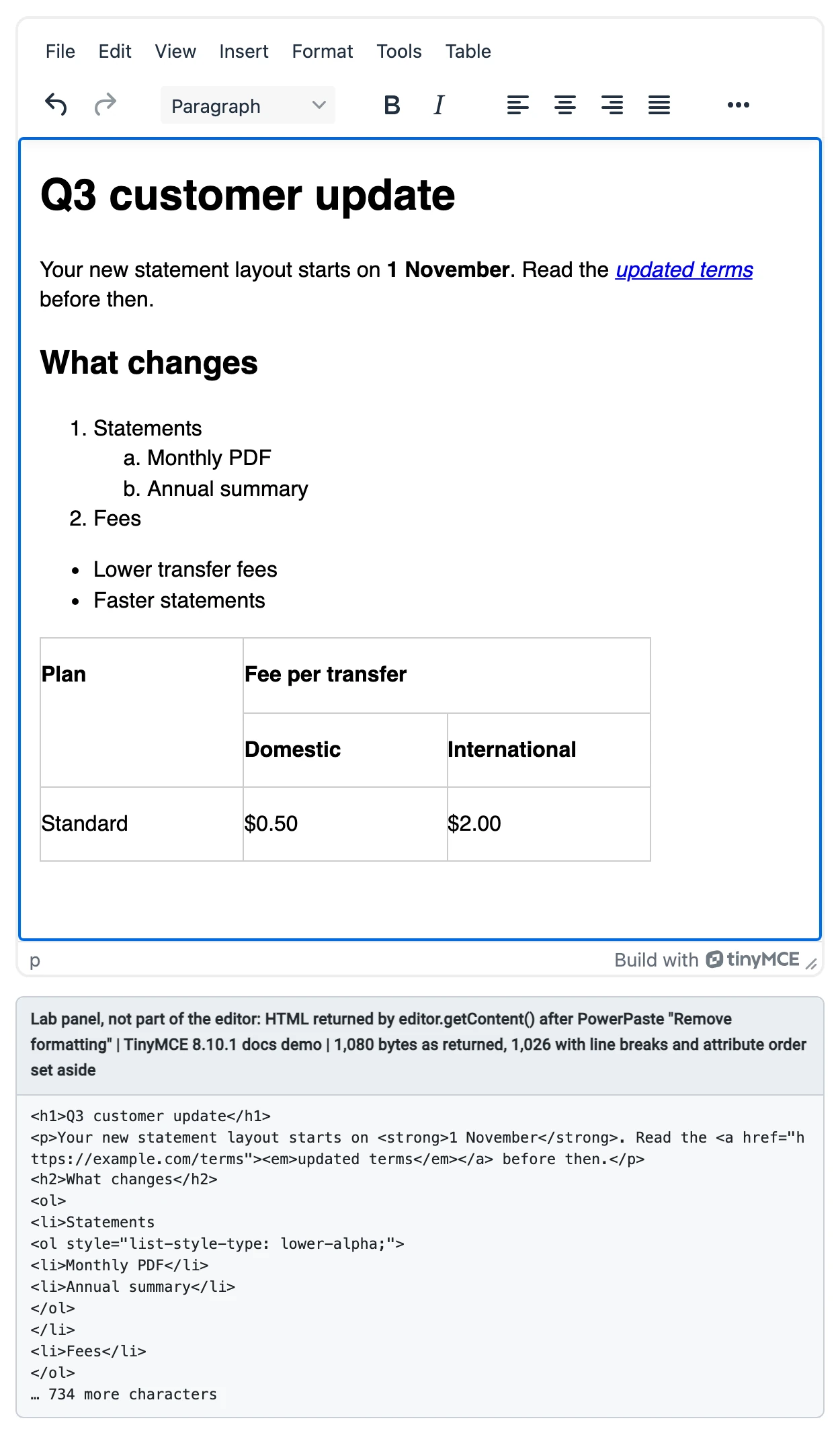
TinyMCE 8.10.1 with PowerPaste on TinyMCE's public demo, after our Word test paste and "Remove formatting". Editor height increased for the screenshot so the whole document shows; it doesn't change the output. The grey panel below the editor is our lab's display of the HTML the editor's own API returned (first part, unedited); it isn't part of the editor. The Word input follows Word's clipboard format; it wasn't copied from Word live.
To get this result, add the PowerPaste plugin to your TinyMCE config and set Word import to clean. You can try it with your own documents on the PowerPaste demo for clean HTML from Word and Google Docs.
Two more settings let you adjust the HTML TinyMCE saves. AI chat apps paste hidden HTML comments, 754 in the ChatGPT answer we used. TinyMCE's default setup keeps them, which is what its AI paste score reflects, and one parser node filter removes them: with it, the same paste stored no comments at all.
tinymce.init({
  selector: "#editor",
  setup: (editor) => {
    editor.on("PreInit", () => {
      editor.parser.addNodeFilter("#comment", (nodes) =>
        nodes.forEach((node) => node.remove())
      );
    });
  },
});
To control which attributes are stored, such as the cellspacing and valign that Word adds to tables, use TinyMCE's content filtering options. See TinyMCE pricing for the plans that include PowerPaste.
CKEditor
CKEditor 5 is our runner-up. Its open source build was the only other editor in our test to turn both Word and Google Docs paste into clean, structured HTML, with the second-highest Office paste score we measured. Its data model dropped parts of existing HTML, though, and its getData() output kept a javascript: link.
License: GPL 2+ or commercial; a license key is required, with 'GPL' for self-hosted open source use. Frameworks: React, Angular, Vue, Svelte and JavaScript. Scores: round trip 43, Office paste 86, AI paste 100, unsafe markup 60, malformed HTML 100.
- Paste from Office turned our Word document into 1,064 bytes with real nested lists and merged cells. Its default heading options start at
<h2>, so the pasted H1 became an H2. - It kept 7 of the 12 round-trip features: the caption became a
<figcaption>, every list item got an ID, and the link title,scopeattributes, classes,data-*attribute and merge-tag span were dropped unless you configure General HTML Support. getData()returned thejavascript:link unchanged, so sanitize its output on the server.- The premium Paste from Office Enhanced is designed to retain more of the original formatting; on CKEditor's public demo it kept more inline styles (6,815 bytes for Word).
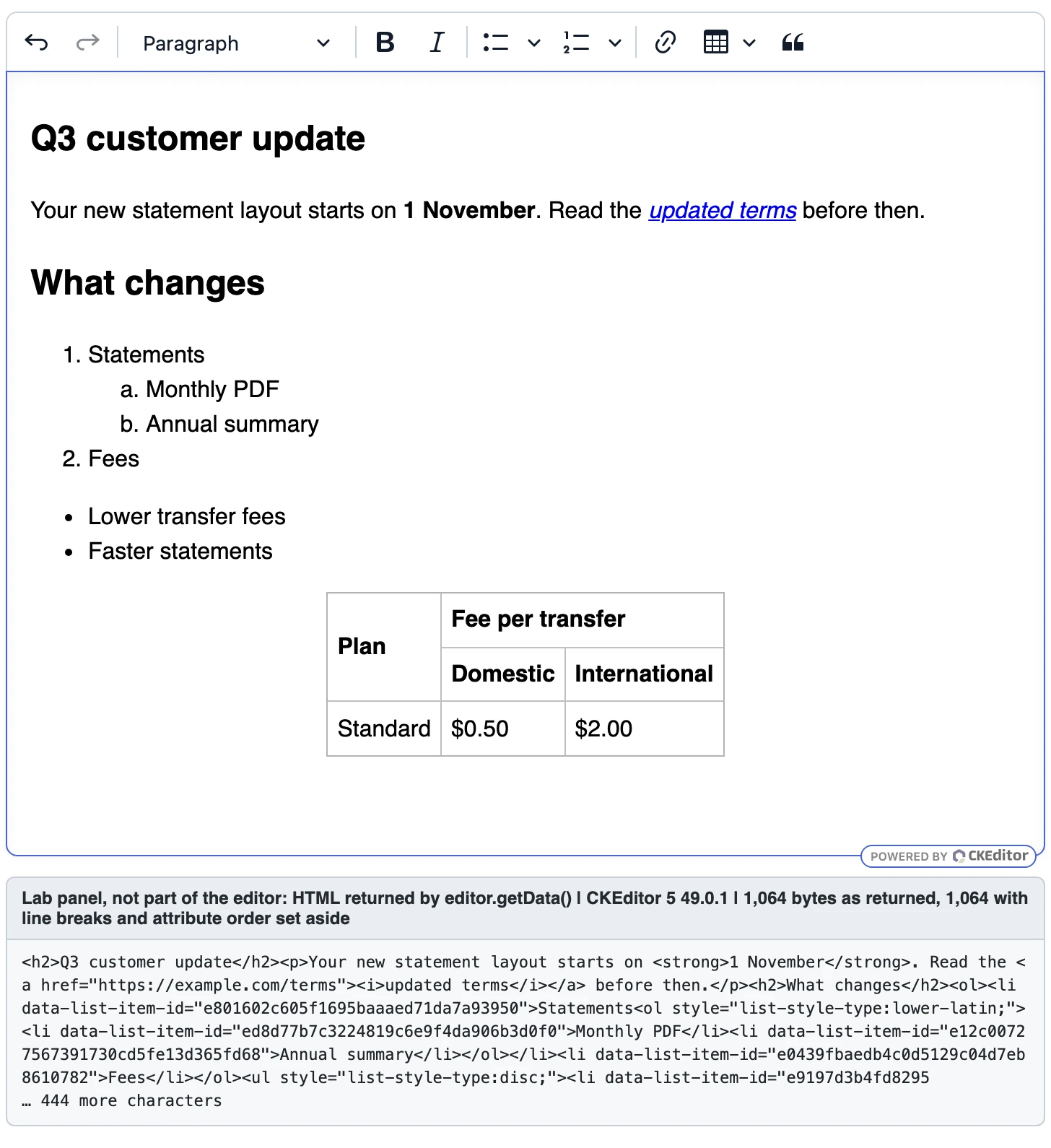
CKEditor 5 49.0.1 (open source build with Paste from Office) after our Word test paste. Toolbar added for the screenshot; it doesn't change the output. The grey panel below the editor is our lab's view of the HTML the editor's own API returned (first part, unedited); it isn't part of the editor. The Word input follows Word's clipboard format; it wasn't copied from Word live.
Editor.js
Editor.js stores content as JSON blocks and has no built-in HTML export, so we didn't score it; you write the renderer.
License: Apache 2.0 (core). Frameworks: JavaScript.
- Pasted headings and paragraphs became blocks, but Word's list items came in as paragraphs.
- When a table was pasted together with other content, the table tool logged an error and created an empty table block.
- The
javascript:link was stored in the block's JSON as written, so your renderer has to sanitize it.
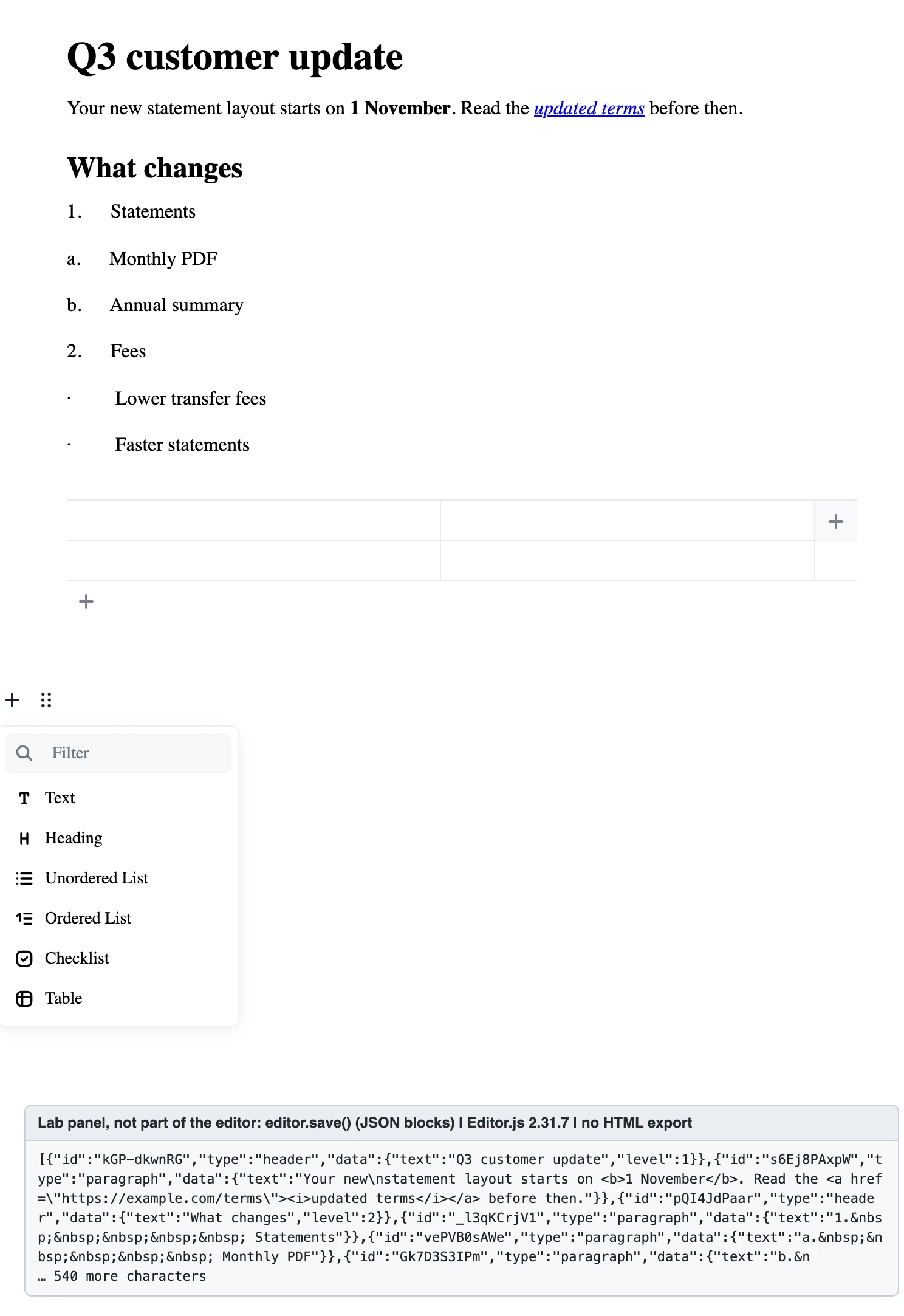
Editor.js 2.31.7 after our Word test paste: list items as paragraph blocks and an empty table block. Below the content, Editor.js's block toolbar and toolbox are open on a new empty block to show its interface; empty blocks aren't saved, so the output is unchanged. The panel shows the JSON from save() (Editor.js has no HTML output). The Word input follows Word's clipboard format; it wasn't copied from Word live.
Froala
Froala returned existing HTML unchanged and removed AI-app comments and unsafe markup by default; its Google Docs paste kept the source's inline styles.
License: commercial only, after a time-limited trial. Frameworks: React, Angular, Vue and JavaScript, among others. Scores: round trip 100, Office paste 77, AI paste 100, unsafe markup 100, malformed HTML 92.
- With "Clean", our Word document came out at 1,488 bytes with real nested lists and merged cells, plus 25 leftover inline styles and a
<div>around each list. - Google Docs content kept 58 of its 59 inline styles in both keep and clean modes (10,920 bytes).
- It removed all 754 AI-app comments and encoded the colon in the
javascript:link so it no longer runs.
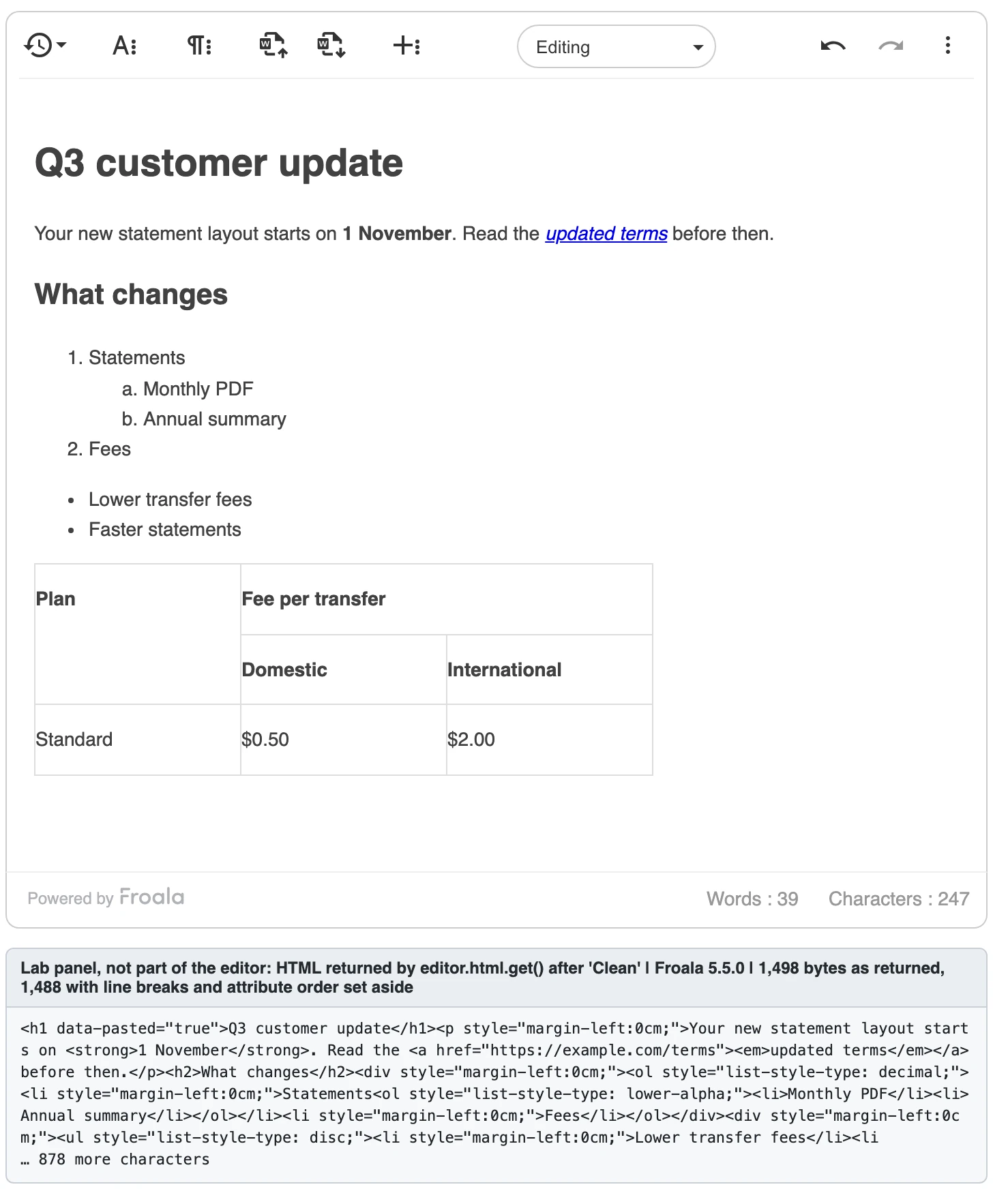
Froala 5.5.0 (evaluation copy, no license key) after our Word test paste with "Clean". The grey panel below the editor is our lab's display of the HTML the editor's own API produced (first part, unedited); it isn't part of the editor. The Word input follows Word's clipboard format; it wasn't copied from Word live.
Jodit
Jodit returned existing HTML unchanged and its "Clean" paste rebuilt Word lists, but it dropped merged cells and kept AI-app comments and a <script> element set through its API.
License: MIT. Frameworks: JavaScript, with React, Angular and Vue integrations. Scores: round trip 100, Office paste 78, AI paste 40, unsafe markup 85, malformed HTML 92.
- With "Clean", our Word document came out at 927 bytes with real lists, but without the merged cells. Google Docs content kept 58 of its 59 inline styles.
- It kept all 754 AI-app comments.
- A
<script>element set througheditor.valuestayed in the value; the paste path removed it. Jodit's paid PRO Paste from Word plugin wasn't tested.
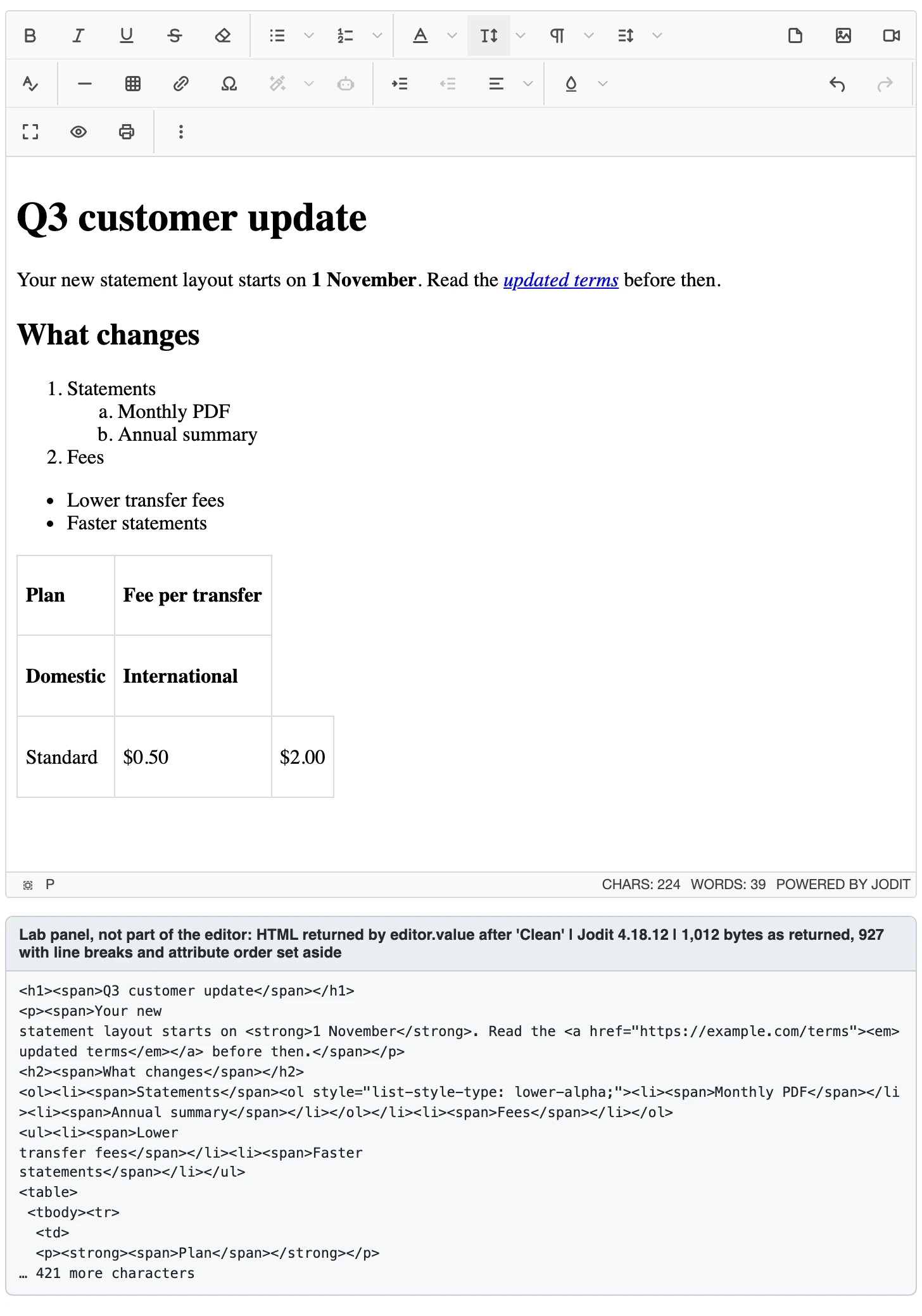
Jodit 4.18.12 after our Word test paste with "Clean": real lists, but the merged table cells are lost. The grey panel below the editor is our lab's display of the HTML the editor's own API returned (first part, unedited); it isn't part of the editor. The Word input follows Word's clipboard format; it wasn't copied from Word live.
Lexical
Lexical removed comments and unsafe links, but its HTML export adds a lot of markup and dropped parts of existing HTML.
License: MIT, maintained by Meta. Frameworks: framework-agnostic core with official React bindings. Scores: round trip 22, Office paste 64, AI paste 80, unsafe markup 100, malformed HTML 92.
$generateHtmlFromNodes()turned our 922-byte round-trip document into 2,756 bytes: it wrapped text in 22white-space: pre-wrapspans and added inline styles to all nine table cells. It kept 5 of the 12 features.- From Word, list items came in as paragraphs with typed numbers.
- The unsafe link was rewritten to
about:blank.
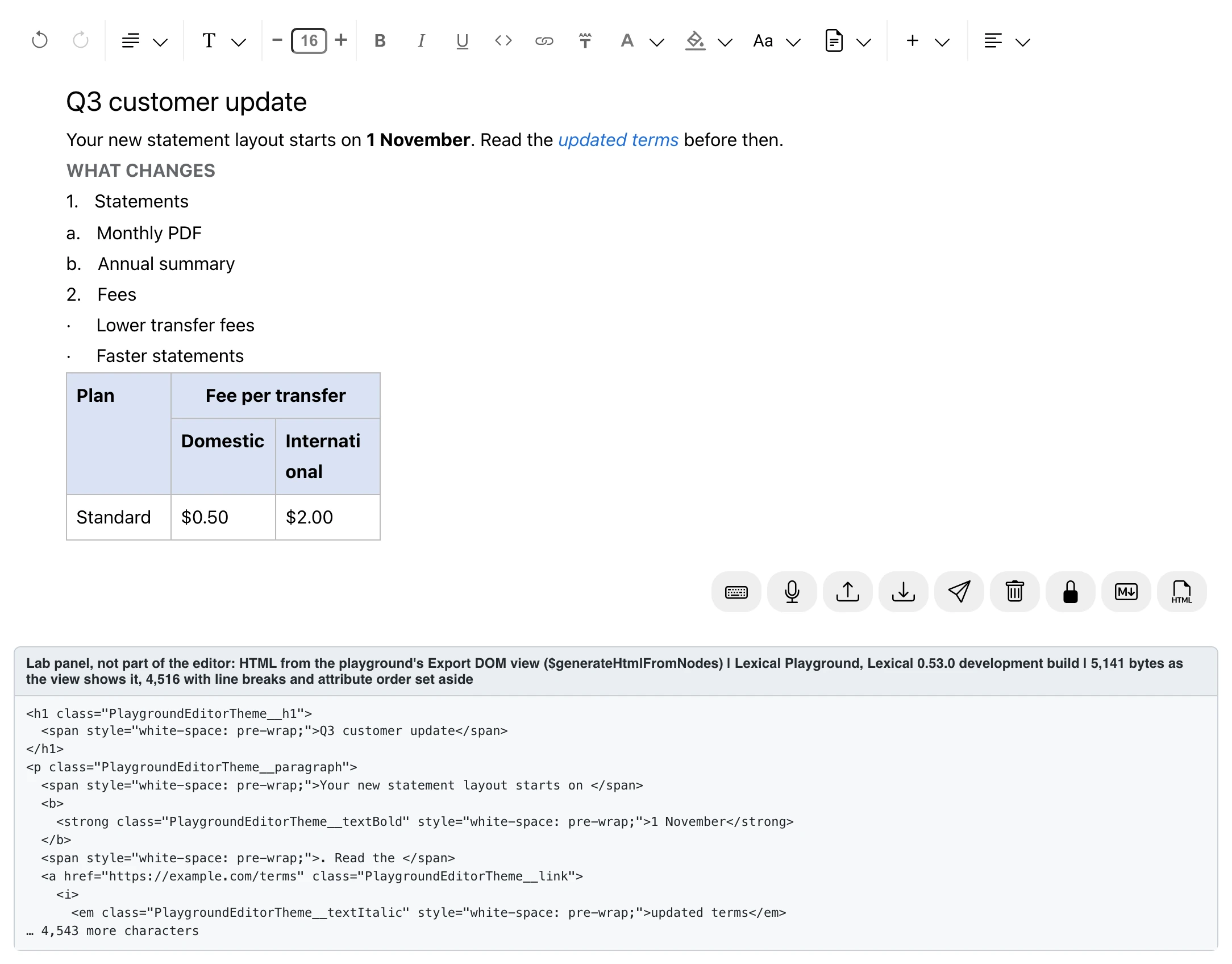
Lexical after our Word test paste, on the Lexical Playground, Lexical's public demo (0.53.0 development build). Lexical ships without a user interface, so the toolbar and styling are the playground's. List items came in as paragraphs with typed numbers, as on our test page. The grey panel below the editor is our lab's display of the HTML from the playground's Export DOM view (first part, exactly as the view shows it); it isn't part of the editor. It differs from our test page's output only in details the playground's setup adds: theme class names, column widths and font-size styles around the typed list numbers. The Word input follows Word's clipboard format; it wasn't copied from Word live.
Quill
Quill performed well on AI paste, unsafe markup and malformed input well, but lost document structure when handling tables and exporting HTML.
License: BSD-3-Clause. Frameworks: JavaScript, with community React wrappers. Scores: round trip 2, Office paste 67, AI paste 100, unsafe markup 100, malformed HTML 100.
getSemanticHTML()wrote every space as a non-breaking space: 40- It collapsed each of our two header rows into a single cell and lost the merged cells; it kept 2 of the 12 round-trip features.
- From Word, it rebuilt the lists but lost the lettered sub-list type and the merged cells. If editor weight matters most to you, see our comparison of lightweight rich text editors.
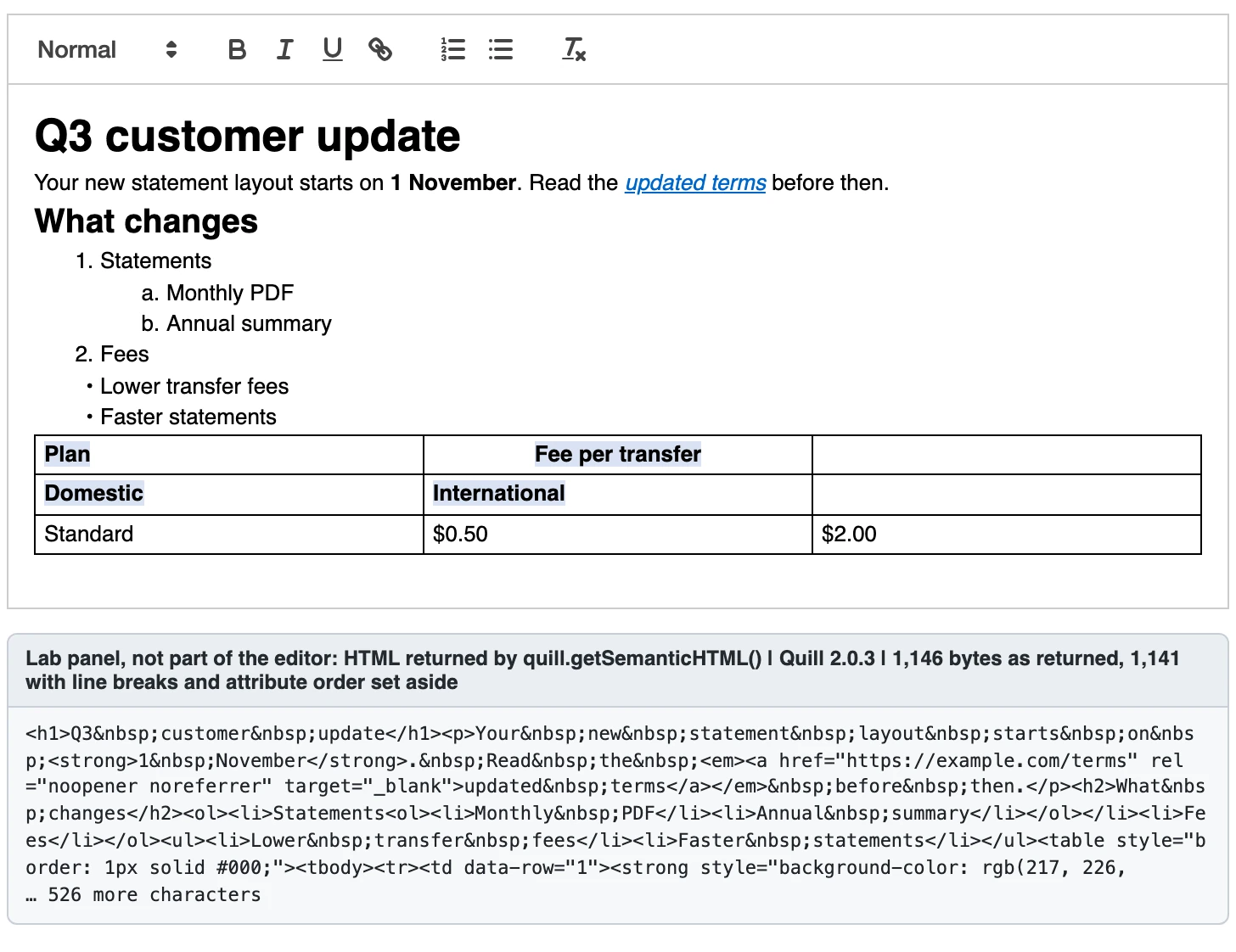
Quill 2.0.3 after our Word test paste: lists rebuilt, merged table cells lost, and every space written as . The grey panel below the editor is our lab's display of the HTML the editor's own API returned (first part, unedited); it isn't part of the editor. The Word input follows Word's clipboard format; it wasn't copied from Word live.
Tiptap
Tiptap produced clean HTML from Google Docs, but its content model dropped parts of existing HTML and it kept Word lists as typed paragraphs.
License: MIT core, with Pro extensions that need a paid subscription. Frameworks: React, Vue and JavaScript. Scores: round trip 40, Office paste 81, AI paste 100, unsafe markup 100, malformed HTML 100.
- Google Docs paste came out at 1,036 bytes with real lists, the lettered sub-list, merged cells and bold text; Word list items stayed paragraphs with typed numbers.
- It kept 6 of the 12 round-trip features: the header row group,
scopeattributes, classes,data-*attribute and merge-tag span were dropped, and the caption text moved into an extra table row. - It removed the unsafe link entirely. Its Pro Paste Handler, on Tiptap's public demo, scored lower for Office paste (75 against 81). For a closer comparison, see Tiptap and TinyMCE in React.
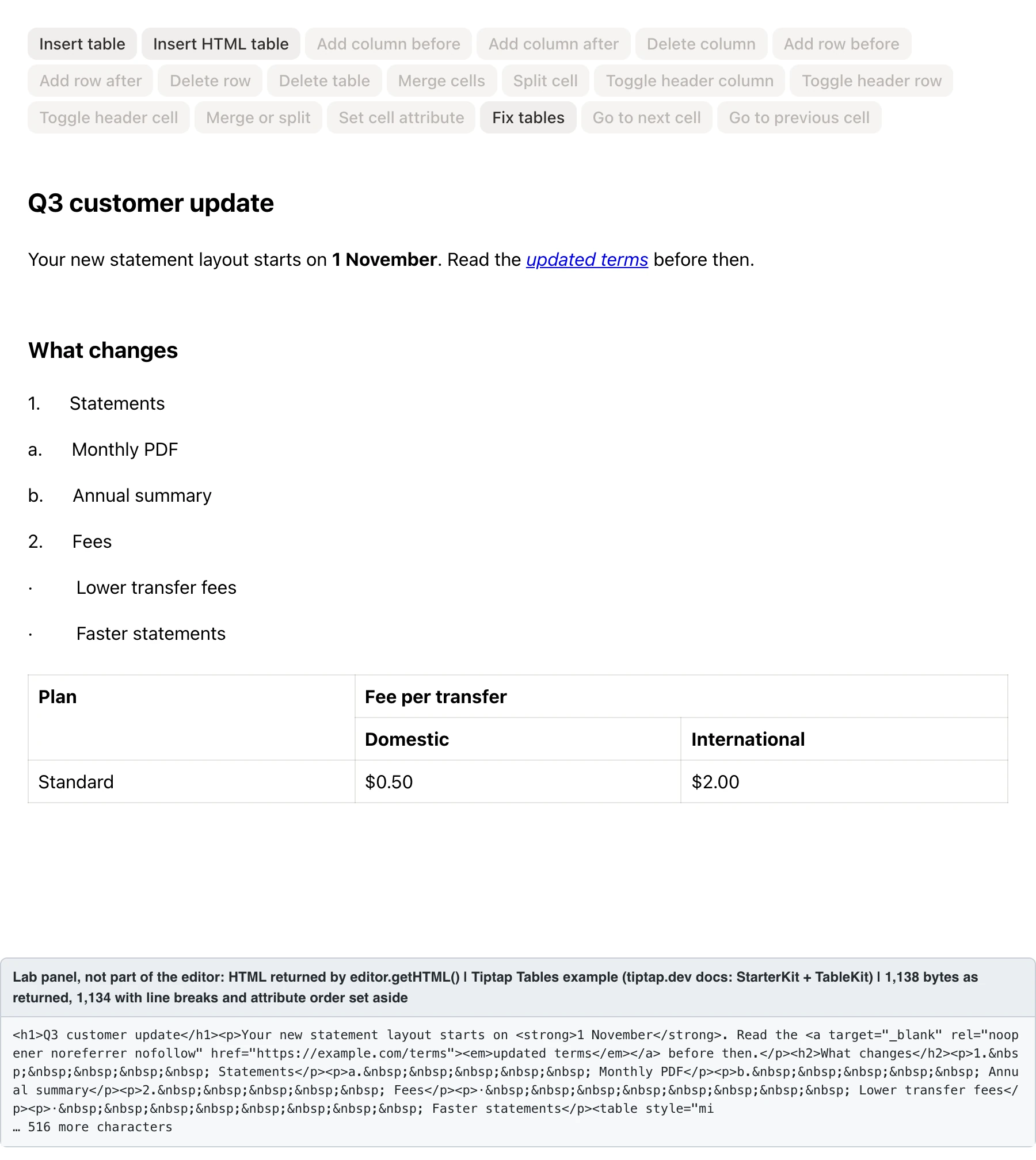
Tiptap after our Word test paste, on the Tables example in Tiptap's docs, a public demo that loads StarterKit and TableKit, the extensions we tested; the page doesn't show its Tiptap version. Tiptap ships without a user interface, so the buttons are the example's. The list items are paragraphs with typed numbers. The grey panel below the editor is our lab's display of the HTML the editor's own API returned (first part, unedited); it isn't part of the editor. It matches our test page's output except for an empty style attribute the example's table setup adds to each cell. The Word input follows Word's clipboard format; it wasn't copied from Word live.
How to choose an editor for HTML output
Try each editor with the kind of content your users work with every day. Here's what to check, and how TinyMCE handled each case in our test:
- Paste from Word and Google Docs: look for real lists and merged cells with no source styles. On TinyMCE's public demo, PowerPaste produced 1,026 and 945 bytes of clean, structured HTML.
- HTML you already store: load real records and read them back. TinyMCE returned our document unchanged.
- AI-generated content: strip the hidden comments chat apps paste; in TinyMCE, the one-line filter above removed all 754.
- React apps: in React, the editor component’s change callback is where your app gets the editor’s output, so check what it hands you: HTML you can store, or a document model you first have to convert to HTML. The official
@tinymce/tinymce-reactpackage’sonEditorChangecallback hands you HTML directly. For more options, see the best React rich text editors. - HTML email: if the HTML ends up in emails, preview it in the email clients your users read, because their HTML and CSS support varies (Can I email tracks it client by client). Our HTML email editor page covers TinyMCE's setup.
Match the editor to your content
- Choose TinyMCE with PowerPaste if: your content ships as HTML, in emails, articles, knowledge-base entries, support replies or web pages, and it arrives from Word, Google Docs or HTML you've already stored; it was the only editor in our test to pass all three checks.
- Choose CKEditor 5 if: it's fine for CKEditor's data model to decide how the HTML you load is stored, and your content is document-like rather than HTML you ship as written; markup outside that model is dropped unless you configure General HTML Support.
- Choose Editor.js if: you want block-based JSON content and will write your own HTML renderer.
- Choose Froala if: you want a commercial editor that stores and returns HTML directly, and you'll clean up the inline styles it keeps from Google Docs paste.
- Choose Jodit if: you want a free, MIT-licensed editor that stores and returns HTML directly, and your tables don't use merged cells.
- Choose Lexical or Tiptap if: you're building your own editor UI on a JSON document model and will extend its schema to keep the HTML features you store.
- Choose Quill if: you'll store its Delta format and render HTML from it yourself, and your content doesn't need complex tables.
Not sure which editor fits your needs? Start with TinyMCE and PowerPaste, and run the checks above on your own content.
See TinyMCE plans with PowerPaste
FAQ
What's the difference between a WYSIWYG HTML editor and a code editor?
A WYSIWYG HTML editor lets people edit formatted text, lists, tables and links while it generates the HTML; a code editor edits the HTML source directly. The editors in this list are WYSIWYG components you embed in your product. For the background, see what is a WYSIWYG editor.
How do I get clean HTML when users paste from Word or Google Docs?
Clean it at paste time: structure such as real lists can only be rebuilt from the original clipboard. In TinyMCE, enable PowerPaste and set powerpaste_word_import and powerpaste_googledocs_import to 'clean' to keep headings, lists and tables and remove inline styles and classes, so pasted text inherits your site's CSS. If users need their own formatting, such as fonts and colors, set them to 'merge': it keeps inline formatting and structure while still removing invalid and proprietary styles, tags and attributes. Either way, limit what's stored with a content model (valid_elements). Our guide to copying and pasting from Word and Excel covers the Office cases.
Is TinyMCE free to use?
TinyMCE's core is free under GPL 2 or later: set license_key: 'gpl' in your config. PowerPaste, a premium plugin, is included in the Professional and Enterprise plans.
How do rich text editors prevent XSS in HTML output?
They filter pasted and loaded HTML, but each one does it differently, as the comparison table shows, and none replaces server-side sanitization. Treat the editor as the first filter and your server as the one that counts; our guide to input sanitization covers the server side.


