


For enterprise teams running content through compliance, legal, or brand approval, review is a critical point in the workflow. But a manual content review process can eat up hours or workdays depending on how many people need to view and approve a piece of content.
TinyMCE AI Review assists users with this process inside your rich text editor (RTE) by checking the whole document against criteria you define. Your organization’s standards are automatically applied to content your users produce, and your users approve or deny changes. There doesn’t have to be a week-long approval process. Your team simply configures the review parameters and approves standardization, from regulatory to brand alignment and beyond.
TinyMCE AI Review is a fully managed feature requiring only one plugin declaration, one JWT endpoint, and a config block. Building an equivalent review layer in-house requires a different scale of work: you'd own the inline suggestion interface, the accept-and-reject tracking, the streaming, and a criteria engine that encodes your standards.
This guide covers what it actually takes to ship customized TinyMCE AI Review into an enterprise environment, and where the real effort lives.
What AI Review does
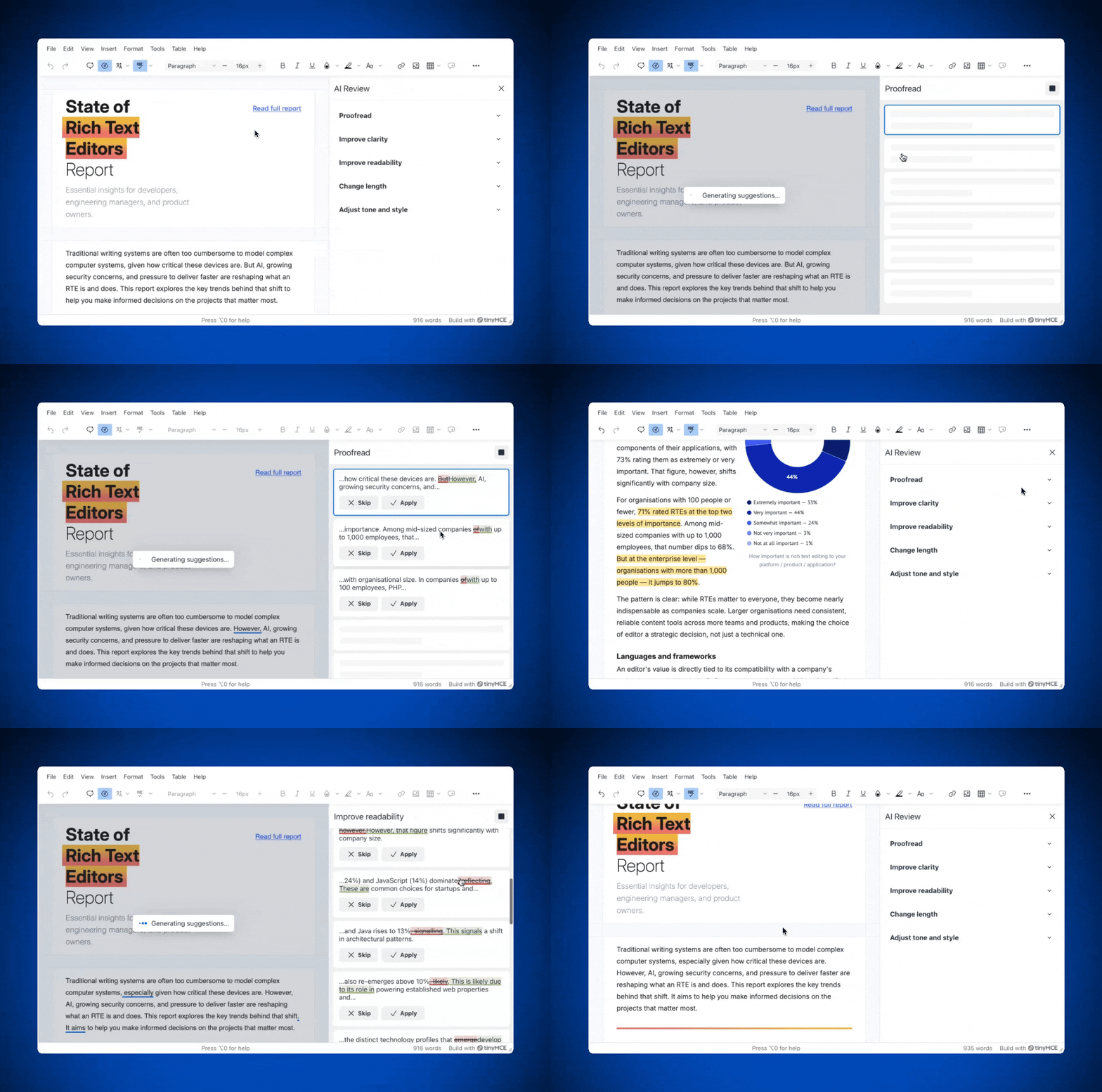
AI Review runs document-wide analysis and returns suggestions inline, with the ability to accept or reject each on its own. While a review is in progress, the editor stays in read-only Review mode, and suggestions appear both in the AI Review sidebar and underlined in the content. Nothing changes until a reviewer accepts the edits.
|
Capability |
What it does |
|
Built-in reviews |
Five review modes ready to configure: proofread, improve clarity, improve readability, change length, and adjust tone and style. Set which ones appear via |
|
Custom review |
A natural-language prompt plus a chosen model. This is where a company style or legal guide, required terminology, and compliance rules live. Runs the same streaming flow as the built-in reviews. |
|
Inline suggestions |
Suggestions stream into the sidebar and underline in the document. Reviewers skip or apply each one, or bulk-complete the rest. |
|
Human-in-the-loop |
The editor is read-only during review. Applied changes are tracked; aborting reverts them. Final judgment stays with the reviewer. |
|
Runs the same review flow outside the editor for server-side checks inside an approval pipeline. |
For an enterprise content pipeline, the custom review is worth configuring to match your app’s requirements. The built-in reviews handle general quality, but standardization, compliance, and legal or brand consistency are specific to your organization, and the custom review is where you encode them.
A custom review can be as simple as flagging banned phrases or as involved as applying a full editorial standard with its own terminology and business logic.
How to implement AI Review
Level of effort: Low to Medium.
The TinyMCE AI suite handles the review interface, the streaming, and the model routing. Your team’s work is simply configuration plus the JWT endpoint your app needs for authentication.
Setup has three parts:
- Add
tinymceaito the plugins array. That adds the Review toolbar button and menu item automatically. On a custom toolbar string, you can addtinymceai-reviewexplicitly. - Set
sidebar_showto surface the Review sidebar, and usetinymceai_reviewsto choose which reviews your users see. For example, you can show only “proofread” and your custom compliance review if that's all the workflow needs. - Add a
tinymceai_token_providerfunction that fetches a signed JWT from your backend and returns{ token: string }, then implement the endpoint that signs it.
The JWT endpoint is where most of the real work sits. The token carries the claims TinyMCE needs, and for a custom review it must include the ai:reviews:custom permission, or the custom call won't run. The TinyMCE AI JWT guides exist for exactly this step:
Your enterprise criteria go in as a custom review prompt, configured in the same tinymce.init() call as everything else. Here’s an example configuration:
tinymce.init({
  selector: "textarea",
  plugins: "tinymceai",
  toolbar: "tinymceai-review",
  sidebar_show: "tinymceai-review",
  tinymceai_reviews: ["ai-reviews-proofread", "ai-reviews-custom"],
  tinymceai_token_provider: () => {
    return fetch("/api/token").then((r) => r.json());
  },
});
That's the whole editor-side integration. The criteria live in a prompt and a permission, not in application logic, which is what makes them cheap to change when a guideline updates. Set against building the equivalent in-house (the sidebar, the streaming, the per-suggestion state, the criteria engine, and the maintenance behind all of it), configuration is faster to ship and easier to keep current.
📖 Want to learn more? Check out the TinyMCE AI Review documentation for even more configuration options.
How TinyMCE AI Review fits an existing approval pipeline
You can drop AI Review into an enterprise workflow without disrupting it. It doesn't replace the workflow, so reviewers can create and have the AI review work in the same familiar RTE. Suggestions appear in the editor they already use. The user stays in control of every change, which is exactly what compliance-sensitive content requires.
Wrap up: Try it yourself
AI Review is easy to drop into TinyMCE in a few minutes, and production-ready from day one. The built-in reviews, your custom criteria, and which reviews appear are all configurable through the same init script you're already using, and the managed backend handles the parts that are genuinely hard to build well. Start a free 14 day trial of TinyMCE AI and try out AI Review in your own environment.
FAQs
How much coding does AI Review actually require?
TinyMCE AI Review doesn’t require extensive coding to integrate. The editor-side integration is a plugin declaration, a few config options, and a token-provider function. The real work is the JWT endpoint your backend already needs for authentication, plus writing the prompt for your custom review. But you don’t need to build any model infrastructure, streaming logic, or suggestion UI.
Can AI Review enforce our company style guide?
Yes, through a custom review. You supply a natural-language prompt that encodes your standards, terminology, and rules, and select the model it runs against. A custom review can range from checking for specific words to applying a full editorial standard.
Does the AI change content automatically?
No. While a review runs, the editor is read-only and the AI only proposes suggestions. Each one is accepted or rejected individually, applied changes are tracked, and aborting the review reverts them. Editorial control stays with your reviewers.
Can we run a review outside the editor?
Yes. The Reviews REST API runs the same review flow without the plugin UI, which suits server-side compliance checks inside an approval pipeline. The custom review endpoint takes your prompt, model, and document content, and streams suggestions the same way the editor does.
What's the difference between TinyMCE AI Review and TinyMCE Quick Actions?
TinyMCE AI Review analyzes the whole document and coordinates tracked suggestions in AI Review mode. Quick Actions are shortcuts for AI operations on a selection, like a single transformation or translation, without entering that workflow. For enforcing standards across a full document, Review is the feature.


