


TinyMCE AI is a fully managed plugin. Adding it requires one plugin declaration, one JWT endpoint, and a config block. No AI backend to build or maintain. Froala AI Assist is a request layer: the plugin handles the editor UI, but you build, host, and maintain the AI backend it points at. This guide compares both by examining what it actually takes to ship AI in your RTE.
AI capabilities: What each editor includes
TinyMCE AI vs Froala AI Assist
|
TinyMCE AI |
Froala AI Assist |
|
|
AI chat |
Built-in; multi-turn with persistent history and document context. |
Available via Ask Anything popup; requires your own AI backend to power it. |
|
Quick actions |
Built-in; grammar, tone, length, translation, and custom actions included. |
Available via Edit Smarter dropdown; tone and translation options configurable, but backend is yours to build. |
|
Document review |
Built-in; 5 review types configurable out of the box. |
Not available. |
|
Model support |
Gemini, OpenAI, Claude; selectable at integrator or user level. |
LLM-agnostic; any model your backend supports, but integration is entirely your responsibility. |
|
Managed backend |
Yes. TinyMCE handles infrastructure and model updates. |
No. You build, host, and maintain the AI backend the plugin points at. |
|
Custom UI required |
No. Toolbar buttons and sidebar panel included by default. |
Partial. Toolbar buttons included; custom tone options, translation targets, and prompt templates require additional build work. |
|
Server-side / background AI |
REST API available for use outside the editor. |
Not available natively. |
|
AI image generation |
Yes. Functionality is dependent on the AI model chosen. |
Not available. |
|
Implementation effort |
Low–Medium; JWT setup and plugin config, no AI infrastructure to build. |
Extra Large; plugin handles editor UI only — AI backend, hosting, and maintenance are fully on your team. |
|
On-premises support |
Cloud only for now; on-prem is in early access for those who request it. Contact the TinyMCE team for more info. |
Self-hostable; developer manages own infrastructure. |
Time to implement TinyMCE AI
Level of effort for implementation: Low to Medium.
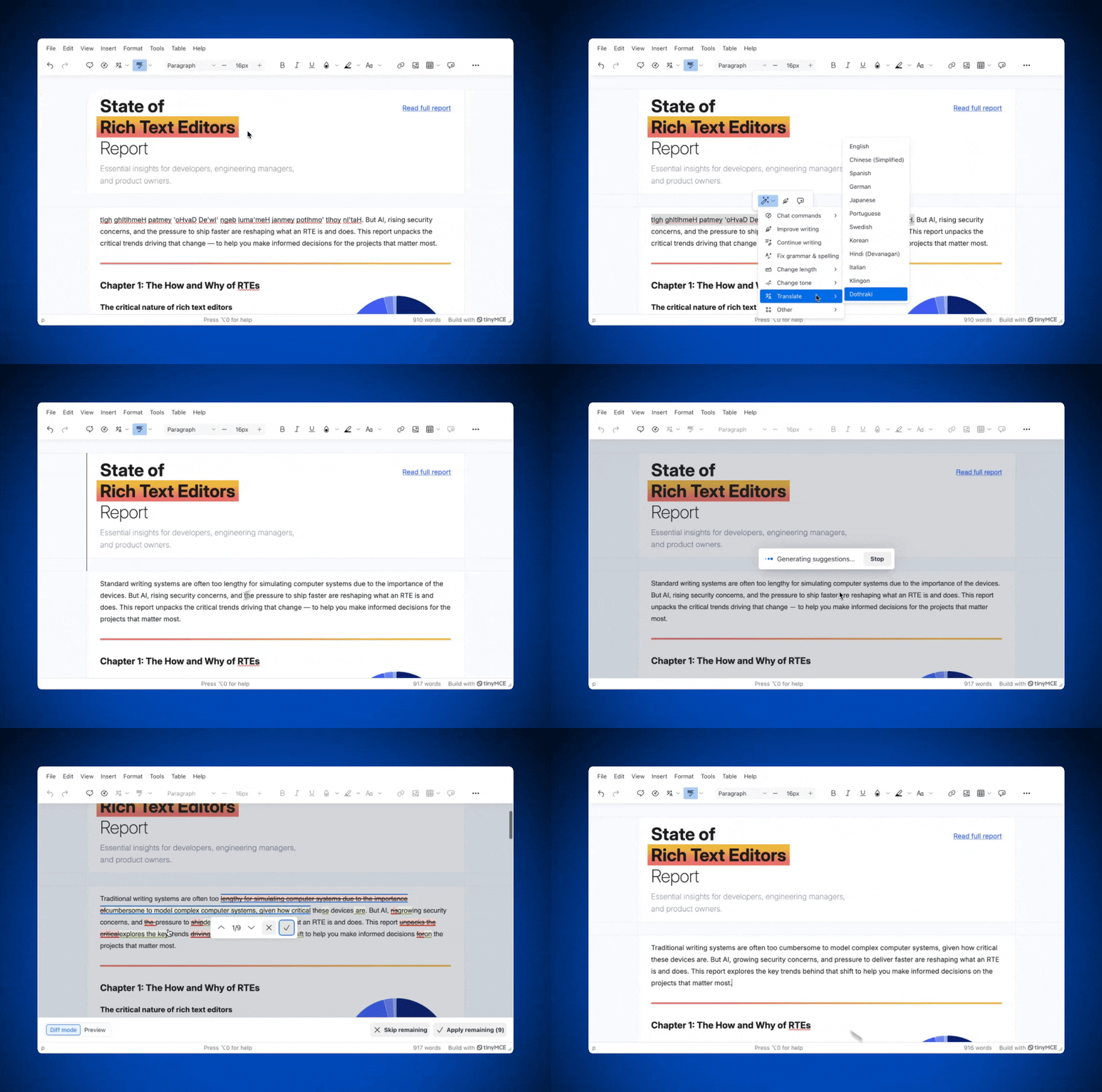
TinyMCE AI is a fully managed premium plugin (Essential tier and above) that adds Chat, Quick Actions, and Review directly into the RTE. The managed backend handles model routing, and you control which models are exposed to users and whether they can switch between the available models. Try out the TinyMCE AI demo now.
If your app needs TinyMCE AI on-prem, get early access by contacting the TinyMCE team.
|
Feature |
What it does |
|
Multi-turn conversations with persistent history, full document context, and optional external source documents (PDFs, web resources) passed via |
|
|
Stateless, one-click text transformations on selected content. Built-in actions cover writing improvement, grammar, tone, length, and translation. Custom actions can be defined as |
|
|
Document-wide analysis with inline suggestions. Five built-in review types: proofread, improve clarity, improve readability, change length, and change tone. These are all configurable via |
Supported models, selectable in the configuration:
- Google Gemini
- OpenAI ChatGPT
- Anthropic Claude
Installation process overview
Setup has three parts:
- Add
tinymceaito plugins. The default Silver theme toolbar includes the AI buttons automatically; if you're using a custom toolbar string, addtinymceai-chat,tinymceai-quickactions, ortinymceai-reviewexplicitly. - Add
tinymceai_token_providerto the editor config. This must be a function that fetches a signed JWT from your backend and returns{ token: string }. - Implement the JWT endpoint. The token requires five claims:
aud(your TinyMCE API key),sub(user ID),exp,iat, andauth. Guides are available:
Optional config in the same tinymce.init() call includes:
- Custom quick actions
- Model restrictions
- Source document uploads
- Review types
content_idscoping
Chat and Review render as sidebars, so set tinymceai_sidebar_type: 'floating' if your layout requires the panel to be draggable outside the editor.
For teams that need to call TinyMCE AI outside the plugin UI (background processing, server-side generation), a TinyMCE AI REST API is also available as an alternative integration path.
TinyMCE AI configuration code sample
tinymce.init({
  selector: "textarea",
  plugins: "tinymceai",
  toolbar: "tinymceai-chat tinymceai-quickactions tinymceai-review",
  content_id: "document-123",
  tinymceai_default_model: "gemini-2-5-flash",
  tinymceai_allow_model_selection: true,
  tinymceai_reviews: [
    "ai-reviews-proofread",
    "ai-reviews-improve-clarity",
    "ai-reviews-change-tone",
  ],
  tinymceai_quickactions_custom: [
    {
      title: "Explain like I am five",
      prompt: "Explain the following text in simple terms.",
      type: "chat",
    },
  ],
  tinymceai_token_provider: () => {
    return fetch("/api/token").then((r) => r.json());
  },
});
📖 Want to read more? Check out the TinyMCE AI documentation to learn more about advanced configuration.
Time to implement Froala’s AI Assist
Froala's AI Assist plugin, introduced in Froala 5.1, adds two AI-powered toolbar buttons to the editor. Unlike a managed service, AI Assist is LLM-agnostic by design, so it doesn't ship with a connected AI backend. Instead, it provides a flexible request layer that you point at whatever endpoint you control.
|
Feature |
What it does |
|
Ask Anything |
An interactive AI chat popup that opens inside the editor. Generate content, expand ideas, rewrite paragraphs, or ask contextual questions. |
|
Edit Smarter |
A one-click AI Shortcuts dropdown applied to selected text. Change tone (Professional, Casual, Friendly, and more) or translate content into multiple languages without prompts. |
The plugin supports two integration patterns:
- Direct endpoint configuration:
- Point
aiAssistEndpointat your API. - Set headers via
aiAssistHeaders. - Map your API's field names using
aiAssistDataKeys. - Define an
aiAssistResponseParserPathto extract the response from your backend's JSON structure.
- Point
- Custom request handler: Implement
aiAssistRequestas an async function for full control: inject user tokens, handle errors, validate responses, and trigger analytics before or after content is inserted using theaiAssist.beforeInsertandaiAssist.afterInsertevents.
To activate AI features, you must also set aiSupplementalTermsAccepted: true in your config to confirm acceptance of Froala's AI legal terms.
AI Assist basic installation
Adding AI Assist requires four steps:
- Include the plugin JS file (ai_assist.min.js) and CSS file (ai_assist.min.css) in your project, either from your local Froala installation or via CDN.
- Add
aiAssistand/oraiShortCutsto yourtoolbarButtonsarray.aiAssistopens the AI chat popup (also triggerable with Ctrl+Shift+I / Cmd+Shift+I);aiShortCutsopens the tone and translation dropdown. - Set
aiSupplementalTermsAccepted: true. - Configure your AI backend connection, either via
aiAssistEndpointwith supporting options, or via a customaiAssistRequestfunction.
You still need to build and host the AI backend that the configuration points at. The Froala AI Assist plugin handles the editor-side wiring, not the model or infrastructure.
Custom tone options, translation targets, and prompt templates are all configurable via aiAssistToneOptions, aiAssistTranslateOptions, and aiAssistPromptTemplate, but each requires its own implementation work.
Level of effort for basic implementation: Extra Large.
Wrap up: Try it yourself
TinyMCE AI is production-ready from day one. Chat, Quick Actions, and Review are all configurable through the same init script you're already using. If you want to see how TinyMCE AI works in your application, start a free 14 day trial of TinyMCE today.
FAQs
Does Froala AI Assist include a backend AI service?
No. The plugin handles the editor-side UI. What it doesn't provide is any AI infrastructure behind it. You supply the endpoint, the model, the authentication, the error handling, and the hosting. Froala gives you the wiring harness; you build the engine.
Which is faster to implement: TinyMCE AI or Froala AI Assist?
TinyMCE AI is significantly faster. For teams with a short runway or a single sprint to ship AI features, that difference is measured in weeks, not hours.
Can Froala AI Assist use Claude or Gemini?
Yes, technically, because Froala AI Assist is model-agnostic by design. You point aiAssistEndpoint at whatever backend you control, so if you've built an endpoint that routes to Anthropic Claude or Google Gemini, the plugin will work with it.
What's the difference between Froala AI Assist and TinyMCE AI?
The difference is where the responsibility sits. TinyMCE AI is primarily a managed service, along with direct plug-and-play UI compliments. Froala AI Assist is a frontend plugin that gives your editor a structured way to talk to an AI backend you build, host, and maintain.
Does TinyMCE AI require you to manage prompt engineering?
Not for the built-in features. Chat, Quick Actions, and Review all ship with default prompts that work out of the box. Where prompt configuration becomes relevant is when you define custom Quick Actions or custom Review types: those require a prompt string, but that's closer to filling in a config field than engineering a prompt chain. The managed backend handles model-specific formatting and context injection. For most teams, the prompt work is optional and additive, not a prerequisite to shipping.


