---
title: "TinyMCE AI Quick Actions"
description: "Quick actions feature for TinyMCE AI plugin"
canonical_url: "https://www.tiny.cloud/docs/tinymce/latest/tinymceai-actions/"
md_url: "https://www.tiny.cloud/docs/tinymce/latest/tinymceai-actions/index.md"
version: "latest"
last_updated: "2026-04-29T05:31:25Z"
tokens: 4172
---
# TinyMCE AI Quick Actions
Quick actions simplify routine content transformations by offering one-click AI-powered suggestions directly within the editor. This feature enhances speed, relevance, and usability, particularly for repeatable or simple tasks. For suggestions that change the document, the editor shows a preview and applies changes only after each suggestion is accepted or rejected. For actions that only open Chat with a pre-filled prompt, see [Chat](../tinymceai-chat/). The API includes the ability to call default and optimized system actions, or to define your own.
Preview transformations and Actions API calls are **stateless**: each invocation is independent and does not retain prior interactions, unlike ongoing [Chat](../tinymceai-chat/) conversations. Quick Actions that open Chat with a pre-filled prompt hand off to the Conversations API instead.
The Quick Actions feature is available as part of the `tinymceai` plugin for TinyMCE and through the Actions API. This page covers both:
- Plugin sections describe user-facing features and configuration ([Quick Actions configuration](../tinymceai/#options-quickactions)).
- API sections cover REST API access (starting at [Actions API](#actions-api)).
## Demo
The live demo loads the full TinyMCE example with Chat, Quick Actions, and Review on the toolbar.
**Example**
```js
// Step 1: Set up session - this should be part of the application's user management process.
// Open-source plugins below are only for editing the demo HTML (lists, links, tables). TinyMCE AI options are the focus.
tinymce.init({
selector: 'textarea#tinymceai-actions',
height: '800px',
plugins: ['tinymceai', 'advlist', 'lists', 'link', 'autolink', 'table', 'wordcount'],
toolbar: 'undo redo | tinymceai-chat tinymceai-review tinymceai-quickactions | styles | bold italic underline strikethrough | alignleft aligncenter alignright alignjustify | bullist numlist outdent indent | link',
sidebar_show: 'tinymceai-chat',
tinymceai_token_provider: async () => {
return fetch('/api/tinymceai-token', { credentials: 'include' })
.then(resp => resp.text())
.then(token => ({ token }));
},
tinymceai_chat_fetch_sources: () => Promise.resolve([{
label: 'TinyMCE resources',
sources: [
{ id: 'docs', label: 'TinyMCE Documentation', type: 'web-resource' },
{ id: 'blog', label: 'Tiny Blog', type: 'web-resource' },
{ id: 'survey-2023', label: 'State of rich text editing 2023', type: 'web-resource' },
]
}]),
tinymceai_chat_fetch_source: (id) => {
const urls = {
'docs': 'https://www.tiny.cloud/docs/tinymce/latest/',
'blog': 'https://www.tiny.cloud/blog/',
'survey-2023': 'https://www.tiny.cloud/developer-survey-results-2023/',
};
return Promise.resolve({ type: 'web-resource', url: urls[id] });
},
tinymceai_quickactions_custom: [
{
type: 'chat',
title: 'Challenge',
prompt: 'Challenge statements, verify facts and identify assumptions'
}
],
tinymceai_languages: [
{ title: 'English', language: 'english' },
{ title: 'Chinese (Simplified)', language: 'chinese' },
{ title: 'Spanish', language: 'spanish' },
{ title: 'German', language: 'german' },
{ title: 'Japanese', language: 'japanese' },
{ title: 'Portuguese', language: 'portuguese' },
{ title: 'Swedish', language: 'swedish' },
{ title: 'Korean', language: 'korean' },
{ title: 'Hindi (Devanagari)', language: 'hindi devanagari' },
{ title: 'Italian', language: 'italian' },
{ title: 'Klingon', language: 'klingon' },
{ title: 'Dothraki', language: 'dothraki' },
]
});
```
## Quick Actions and Review
Quick Actions fit transforming a selection or section (for example grammar fixes, translation, or tone). Review fits whole-document quality analysis with suggestions in the Review sidebar and the document.
Both Quick Actions and Review can propose edits that apply only after acceptance or rejection. The main differences are scope and where the work happens in the editor:
- **Quick Actions**: Operate on a selection or section (including the full document when the scope includes it). The Quick Actions menu runs one-off operations such as Chat with a pre-filled prompt, preview transformations, translation, and custom actions.
- **Review**: Always analyzes the entire document in read-only Review mode. Suggestions appear in the Review sidebar and in the document. See [Review](../tinymceai-review/) for details.
## Integration
To start using the Quick Actions feature, first load the TinyMCE AI plugin in the editor configuration. See [Plugin Reference](../tinymceai/) for installation and enabling AI features.
Enabling the `tinymceai` plugin registers Chat, Quick Actions, and Review toolbar controls. Those controls appear on the main toolbar only when the [`toolbar`](../toolbar-configuration-options/#toolbar) configuration includes them: the default toolbar (when `toolbar` is omitted or `true`) adds `tinymceai-chat`, `tinymceai-quickactions`

, `tinymceai-review`, and related items; with a custom `toolbar` value, each control must be listed or it remains hidden.
To show Quick Actions on the Quickbars selection toolbar, add the desired identifiers to the [`quickbars_selection_toolbar`](../quickbars/#quickbars_selection_toolbar) option.
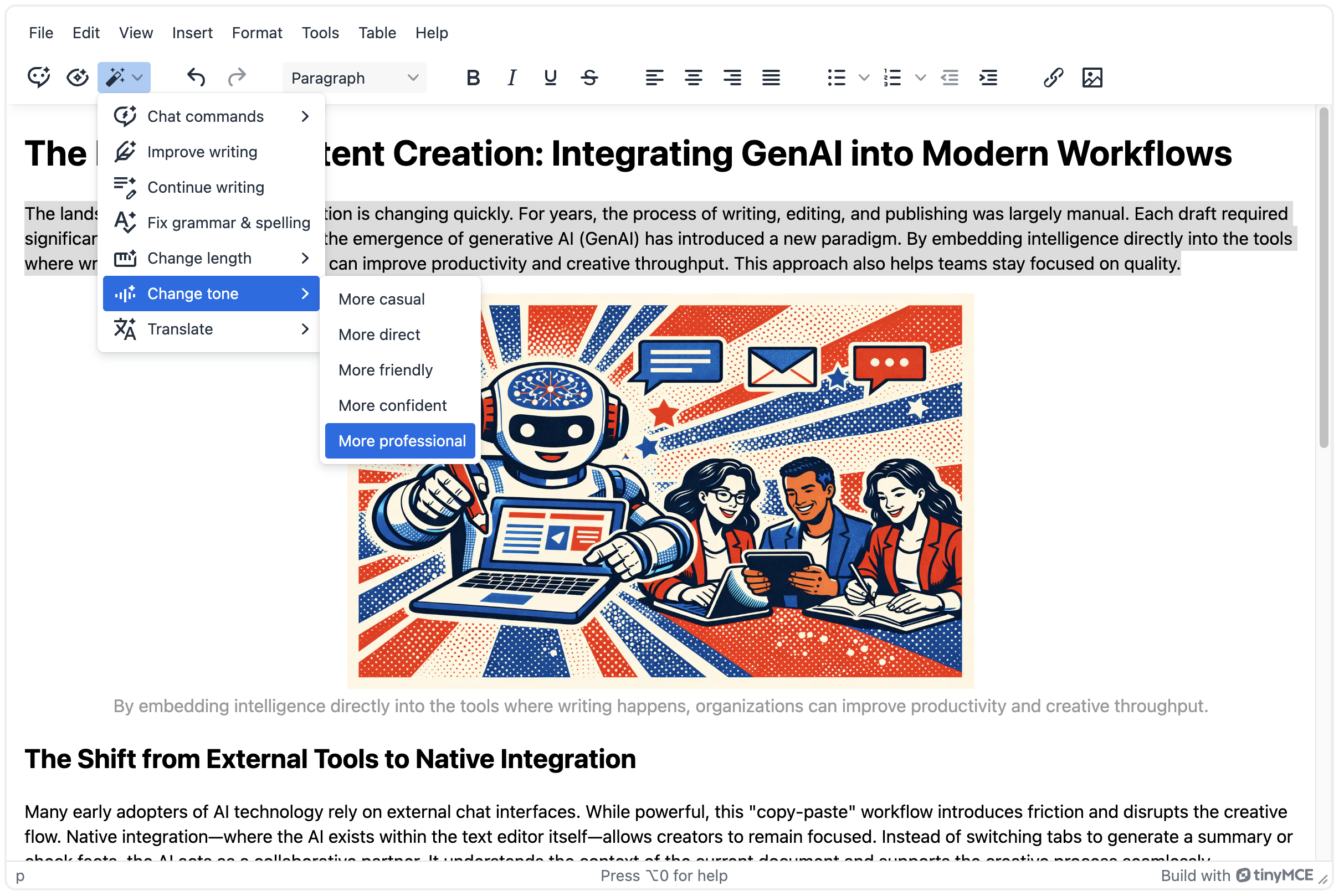
Finally, individual Quick Actions can also be added to the toolbar as shortcuts for easier access.
For example, add the `ai-quickactions-improve-writing`

button, or the `ai-chat-explain`

button (find it in the demo above). Whole categories can be added to the toolbar as well. Learn more about [available actions](#default-actions).
The final example configuration looks as follows:
```js
tinymce.init({
selector: '#editor',
plugins: 'tinymceai',
toolbar: 'undo redo tinymceai-chat tinymceai-quickactions tinymceai-review | styles | bold italic underline strikethrough | alignleft aligncenter alignright alignjustify | bullist numlist outdent indent | link image',
tinymceai_quickactions_menu: [
'ai-quickactions-chat-prompts',
'ai-quickactions-improve-writing',
'ai-quickactions-continue-writing',
'ai-quickactions-check-grammar',
'ai-quickactions-change-length',
'ai-quickactions-change-tone',
'ai-quickactions-translate'
],
// Configure a sub-menu (e.g., chat commands)
tinymceai_quickactions_chat_prompts: [
'ai-chat-explain',
'ai-chat-summarize',
'ai-chat-highlight-key-points'
],
// Required for authentication
tinymceai_token_provider: () => {
return fetch('/api/token').then(r => r.text()).then(token => ({ token }));
}
});
```
> **Note:** AI controls are not added to the [`quickbars_selection_toolbar`](../quickbars/#quickbars_selection_toolbar) automatically; add the desired toolbar button identifiers to that option when they should appear there.
>
> For example:
>
> ```js
> tinymce.init({
> selector: 'textarea#editor',
> plugins: 'quickbars tinymceai',
> quickbars_selection_toolbar: 'tinymceai-quickactions bold italic',
> });
> ```
## Types of actions
There are two types of actions available in the quick actions feature:
- Chat actions, such as "Explain" or "Summarize", open the [Chat](../tinymceai-chat/) interface with the selected text added as context and automatically start the conversation with a pre-filled prompt.
- Preview actions such as *Continue writing*, *Make shorter*, *Improve writing*, and *Fix grammar* show a preview of your document where suggested edits appear so you can review them and apply or skip each change.
Custom actions let integrators define whether each action opens Chat or shows a preview. See [Custom Actions](#custom-actions).
## Default Actions
By default, the Quick Actions feature includes several built-in actions that speed up the content editing process. All Quick Actions can be accessed through the menu button

(`tinymceai-quickactions`) or individually when selected by the integrator in the [editor toolbar configuration](../toolbar-configuration-options/). Whole action categories can be added to the toolbar as well.
Custom actions can be added to the list, and default actions can be removed or reordered by configuring `tinymceai_quickactions_menu`. See [Configuring Quick Actions menu](#configuring-quick-actions-menu).
The following table lists built-in Quick Actions.
- The **Editor** column is the label in the Quick Actions menu when that action is available in the editor.
- The **Menu or control ID** column lists values for `tinymceai_quickactions_menu`, `tinymceai_quickactions_chat_prompts`, `tinymceai_quickactions_change_tone_menu`, and the toolbar when adding individual controls (see [Configuring Quick Actions menu](#configuring-quick-actions-menu)).
- The **System `actionName` or quick-action prompt id** column is the service identifier. Preview actions use a system `actionName` with the [Actions API](#actions-api). Chat actions use a quick-action prompt id and [Chat](../tinymceai-chat/) with a pre-filled prompt, not the system actions API.
| Editor | Menu or control ID | System `actionName` | Description | Editor UI | API |
| --- | --- | --- | --- | --- | --- |
| **Explain** | `ai-chat-explain` | `explain` | Opens Chat with the selected text and a pre-filled prompt. Uses the Conversations API, not the system actions path. | ✓ | — |
| **Summarize** | `ai-chat-summarize` | `summarize` | Opens Chat with a summarize prompt. Uses the Conversations API, not the system actions path. | ✓ | — |
| **Highlight key points** | `ai-chat-highlight-key-points` | `highlight-key-points` | Opens Chat with a key-points prompt. Uses the Conversations API, not the system actions path. | ✓ | — |
| **Improve Writing** | `ai-quickactions-improve-writing` | `improve-writing` | Enhance clarity, word choice, and sentence structure. | ✓ | ✓ |
| **Continue Writing** | `ai-quickactions-continue-writing` | `continue` | Complete unfinished sentences, paragraphs, or entire documents. | ✓ | ✓ |
| **Fix Grammar** | `ai-quickactions-check-grammar` | `fix-grammar` | Correct grammar, spelling, and punctuation errors. | ✓ | ✓ |
| **Change length** | `ai-quickactions-change-length` | `make-shorter`, `make-longer` | Shorten or lengthen the selection. Each option is its own system action. | ✓ | ✓ |
| **Adjust Tone** | `ai-quickactions-change-tone`
`ai-quickactions-tone-casual`
`ai-quickactions-tone-direct`
`ai-quickactions-tone-friendly`
`ai-quickactions-tone-confident`
`ai-quickactions-tone-professional` | `make-tone-casual`
`make-tone-direct`
`make-tone-friendly`
`make-tone-confident`
`make-tone-professional` | Change writing style; each menu option maps to its own system action. | ✓ | ✓ |
| **Translate** | `ai-quickactions-translate`
`ai-quickactions-translate-english`
`ai-quickactions-translate-spanish`
`ai-quickactions-translate-russian`
`ai-quickactions-translate-swedish`
`ai-quickactions-translate-german`
`ai-quickactions-translate-japanese`
`ai-quickactions-translate-portuguese`
`ai-quickactions-translate-korean`
`ai-quickactions-translate-italian`
`ai-quickactions-translate-chinese` | `translate` | Convert content between languages. Request body uses `args: { language: string }` with values such as `english`, `spanish`, `russian`, `swedish`, `german`, `japanese`, `portuguese`, `korean`, `italian`, or `chinese`. Configure the editor submenu with `tinymceai_languages`. | ✓ | ✓ |
> **Note:**
> - A checkmark in the **Editor UI** column means the action can appear when included in `tinymceai_quickactions_menu` (and related sub-menu options such as `tinymceai_quickactions_chat_prompts`).
> - A checkmark in the **API** column means the action is invoked through the system Actions API path `/v1/actions/system/{actionName}/calls`. An em dash means the command is Chat-based and uses the Conversations API instead.
For system action endpoints, schemas, and streaming details, see the [Actions API](https://tinymceai.api.tiny.cloud/docs#tag/Actions) reference.
## Custom Actions
The `tinymceai_quickactions_custom` configuration property allows adding new commands to the Quick actions feature. The items can be of type `action` (a quick action that shows a preview of the editor content with AI suggestions so changes can be reviewed before applying) or type `chat` (which opens the chat interface for a conversation related to the prompt and selection). The `title` is used in the menu items, while the `prompt` is what is actually sent to the AI. The `model` is required for `action` type commands. Learn more about [types of actions](#types-of-actions).
```js
tinymce.init({
selector: '#editor',
plugins: 'tinymceai',
toolbar: 'tinymceai-quickactions',
// Required for authentication
tinymceai_token_provider: () => {
return fetch('/api/token').then(r => r.text()).then(token => ({ token }));
},
tinymceai_quickactions_custom: [
{
title: 'Add a quote from a famous person',
prompt: 'Add a quote from a known person, which would make sense in the context of the selected text.',
type: 'action',
model: 'gemini-2-5-flash'
},
{
title: 'Summarize in 5 bullet points',
prompt: 'Summarize the selected text in 5 bullet points.',
type: 'chat'
},
{
title: 'Rewrite adding more sarcasm',
prompt: 'Rewrite using a sarcastic tone.',
type: 'action',
model: 'gemini-2-5-flash'
}
]
});
```
## Configuring Quick Actions menu
Which actions appear in the Quick Actions menu can be configured by specifying the list of actions to include. The `tinymceai_quickactions_menu` configuration option controls the main menu items.
Sub-menus have their own configuration options:
- `tinymceai_quickactions_chat_prompts`: Controls items in the **"Chat commands"** sub-menu
- `tinymceai_quickactions_change_tone_menu`: Controls items in the **"Change tone"** sub-menu
- `tinymceai_languages`: Controls languages in the **"Translate"** sub-menu
```js
tinymce.init({
selector: '#editor',
plugins: 'tinymceai',
toolbar: 'tinymceai-quickactions',
// Required for authentication
tinymceai_token_provider: () => {
return fetch('/api/token').then(r => r.text()).then(token => ({ token }));
},
// Configure the main Quick Actions menu
tinymceai_quickactions_menu: [
'ai-quickactions-chat-prompts',
'ai-quickactions-improve-writing',
'ai-quickactions-continue-writing',
'ai-quickactions-check-grammar',
'ai-quickactions-change-length',
'ai-quickactions-change-tone',
'ai-quickactions-translate',
'ai-quickactions-custom'
],
// Configure a sub-menu (e.g., chat commands)
tinymceai_quickactions_chat_prompts: [
'ai-chat-explain',
'ai-chat-summarize',
'ai-chat-highlight-key-points'
]
});
```
## Actions API
The Quick Actions plugin feature is built on top of the Actions API, which provides REST API access to action functionality. Actions are fast, stateless operations—each request is independent, as described under [Stateless actions](#stateless-actions). For suggestions that change the document, the preview flow applies edits only after each suggestion is accepted or rejected. Actions that only open Chat with a pre-filled prompt use the Conversations API; see [Chat](../tinymceai-chat/).
Actions use streaming output with Server-Sent Events for real-time feedback as results are generated.
### System Actions
Built-in Quick Actions—including identifiers, descriptions, and whether each command uses the system Actions API or Chat (Conversations API)—are summarized in [Default Actions](#quick-actions-reference-table).
For endpoint details, request and response schemas, authentication, and streaming behavior for system `actionName` calls, see [Actions API](https://tinymceai.api.tiny.cloud/docs#tag/Actions).
### Custom Actions through the API
In addition to system actions, custom actions can be created for specific use cases through the API. Custom actions allow specialized content transformations using custom prompts to control AI behavior.
Unlike system actions that use default identifiers, custom actions use a unified endpoint where the transformation behavior is defined through a prompt parameter. See [Actions API](https://tinymceai.api.tiny.cloud/docs#tag/Actions) for the custom actions endpoint and implementation details.
Custom actions require the `ai:actions:custom` permission in the JWT token.
### Streaming Responses
Actions use Server-Sent Events (SSE) for real-time streaming results. See the [Streaming Responses guide](../tinymceai-streaming/) for detailed implementation information.
### API Reference
The [Actions API](https://tinymceai.api.tiny.cloud/docs#tag/Actions) reference (interactive OpenAPI documentation) is the full source for system and custom action endpoints, request and response schemas, authentication, worked examples, and streaming action responses.
## Related Features
- [AI Chat](../tinymceai-chat/): For interactive discussions with document analysis and context.
- [AI Review](../tinymceai-review/): For content quality analysis and improvement suggestions.