---
title: "TinyMCE 7.3"
description: "Release notes for TinyMCE 7.3"
canonical_url: "https://www.tiny.cloud/docs/tinymce/7/7.3-release-notes/"
md_url: "https://www.tiny.cloud/docs/tinymce/7/7.3-release-notes/index.md"
version: "7"
last_updated: "2024-08-22T03:32:31Z"
tokens: 4006
---
Important This page documents TinyMCE 7. For new projects, Tiny recommends using the latest, most up-to-date version. [See TinyMCE 8 documentation](../../latest/).
# TinyMCE 7.3
> **Note:** These are the Tiny Cloud and TinyMCE Enterprise release notes. For information on the latest community version of TinyMCE, see the [TinyMCE Changelog](../changelog/).
## Overview
TinyMCE 7.3 was released for TinyMCE Enterprise and Tiny Cloud on Wednesday, August 7 th, 2024. These release notes provide an overview of the changes for TinyMCE 7.3, including:
- [Accompanying Premium plugin changes](#accompanying-premium-plugin-changes)
- [Accompanying Enhanced Skins & Icon Packs changes](#accompanying-enhanced-skins-and-icon-packs-changes)
- [Improvements](#improvements)
- [Additions](#additions)
- [Bug fixes](#bug-fixes)
## Accompanying Premium plugin changes
The following premium plugin updates were released alongside TinyMCE 7.3.
### AI Assistant
The TinyMCE 7.3 release includes an accompanying release of the **AI Assistant** premium plugin.
**AI Assistant** includes the following addition.
#### Add "Translate" options to AI Assistant default shortcuts.
The **AI Assistant** required an enhancement to support in-editor translation capabilities.
TinyMCE 7.3 introduces a new translate dropdown, that has been added to the **AI Assistant’s** default shortcuts. The dropdown includes language options: English, Spanish, Portuguese, German, French, Norwegian, Ukrainian, Japanese, Korean, Simplified Chinese, Hebrew, Hindi, and Arabic.
As a result, users can seamlessly translate content within the editor into multiple languages with a single "click".
For information on the **AI Assistant** premium plugin, see: [AI Assistant](../ai/).
### Enhanced Code Editor
The TinyMCE 7.3 release includes an accompanying release of the **Enhanced Code Editor** premium plugin.
**Enhanced Code Editor** includes the following improvements.
#### Added new option `advcode_prettify_getcontent` to Enhanced Code Editor.
Previously, formatting HTML content within the **Enhanced Code Editor** view or retrieving formatted HTML from the `editor.getContent` API as not possible.
To resolve this issue, TinyMCE 7.3 introduces a new `advcode_prettify_getcontent` option. When enabled (default: false), `editor.getContent` will return formatted HTML. Additionally, invoking `editor.getContent({ prettify: true })` will retrieve formatted HTML content regardless of the option’s status.
As a result, It is now possible to obtain formatted content through the editor API.
#### By default, code is now formatted automatically when the Enhanced Code Editor view is opened.
Previously, the Enhanced Code Editor plugin did not automatically format code with indentation, resulting in less readable source code for users.
With TinyMCE 7.3, the new `advcode_prettify_editor` option has been introduced. By default, this option is set to `true`, ensuring that HTML content is automatically formatted upon opening the Enhanced Code Editor view.
Additionally, users can now format either all content within the Enhanced Code Editor or a specific context selection when clicking on the "Format Code" button.
As a result, code within the Enhanced Code Editor is now more readable.
For more information on the **Enhanced Code Editor** premium plugin, see: [Enhanced Code Editor](../advcode/).
### Markdown
The TinyMCE 7.3 release includes an accompanying release of the **Markdown** premium plugin.
This **Markdown** premium plugin release includes the following improvement:
#### Markdown will now respect the 'Paste as Text' menu option.
In previous versions of the Markdown plugin, pasting text would always modify the content, even if the "Paste as Text" option was active. This caused HTML documents to be altered during paste operations, affecting elements like newlines.
TinyMCE 7.3 resolves this issue. Now, pasting Markdown does not trigger conversion when the "Paste as Text" button is active.
For information on the **Markdown** plugin, see [Markdown](../markdown/).
### Math Plugin
The TinyMCE 7.3 release includes an accompanying release of the **Math** premium plugin.
This **Math** premium plugin release includes the following improvement:
#### Double-clicking on a `math` element now opens the Edit Math dialog.
In earlier versions of the Math plugin, the double-click handler was not implemented, preventing users from opening the Math dialog by double-clicking on a math element within the editor. This behavior was inconsistent with other plugins, such as the code sample dialog.
To address this inconsistency, TinyMCE 7.3 introduced a double-click handler for the Math dialog.
Now, users can open the Math dialog by double-clicking on a math element, aligning with the functionality of other plugins.
For more information on the **Math** plugin, see: [Math](../math/).
### Revision History
The TinyMCE 7.3 release includes an accompanying release of the **Revision History** premium plugin.
**Revision History** includes the following additions, changes, and improvements.
#### An author is now shown for revisions. Revisions created without an author will show as "Anonymous".
In TinyMCE 7.3, the Revision History premium plugin now displays the author for each revision in the Revision History sidebar. Revisions without an author will be marked as "Anonymous" and accompanied by an auto-generated avatar.
This feature enhancement aims to improve traceability and accountability for content revisions.
#### New option `revisionhistory_author` for setting the current author.
In TinyMCE 7.3, the **Revision History** premium plugin includes a new option `revisionhistory_author` for setting the author for the `initial` and `draft` revisions. This option expects an [Author](../revisionhistory/#author) object as its value.
> **Note:** The `revisionhistory_display_author` option must be set to `true` to display the authors.
Example
```js
tinymce.init({
selector: 'textarea', // Change this value according to your HTML
plugins: 'revisionhistory',
toolbar: 'revisionhistory',
revisionhistory_fetch: () => Promise.resolve([]), // Required option for the plugin - replace with actual API request
revisionhistory_display_author: true,
revisionhistory_author: {
id: 'john.doe',
name: 'John Doe',
avatar: 'https://example.com/avatar.jpg'
}
});
```
For more information on the `revisionhistory_author` option, see: [revisionhistory_author option](../revisionhistory/#revisionhistory_author).
#### New `revisionhistory_display_author` option that determines whether the author is displayed.
In TinyMCE 7.3, the **Revision History** premium plugin includes a new option `revisionhistory_display_author` that expects a boolean value. When set to `true`, the author is displayed on each revision in the Revision History sidebar.
Example
```js
tinymce.init({
selector: 'textarea', // Change this value according to your HTML
plugins: 'revisionhistory',
toolbar: 'revisionhistory',
revisionhistory_fetch: () => Promise.resolve([]), // Required option for the plugin - replace with actual API request
revisionhistory_display_author: true
});
```
For more information on the `revisionhistory_display_author` option, see: [revisionhistory_display_author option](../revisionhistory/#revisionhistory_display_author).
#### Enhance the appearance of the Revision History sidebar.
In TinyMCE 7.3, the **Revision History** premium plugin features an enhanced design for the Revision History sidebar. The sidebar has been updated to align better with the new author information and the TinyMCE `oxide-dark` skin.
#### Add a label to the `initial` and `draft` revisions.
In TinyMCE 7.3, the **Revision History** premium plugin now includes labels for the `initial` and `draft` revisions. These labels are displayed in the Revision History sidebar, providing users with a clear identification of the `initial` and `draft` revisions when present.
#### It is easier to identify the selected revision.
In TinyMCE 7.3, the **Revision History** premium plugin now includes a check icon to improve identification of the selected revision. Additionally, improvements have been made to the layout of the selected revision for enhanced visibility and clarity.
#### "Restore this version" button is now disabled when a draft or initial revision is selected.
Previously in TinyMCE, the **Revision History** premium plugin allowed users to restore any revision. In TinyMCE 7.3, the **Revision History** now disables the "Restore this version" button when a `draft` or `initial` revision is selected.
For information on the **Revision History** premium plugin, see: [Revision History](../revisionhistory/).
### Spell Checker
The TinyMCE 7.3 includes an accompanying release of the **Spell Checker** premium plugin.
**Spell Checker** includes the following improvement.
#### Added success notification when all misspellings are resolved.
Previously, when all misspelled words within the spelling dialog were resolved, the editor displayed a misleading notification: "No misspellings found." This message did not accurately reflect the user’s actions.
To address this issue, TinyMCE 7.3 introduces a new success notification. Now, when all misspelled words are resolved, the editor displays a success notification with the text "Spell check complete."
As a result, users are now correctly informed when all misspellings have been resolved within the spelling dialog.
For information on the **Spell Checker** premium plugin, see: [Spell Checker plugin](../introduction-to-tiny-spellchecker/).
## Accompanying Enhanced Skins & Icon Packs changes
The TinyMCE 7.3 release includes an accompanying release of the **Enhanced Skins & Icon Packs**.
### Enhanced Skins & Icon Packs
The **Enhanced Skins & Icon Packs** release includes the following updates:
The **Enhanced Skins & Icon Packs** were rebuilt to pull in the changes also incorporated into the default TinyMCE 7.3 skin, Oxide.
For information on using Enhanced Skins & Icon Packs, see: [Enhanced Skins & Icon Packs](../enhanced-skins-and-icon-packs/).
## Improvements
TinyMCE 7.3 also includes the following improvements:
### When a full document was loaded as editor content the head elements were added to the body.
When loading a full document as editor content, HTML, head, and body tags were wrapped within a body tag before parsing. Since these tags are not meant to be inside a body tag, they were unwrapped.
As a consequence, this resulted in the unintended inclusion of head tag content within the editor. For example, `` was treated as if it were just `` during parsing.
TinyMCE 7.3 addresses this issue by implementing detection for HTML, head, and body elements. This fix ensures that head content is appropriately wrapped in HTML tags instead of body tags, preventing it from appearing in the editor.
As a result, the editor now correctly handles full document content without misplacing head elements into the body, ensuring cleaner and more accurate content loading.
## Additions
TinyMCE 7.3 also includes the following addition:
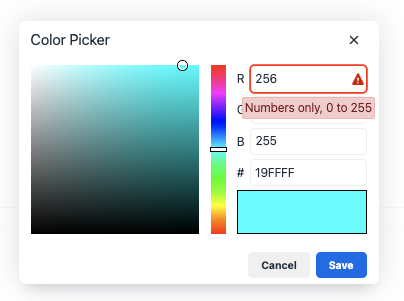
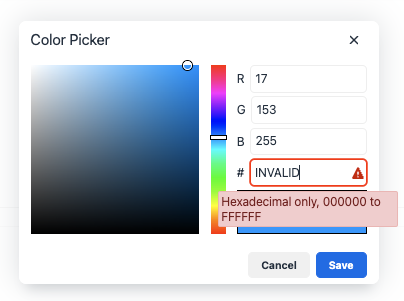
### Colorpicker number input fields now show an error tooltip and error icon when invalid text has been entered.
Previously, the color picker HEX value input field only displayed a red outline and an aria label reading "invalid data" when users entered invalid values. This lacked sufficient detail to help users correct their input.
As a consequence, users experienced confusion due to the vague error indication and insufficient guidance, potentially leading to repeated input errors.
In TinyMCE 7.3, improvements were made to the color picker input field to enhance user feedback and accessibility. The input field now includes:
- A red outline to indicate errors.
- An error icon for visual clarity.
- On `hover` and `focus`, tooltips provide clear instructions such as "Numbers only, 0 to 255" or "Hexadecimal only, 000000 to FFFFFF."
- Voice over reads aloud as example: "Number 256. Contents selected. Range from 0 to 255. Invalid data. Edit text."
> **Note:** Although there may be slight variations in pronunciation and phrasing across different operating systems or specific screen readers, most screen readers will convey similar messages, emphasizing numerical values and the status of the content.
These enhancements improve user understanding and facilitate error correction.
## Bug fixes
TinyMCE 7.3 also includes the following bug fixes:
### Unnecessary nbsp entities were inserted when typing at the edges of inline elements.
Previously, the replacement mechanism for ` ` did not account for nearby elements when converting non-breaking spaces to regular spaces.
As a consequence, when typing a sequence like "a space b," the output was correct. However, if the "b" was wrapped in an inline element (such as bold), the ` ` remained instead of being replaced.
TinyMCE 7.3 addresses this issue. Now, the normalization process triggers when an inline format is applied, affecting the previous sibling element to ensure spaces are properly converted.
As a result, non-breaking spaces between different inline elements are now normalized, preventing unnecessary ` ` entities.
### Fixed JavaScript error when inserting a table using the context menu by adjusting the event order in `renderInsertTableMenuItem`.
Previously in TinyMCE, a JavaScript warning would appear when attempting to insert a table from the context menu while using both the `table` and `autoresize` plugins. This warning was caused by the `onAction` event hiding the context menu, followed by an attempt to close the already hidden context menu, resulting in the warning message:
> "Uncaught Error: The component must be in a context to send: triggerEvent is not in context."
> **Note:** This warning did not impact the functionality of table insertion, but it could be confusing for users.
In TinyMCE 7.3, this issue has been resolved by adjusting the order of function calls in the code. Now, the context menu is closed before the `onAction` event is triggered when inserting a table from the context menu. As a result, the table is now inserted as expected without any JavaScript warnings.
### Notifications didn’t position and resize properly when resizing the editor or toggling views.
Previously, the function responsible for recalculating the width of notifications only added a width if the notification’s width exceeded the boundaries.
As a consequence, when notifications were constrained by boundaries, an additional width was added. However, if the boundaries were later increased, the added width was not adjusted accordingly.
TinyMCE 7.3 addresses this issue. Now, the function adds width when the notification’s width exceeds the boundaries but also removes this width when necessary.
As a result, notifications now resize correctly when the boundaries increase, ensuring their width adjusts as expected.
### The pattern commands would execute even if the command was not enabled.
Previously in TinyMCE, the `text_patterns` commands would attempt to execute even if the functionality were not supported in the current editor context. As a consequence, the command would fail and the editor would display unexpected behavior. For example, typing "1. " without the `lists` plugin enabled would delete the text instead of converting it to a list.
This issue has been resolved in TinyMCE 7.3. The editor now filters `text_patterns` to only the supported commands. For example, typing "1. " without the `lists` plugin enabled will no longer fire a text pattern and instead retain the text as plain text.
### Split button popups were incorrectly positioned when switching to fullscreen mode if the editor was inside a scrollable container.
Previously in TinyMCE, there was an issue where split button popups would be positioned incorrectly when opened within a scrollable container and the editor was in `fullscreen` mode. The behavior occurred because the box constraints for the split button popup did not take the `fullscreen` mode into account when calculating the position, resulting in an incorrect placement of the popup.
In TinyMCE 7.3, this issue has been fixed. The box constraints for the split button popup are now correctly calculated when the editor is in a scrollable container and in `fullscreen` mode. As a result, the split button popup is now positioned correctly.
### Sequential html comments would in some cases generate unwanted elements.
Previously in TinyMCE, consecutive HTML comments would generate unwanted elements in the editor. For example, when inserting the following HTML into the editor:
```html
a
b
```
The editor would generate a ` ` paragraph between the comments, resulting in extra paragraphs being generated.
```html
a
b
```
In TinyMCE 7.3, this issue has been resolved. The editor now correctly handles consecutive HTML comments by removing the whitespace before parsing.
```html
a
b
```
As a result, no extra paragraphs are generated.
### The listbox component had a fixed width and was not a responsive ui element.
Previously, the listbox component was not responsive as a UI element, due to a fixed width being applied in the `CommonDropdown` component during dialog initialization.
This issue has been resolved in TinyMCE 7.3 by removing the fixed width setting, allowing the listbox component to function as a responsive UI element.
### Prevent default mousedown on toolbar buttons was causing misplaced focus bugs.
In previous versions of TinyMCE, the `preventDefault` on mousedown in the toolbar button component caused focus issues. As a consequence, when clicking on different toolbar buttons, the focus was not updated, leaving the initial button highlighted.
TinyMCE 7.3 addresses this issue by removing the `preventDefault`, allowing the focus to change as expected when users click on the image controls (ie. zoom in and out).
### Attempting to use focus commands on an editor where the cursor had last been in certain `contentEditable="true"` elements would fail.
Previously, when `contentEditable="true"` (CET) fields where not wrapped in `contentEditable="false"` (CEF) elements, the elements did not respond properly to focus commands. As a consequence, the focus was not given to the editor as expected, leading to disruptions in user interactions.
TinyMCE 7.3 addresses this issue. Now, when (CET) fields are **not wrapped** in (CEF) elements, the editor directs the focus to the body of the editor first.
As a result, the editor now correctly returns focus as expected, ensuring seamless user interactions.