---
title: "TinyMCE 5.1"
description: "Release notes for TinyMCE 5.1"
canonical_url: "https://www.tiny.cloud/docs/tinymce/5/release-notes51/"
md_url: "https://www.tiny.cloud/docs/tinymce/5/release-notes51/index.md"
version: "5"
last_updated: "2024-04-09T10:06:54Z"
tokens: 6364
---
Important This page documents TinyMCE 5. For new projects, Tiny recommends using the latest, most up-to-date version. [See TinyMCE 8 documentation](../../latest/).
# TinyMCE 5.1
## Overview
TinyMCE 5.1 was released for TinyMCE Enterprise and Tiny Cloud on Wednesday, December 11 th, 2019. It includes TinyMCE 5.1.3 and additional changes to premium plugins. These release notes provide a high-level coverage of the changes for TinyMCE 5.1, including:
- [New features and enhancements](#newfeaturesandenhancements)
- [Premium Plugin changes](#premiumpluginchanges)
- [Deprecated features](#deprecatedfeatures)
- [Known issues](#knownissues)
- [Upgrading to the latest version of TinyMCE 5](#upgrading-to-the-latest-version-of-tinymce-5)
> **Note:** This is the Tiny Cloud and TinyMCE Enterprise release notes. For information on the latest community version of TinyMCE, see: [TinyMCE Changelog](../changelog/).
## New features and enhancements
The following new features and enhancements were added for the TinyMCE 5.1 release.
### Mobile
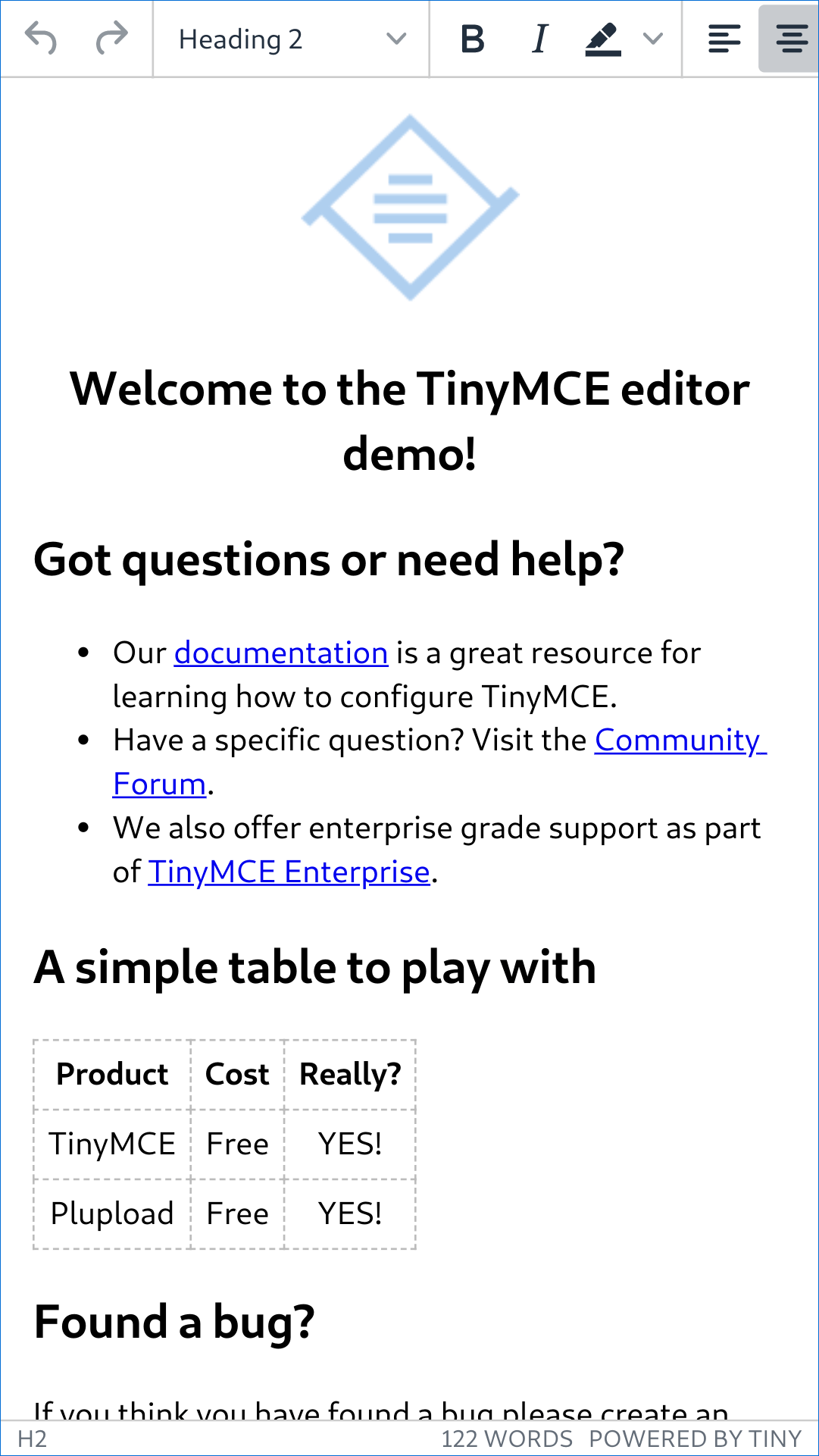
TinyMCE 5.1 provides an improved mobile editor, replacing the existing mobile editor with a touch friendly version of the silver theme.
The new mobile experience comes with a number of user interface changes, building on the TinyMCE desktop experience:
- [Mobile devices now use the `silver` theme](#mobiledevicesnowusethesilvertheme)
- [Horizontal contextual menus on mobile](#horizontalcontextualmenusonmobile)
- [Side-scrolling toolbars on mobile](#side-scrollingtoolbarsonmobile)
- [Contextual keyboard settings](#contextualkeyboardsettings)
- [New mobile defaults for selected settings](#newmobiledefaultsforselectedsettings)
- [Table cell selection on mobile](#tablecellselectiononmobile)
- [Touch-friendly split buttons](#touch-friendlysplitbuttons)
- [Unsupported settings for mobile](#unsupportedsettingsformobile)
The new mobile experience allows most of the TinyMCE plugins to work on mobile devices, except for:
- [Comments](../comments/)
- [Image tools](../editimage/)
- [MoxieManager](../moxiemanager/)
- [Permanent Pen](../permanentpen/)
#### Enabling the mobile editor
To ensure the mobile editor functions as intended, add the following `meta` tag to the `head` of pages using TinyMCE.
```html
```
#### Mobile devices now use the `silver` theme
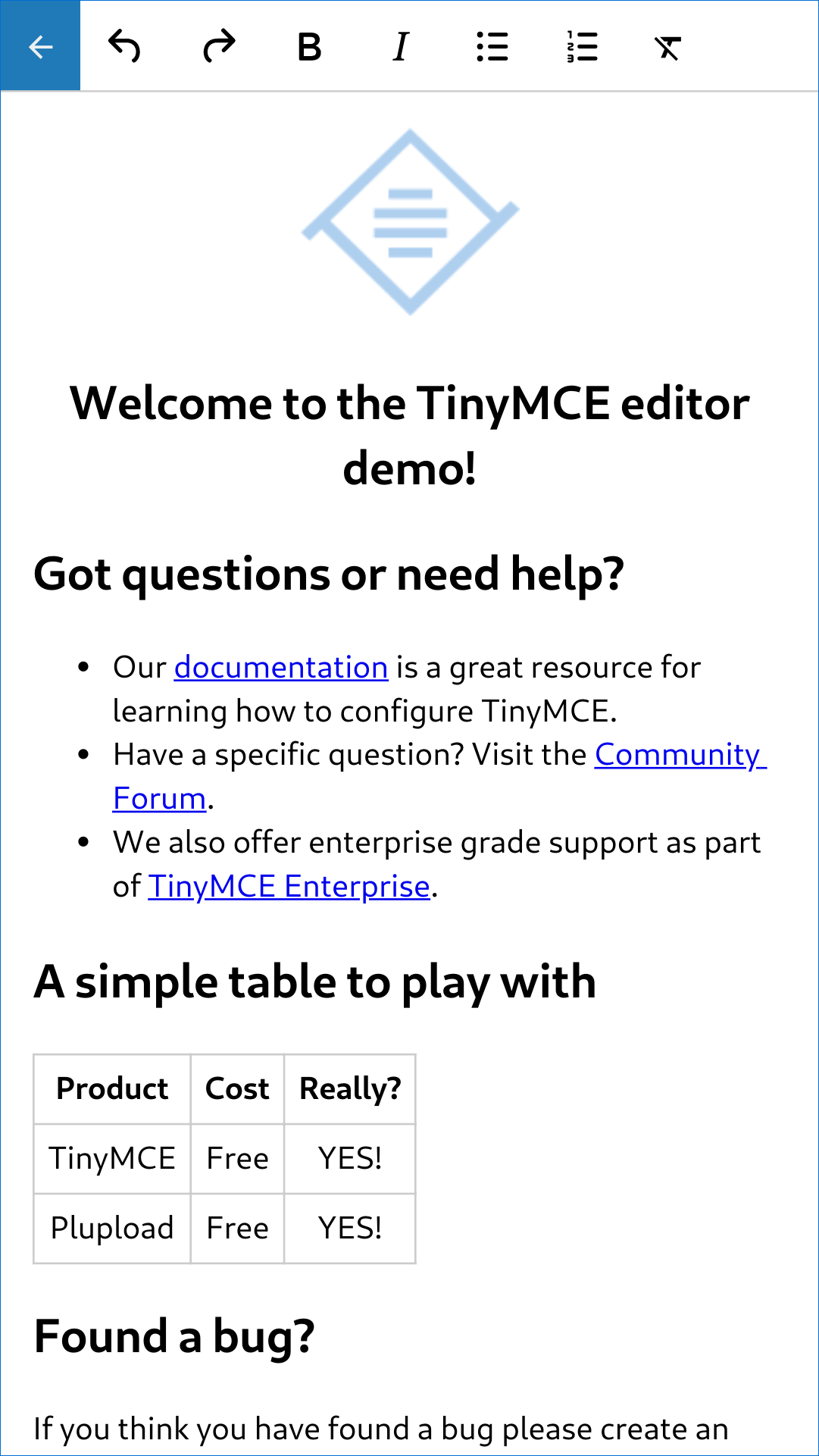
The mobile experience provided for TinyMCE 4.7 through TinyMCE 5.0 has been deprecated in TinyMCE 5.1.
| **Legacy mobile experience**
( TinyMCE 4.7 through TinyMCE 5.0 ) | **New mobile experience**
( TinyMCE 5.1 + ) |
| --- | --- |
|  |  |
To revert to the legacy mobile theme, add the mobile theme to the TinyMCE configuration, such as:
```js
tinymce.init({
mobile: {
theme: 'mobile'
}
});
```
> **Note:** No enhancements have been made to the legacy mobile theme. All the changes described in these release notes relate to the `silver` theme on mobile devices.
For information on:
- Using the `silver` theme for mobile, see: [TinyMCE Mobile](../tinymce-for-mobile/).
- Using the legacy `mobile` theme, see: [TinyMCE Mobile - The legacy mobile theme](../tinymce-for-mobile/#thelegacymobiletheme).
#### Horizontal contextual menus on mobile
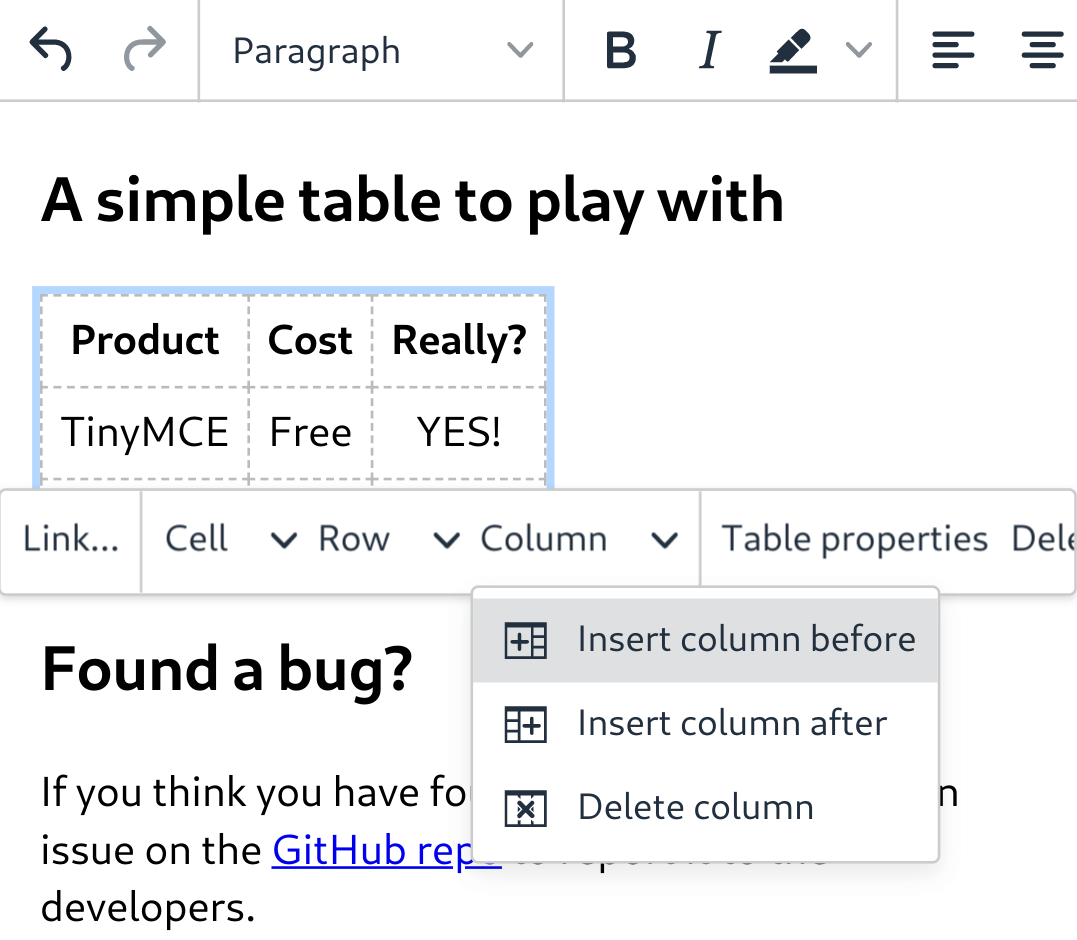
Contextual menus are now horizontal on mobile devices and open when a long-press is used. They also [side-scroll](#side-scrollingtoolbarsonmobile) to allow larger lists of items to be available on mobile devices.
For example:
#### Side-scrolling toolbars on mobile
Toolbars and [horizontal menus](#horizontalcontextualmenusonmobile) side-scroll using "swipe" gestures on mobile devices. This allows longer toolbars to be used without occupying too much screen space. This feature removes the need for a toolbar drawer on mobile devices.
#### Contextual keyboard settings
A new `inputMode` configuration setting for dialog input components has been added to provide contextual onscreen keyboards on mobile devices. Dialogs in TinyMCE, the core TinyMCE plugins, and the premium TinyMCE plugins have been updated to use `inputMode`.
For information on using `inputMode`, see: [Dialog components - `inputMode`](../dialog-components/#inputmode).
#### New mobile defaults for selected settings
These mobile-specific default values have been set to disable unsupported settings for mobile devices or to provide the best experience without configuration from developers.
The following settings have mobile-specific default values:
- [`menubar`](../editor-appearance/#menubar) - defaults to `false` on mobile phones.
- [`toolbar_drawer`](../editor-appearance/#toolbar_drawer) - defaults to `false` on mobile devices. The toolbar will [side-scroll by default](#side-scrollingtoolbarsonmobile).
- [`toolbar_sticky`](../editor-appearance/#toolbar_sticky) - Sticky Toolbar is not supported on mobile devices and defaults to `false`.
- [`table_grid`](../table/#table_grid) - Table grid is not supported on mobile devices and defaults to `false`. When creating tables on mobile, a dialog is shown instead of the table grid.
- [`resize`](../editor-appearance/#resize) - Resizing is not supported on mobile devices and defaults to `false`.
- [`object_resizing`](../content-behavior-options/#object_resizing) - Object resizing is not supported on mobile devices and defaults to `false`.
#### Table cell selection on mobile
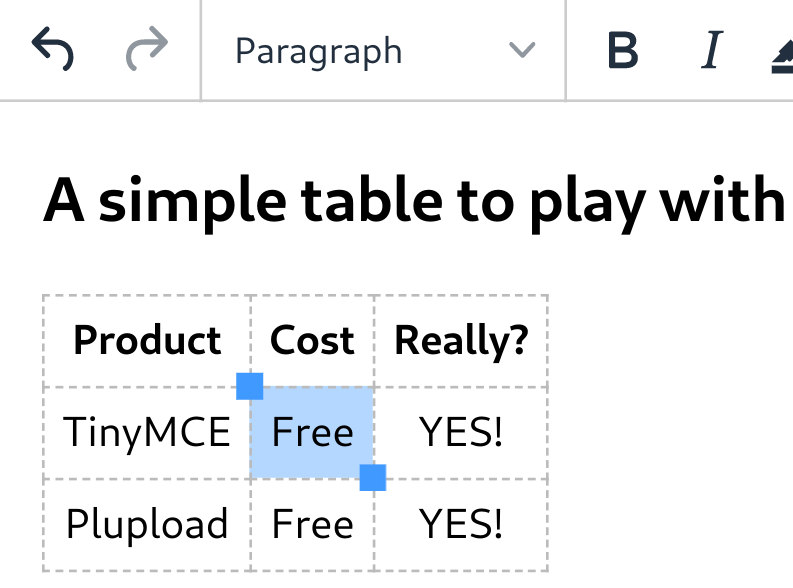
The [table plugin](../table/) has been updated to provide *touch selection handles* on touch devices. The touch selection handles appear when users double-tap a table cell, and allow users to select a range of table cells on touch devices.
For example:
#### Touch-friendly split buttons
The styling on [split buttons](../typesoftoolbarbuttons/#splitbutton) has been updated to include more padding so they are easier to interact with on touch devices.
#### Unsupported settings for mobile
The following settings are not supported on mobile devices:
- [Inline editing mode](../use-tinymce-inline/).
- [Distraction-free editing mode](../use-tinymce-distraction-free/).
- [`inline`](../editor-appearance/#inline).
- [`toolbar_sticky`](../editor-appearance/#toolbar_sticky).
- [`table_grid`](../table/#table_grid).
- [`resize`](../editor-appearance/#resize).
- [`object_resizing`](../content-behavior-options/#object_resizing).
### Sticky Toolbar
The Sticky Toolbar (or Docking Toolbar) docks the toolbar and the menu to the top of the screen when scrolling down a web page. The sticky toolbar will remain docked until the editor is no longer visible. This allows the menu and toolbar to remain in view when editing large text areas.
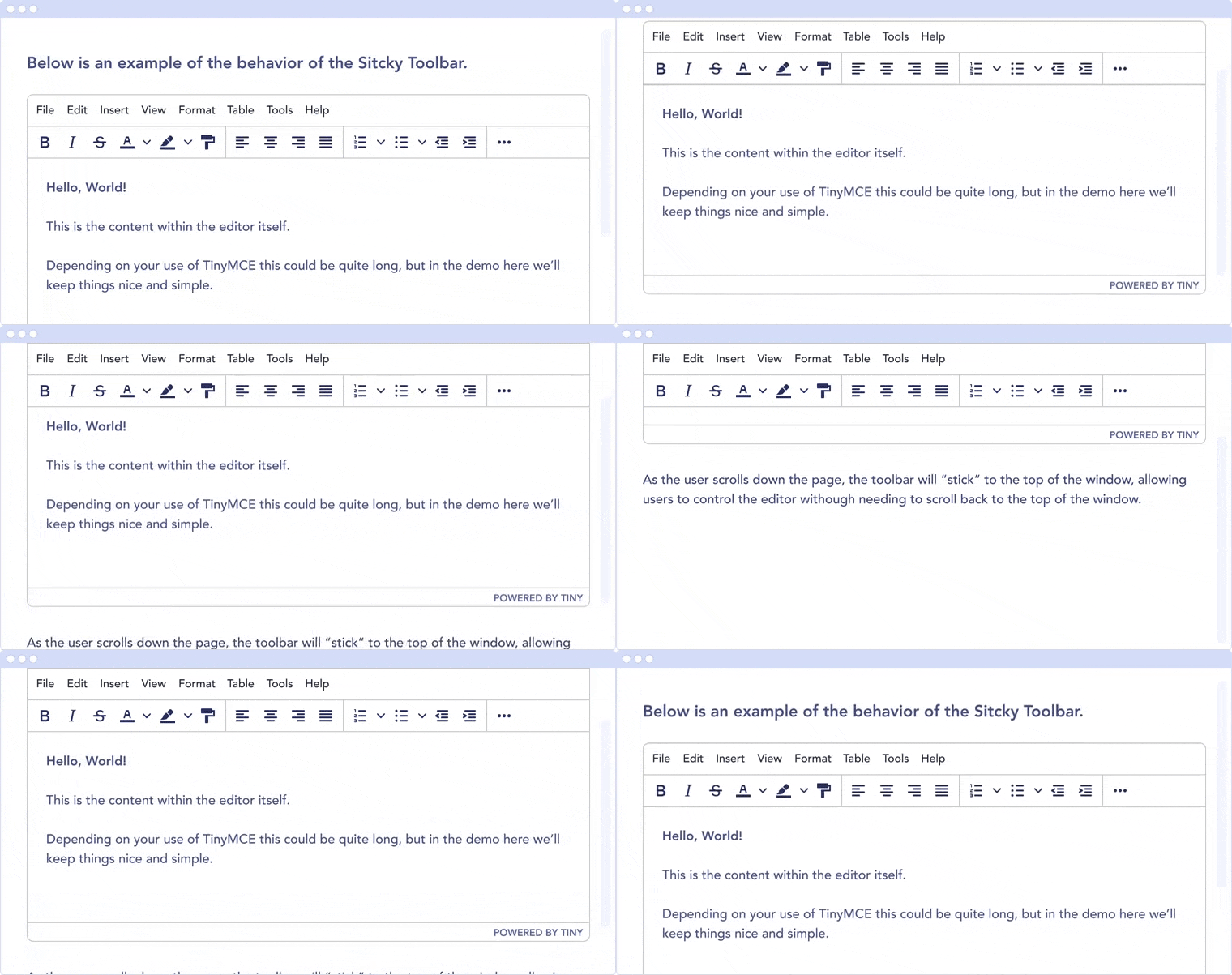
For information on the Sticky Toolbars, see: [Enabling Sticky Toolbars](../editor-appearance/#toolbar_sticky).
### Changes to the Env API for platform detection
New platform detection functions have been added to the [`Env` API](../apis/tinymce.env/), allowing for some older detection properties to be deprecated.
#### New Env API properties
| Property | Type | Description |
| --- | --- | --- |
| `browser.current` | String | Returns the current browser name. |
| `browser.version` | Object | Returns the current browser major and minor version. |
| `os.current` | String | Returns the current operating system name. |
| `os.version` | Object | Returns the current operating system major and minor version. |
#### New Env methods
| Method | Type | Description |
| --- | --- | --- |
| `browser.isEdge` | Boolean | Returns `true` if the user’s browser is Microsoft Edge. |
| `browser.isChrome` | Boolean | Returns `true` if the user’s browser is Google Chrome. |
| `browser.isIE` | Boolean | Returns `true` if the user’s browser is Microsoft Internet Explorer. |
| `browser.isOpera` | Boolean | Returns `true` if the user’s browser is Opera. |
| `browser.isFirefox` | Boolean | Returns `true` if the user’s browser is Firefox. |
| `browser.isSafari` | Boolean | Returns `true` if the user’s browser is Safari. |
| `os.isWindows` | Boolean | Returns `true` if the user’s operating system is Microsoft Windows. |
| `os.isiOS` | Boolean | Returns `true` if the user’s operating system is iOS. |
| `os.isAndroid` | Boolean | Returns `true` if the user’s operating system is Android. |
| `os.isOSX` | Boolean | Returns `true` if the user’s operating system is Mac OS X. |
| `os.isLinux` | Boolean | Returns `true` if the user’s operating system is Linux. |
| `os.isSolaris` | Boolean | Returns `true` if the user’s operating system is Solaris. |
| `os.isFreeBSD` | Boolean | Returns `true` if the user’s operating system is FreeBSD. |
| `deviceType.isDesktop` | Boolean | Returns `true` if the user’s device is a desktop device. |
| `deviceType.isiPad` | Boolean | Returns `true` if the user’s device is an iPad. |
| `deviceType.isiPhone` | Boolean | Returns `true` if the user’s device is an iPhone. |
| `deviceType.isPhone` | Boolean | Returns `true` if the user’s device is a phone. |
| `deviceType.isTablet` | Boolean | Returns `true` if the user’s device is a tablet. |
| `deviceType.isTouch` | Boolean | Returns `true` if the user’s device is a touch device. |
| `deviceType.isWebView` | Boolean | Returns `true` if the user’s device is a WebView device. |
For a list of deprecated `Env` APIs, see: [Deprecated API Properties - `tinymce.Env`](#deprecatedapiproperties-tinymceenv).
### Added new `referrer_policy` setting
Used for setting the level of referrer information sent when loading plugins and CSS. Referrer policies can be used to:
- Improve the privacy of end-users.
- Assist with server-side filtering of cross-origin requests for TinyMCE resources.
For information on using the `referrer_policy` setting, see: [Integration and setup options - `referrer_policy`](../integration-and-setup/#referrer_policy).
### Added a dark content css skin
A dark CSS definition for `content_css` has been added to compliment the dark user interface skin.
For example:
**Example**
```js
tinymce.init({
selector: 'textarea#dark-mode',
height: 500,
menubar: false,
skin: 'oxide-dark',
content_css: 'dark',
plugins: [
'advlist autolink lists link image charmap print preview anchor',
'searchreplace visualblocks code fullscreen',
'insertdatetime media table paste code help wordcount'
],
toolbar: 'undo redo | formatselect | bold italic backcolor | alignleft aligncenter alignright alignjustify | bullist numlist outdent indent | removeformat | help | fullscreen code',
content_style: 'body { font-family:Helvetica,Arial,sans-serif; font-size:14px }'
});
```
For information on using the dark version of the default skin, see: [Customizing the editor UI - Skins](../customize-ui/#skins).
### Added border width to Table cell dialog
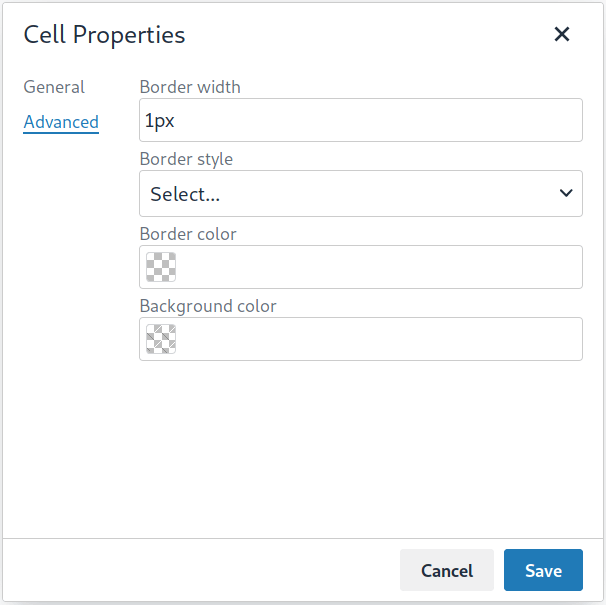
The table plugin has been updated to include a **Border width** field in the **Cell Properties** dialog. The field will accept any [valid CSS units](https://developer.mozilla.org/en-US/docs/Learn/CSS/Building_blocks/Values_and_units#Lengths).
For example:
### Changed the default `toolbar_drawer` to `floating`
The default for the `toolbar_drawer` setting has been changed from `false` to `floating`.
To revert to the TinyMCE 5.0 behavior, add `toolbar_drawer: false` to the `tinymce.init`, such as:
```js
tinymce.init({
selection: textarea#myEditor
toolbar_drawer: false
});
```
For information on the `toolbar_drawer` setting, see: [User interface options - `toolbar_drawer`](../editor-appearance/#toolbar_drawer).
### Icon changes
In TinyMCE 5.0, the same icon (`paragraph`) was used for the `visualchars` and `visualblocks` menu items and toolbar buttons.
To improve the user experience:
- The `paragraph` icon has been renamed `visualchars` and is used for the `visualchars` toolbar button:

- A new `visualblocks` icon is used for the `visualblocks` toolbar button:

For the list of icons included in TinyMCE, see: [Available icons](../editor-icon-identifiers/).
### Fixes to the positioning of inline dialogs and menus
Fixes for inline dialogs and menus have been included to:
- Position inline dialogs correctly when the page is scrolled.
- Reposition inline dialogs and menus when resizing TinyMCE.
## Premium Plugin changes
### Advanced Code Editor
The TinyMCE 5.1 release includes **Advanced Code Editor** 2.0.2.
**Advanced Code Editor** 2.0.2 has been updated to improve performance on mobile devices.
### Advanced Tables
A new **Advanced Tables** premium plugin has been released with TinyMCE 5.1. The **Advanced Tables** plugin extends the core [`table` plugin](../table/) by adding sort options for rows and columns.
The plugin is capable of sorting:
- Numerical data
- Text data
> **Note:** Currently, the sort function will treat cells with Alphanumeric data as Text data. This includes currency symbols which are text characters.
For information on this plugin, see:
- [The Advanced Tables product page](/tinymce/features/advanced-tables).
- [The Advanced Tables Premium features page (including demo)](../advtable/).
- [The Advanced Tables plugin documentation page](../advtable/).
### Checklist
The TinyMCE 5.1 release includes **Checklist** 1.0.1.
**Checklist** 1.0.1 includes:
* A fix to allow checklist items to be toggled on an iPad.
* A fix to ensure the checklist toolbar button is toggled when checklist content is selected.
### Enhanced Media Embed
The TinyMCE 5.1 release includes **Enhanced Media Embed** 2.2.4.
**Enhanced Media Embed** 2.2.4 has been updated to include a touch event listener to allow embedded media to execute on mobile platforms.
### Format Painter
The TinyMCE 5.1 release includes **Format Painter** 1.2.0.
**Format Painter** 1.2.0 has been updated to support mobile platforms. The **Format Painter** will now function as expected for mobile users.
This version of **Format Painter** includes a fix to work with the [*Legacy Output* plugin](../legacyoutput/)).
### Mentions
The TinyMCE 5.1 release includes **Mentions** 2.1.0.
**Mentions** 2.1.0 has been updated to allow for the inclusion of "extra" menu items, such as additional results or search items. For details, see: [Mentions - `mentions_fetch`](../mentions/#mentions_fetch).
### Page Embed
The TinyMCE 5.1 release includes **Page Embed** 1.0.1.
**Page Embed** 1.0.1 has been updated to include a touch event listener to allow embedded media to execute on mobile platforms.
### PowerPaste
The TinyMCE 5.1 release includes **PowerPaste** 5.2.0.
#### Changes to `clean` paste and `Remove Formatting` paste
**PowerPaste** *5.0* included a change to the `Remove Formatting` functionality to filter out inline style elements (such as `strong`, `b`, `em`, `i`, and `sub`), in-line with other editor functionality.
**PowerPaste** *5.2* **reverses the *5.0* change** and includes a new `powerpaste_clean_filtered_inline_elements` setting. This setting accepts a list of inline style elements to be filtered. These inline elements will be filtered on `clean` or `Remove Formatting` paste.
To retain the *5.0* default inline style element filter, add the following setting to `tinymce.init`:
```js
powerpaste_clean_filtered_inline_elements: 'strong,em,b,i,u,strike,sup,sub,font'
```
For information on `powerpaste_clean_filtered_inline_elements`, see: [PowerPaste - `powerpaste_clean_filtered_inline_elements`](../introduction-to-powerpaste/#powerpaste_clean_filtered_inline_elements).
#### Pre-filtering and post-filtering callbacks
**PowerPaste** 5.2 modifies the *pre-filtering* and *post-filtering* callbacks. The callbacks now contain additional data regarding the paste `mode` and the `source` of the content.
For information on using the Pre-filtering and Post-filtering callbacks, see: [PowerPaste Plugin - Pre-filtering and post-filtering callbacks](../introduction-to-powerpaste/#pre-filtering-and-post-filtering-callbacks)
## Deprecated features
Some API properties have been deprecated in TinyMCE 5.1 to provide an improved solution, or they are no longer required.
### Deprecated API Properties - `tinymce.Env`
New platform detection functions have been added to the [`Env` API](../apis/tinymce.env/), allowing for some older detection properties to be deprecated.
| Deprecated Property | Alternative Property / Reason for Deprecation | Type | Original Description |
| --- | --- | --- | --- |
| `opera` | Use [`browser.isOpera()`](../apis/tinymce.env/#browser.isOpera) instead. | Boolean | Constant that is `true` if the browser is Opera. |
| `webKit` | Use [`browser.isSafari()`](../apis/tinymce.env/#browser.isSafari) or [`browser.isChrome()`](../apis/tinymce.env/#browser.isChrome) instead. | Boolean | Constant that is `true` if the browser is WebKit (Safari/Chrome). |
| `ie` | Use [`browser.version.major`](../apis/tinymce.env/#properties) and [`browser.isIE()`](../apis/tinymce.env/#browser.isIE) or [`browser.isEdge()`](../apis/tinymce.env/#browser.isEdge) instead. | Number | Constant that is greater than zero if the browser is IE. |
| `gecko` | Use [`browser.isFirefox()`](../apis/tinymce.env/#browser.isFirefox) instead. | Boolean | Constant that is `true` if the browser is Gecko. |
| `mac` | Use [`os.isOSX()`](../apis/tinymce.env/#os.isOSX) or [`os.isiOS()`](../apis/tinymce.env/#os.isiOS) instead. | Boolean | Constant that is `true` if the operating system is Mac OS. |
| `iOS` | Use [`os.isiOS()`](../apis/tinymce.env/#os.isiOS) instead. | Boolean | Constant that is `true` if the operating system is iOS. |
| `android` | Use [`os.isAndroid()`](../apis/tinymce.env/#os.isAndroid) instead. | Boolean | Constant that is `true` if the operating system is android. |
| `desktop` | Use [`deviceType.isDesktop()`](../apis/tinymce.env/#deviceType.isDesktop) instead. | Boolean | Constant that is `true` if the browser is running on a desktop device |
| `contentEditable` | All supported browsers now support content editable elements. | Boolean | Constant that is `true` if the browser supports editing. |
| `caretAfter` | All supported browsers now support placing carets after inline blocks. | Boolean | Returns `true` / `false` if the browser can or can’t place the caret after a inline block like an image. |
| `range` | All supported browsers now support native DOM ranges. | Boolean | Constant that is `true` if the browser supports native DOM Ranges. IE 9+. |
| `ceFalse` | All supported browsers now support `contentEditable=false` regions. | Boolean | Constant that is `true` if the browser supports `contentEditable=false` regions. |
## Known issues
This section describes issues that users of TinyMCE 5.1 may encounter, as well as possible workarounds for these issues.
**Outline**
- [Autocompleter and keypress event issues on Android](#autocompleterandkeypresseventissuesonandroid)
- [Text Patterns plugin: Limited functionality on Android devices](#textpatternspluginlimitedfunctionalityonandroiddevices)
- [Spell Checker Pro plugin: Unexpected behavior on Android devices](#spellcheckerpropluginunexpectedbehavioronandroiddevices)
- [UI elements may render behind the keyboard on iOS 12 devices](#uielementsmayrenderbehindthekeyboardonios12devices)
- [UI issue with sidebars on mobile](#uiissuewithsidebarsonmobile)
- [Find and replace moving out of view in iOS](#findandreplacemovingoutofviewinios)
- [Inline toolbar placement issues on mobile devices](#inlinetoolbarplacementissuesonmobiledevices)
- [Touch selection handle issue on iOS](#touchselectionhandleissueonios)
- [Text selection context toolbar issue on Android devices](#textselectioncontexttoolbarissueonandroiddevices)
- [FormatPainter: Limited functionality on iOS devices](#formatpainterlimitedfunctionalityoniosdevices)
### Autocompleter and keypress event issues on Android
#### Issue
> **Note:** This issue affects the following plugins:
>
> - [Mentions](../mentions/).
> - [Emoticons](../emoticons/).
> - [Character Map](../charmap/).
Plugins relying on the [autocompleter API](../autocompleter/) or keypress events do not work on Android. Android intercepts content and processes content prior to insertion into the editor.
#### Workaround
The only known workaround for the autocompleter at the moment is to press space and then press backspace to trigger the autocompleter to activate.
### Text Patterns plugin: Limited functionality on Android devices
#### Issue
The text pattern plugin will not apply inline patterns if the text pattern is immediately followed by a space on Android devices. The Text Patterns plugin relies on keypress events, which do not work on Android. Android intercepts content and processes content prior to insertion into the editor.
#### Workaround
Press *Enter* or *Return* immediately after entering the text pattern.
### Spell Checker Pro plugin: Unexpected behavior on Android devices
#### Issue
When selecting a correction, the original word will be duplicated and inserted at the selection point. Such as `Anddddroid` might be replaced with `Anddd Andddroid droid`.
#### Workaround
No known workaround at the time of release.
### UI elements may render behind the keyboard on iOS 12 devices
#### Issue
UI elements may be rendered behind the keyboard on iOS 12 devices. This includes, but is not limited to:
- Dialogs.
- Context menus.
- Context toolbars.
This is due to a limitation of Safari on iOS 12. The silver theme relies on the `VisualViewport` API to determine the area of the page is visible on the device. Unfortunately the `VisualViewport` API is an experimental feature in iOS 12.
#### Workaround
To workaround this issue, users can either:
- Upgrade to iOS 13 or later
- Turn on the experimental feature by going to:
**Settings** > **Safari** > **Advanced** > **Experimental Features** > **Visual Viewport API**.
### UI issue with sidebars on mobile
#### Issue
> **Note:** This issue affects the [Comments plugin](../comments/).
When opening sidebars on small screens (such as mobile phones), the sidebar may occupy most or all of the text area of the editor.
#### Workaround
For the comments plugin, the comments sidebar can be collapsed using the `showcomments` toolbar button (

).
For other plugins with sidebars, Tiny recommends ensuring the sidebar’s toolbar button is accessible on the toolbar.
### Find and replace moving out of view in iOS
#### Issue
The Find and replace dialog moves outside the screen view on iOS when finding a match off-screen.
#### Workaround
No known workaround at the time of release.
### Inline toolbar placement issues on mobile devices
#### Issue
On mobile devices, the inline toolbar can intermittently display in the wrong location when the keyboard is open or when scrolling.
#### Workaround
No known workaround at the time of release.
### Touch selection handle issue on iOS
#### Issue
The iOS touch selection handles (lollipops) sometimes remain on screen after the selection changes, resulting in misplaced or multiple selections.
#### Workaround
This may be an iOS bug, and the is no known workaround at the time of release. To remove the duplicate or multiple selections, restart the Safari app.
### Text selection context toolbar issue on Android devices
#### Issue
TinyMCE text selection context toolbars do not appear on Android.
#### Workaround
No known workaround at the time of release.
### Format Painter plugin: Limited functionality on iOS devices
#### Issue
Unable to apply formats using a collapsed selection on iOS due to iOS selection placement.
#### Workaround
No known workaround at the time of release.
## Upgrading to the latest version of TinyMCE 5
The procedure for upgrading to the latest version of TinyMCE 5 depends on the deployment type.
- [Upgrading Tiny Cloud](#upgradingtinycloud).
- [Upgrading TinyMCE Self-hosted manually](#upgradingtinymceself-hostedmanually).
### Upgrading Tiny Cloud
Tiny Cloud provides the latest enterprise version of TinyMCE. For information on configuring Tiny Cloud, see: [the Cloud deployment guide](../cloud-deployment-guide/).
### Upgrading TinyMCE Self-hosted manually
To upgrade to TinyMCE 5.10 using a manually downloaded package:
1. Backup the `tinymce/` directory so any customizations can be restored after the upgrade.
Customizations for TinyMCE are typically stored in the following directories:
```sh
tinymce/
├── icons/
├── langs/
├── plugins/
├── skins/
│ ├── content/
│ └── ui/
└── themes/
```
2. Download the latest version of TinyMCE.
- For the TinyMCE Community Version, download `tinymce_.zip` from [Get TinyMCE - Self-hosted releases](/get-tiny/self-hosted/), where `` is the latest version of TinyMCE.
- For the TinyMCE Enterprise Version, download the **TinyMCE Enterprise Bundle** from [Tiny Account > Downloads](/my-account/downloads/). The downloaded file will be named `enterprise_latest.zip`.
3. Extract the downloaded `.zip` file to a temporary location.
4. (If required) Install the latest language packs from [Get TinyMCE - Language Packages](/get-tiny/language-packages/).
5. Copy customizations to the new `tinymce/` directory. Ensure that *only custom changes* are added the new `tinymce/` directory, such as:
- Custom icons packs
- Custom plugins
- Custom skins
- Custom themes
6. Delete the existing `tinymce/` directory and replace with the new `tinymce/`.
> **Note:** To simplify the upgrade process to future versions of TinyMCE:
>
> 1. Host the TinyMCE customizations outside of the `tinymce/` directory.
> 2. Update your TinyMCE configuration as required:
>
> - Set the location of content CSS customizations using [`content_css`](../content-appearance/#content_css).
> - Set the location of custom plugins using [`external_plugins`](../integration-and-setup/#external_plugins).
> - Set the location of custom icon packages using [`icons_url`](../editor-appearance/#icons_url) instead of `icons`.
> - Set the location of custom localization packages using [`language_url`](../content-localization/#language_url) instead of `language`.
> - Set the location of custom skin packages using [`skin_url`](../editor-appearance/#skin_url) instead of `skin`.
> - Set the location of custom themes using [`theme_url`](../editor-appearance/#theme_url) instead of `theme`.